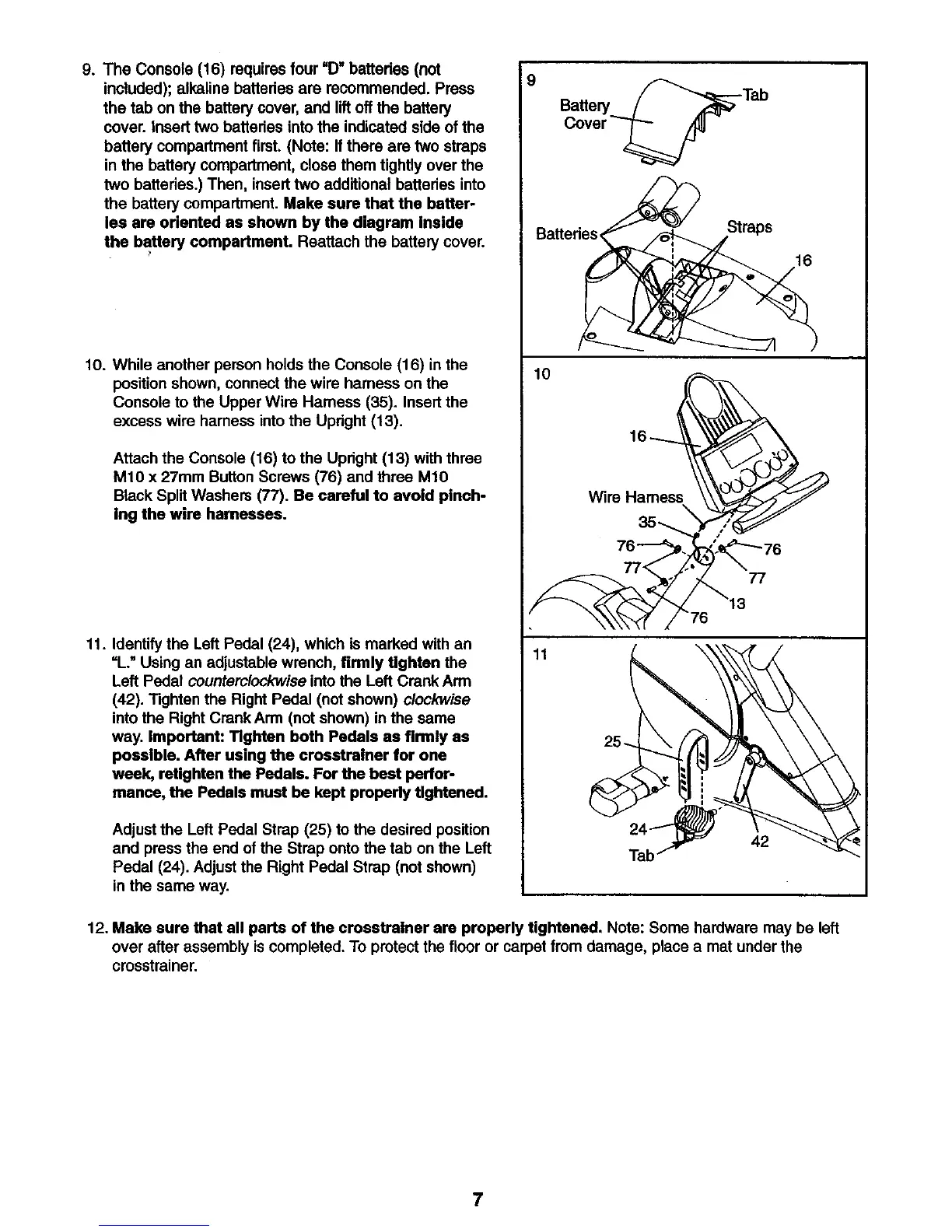
9. The Console (16) requires four =Dwbettedes (not
included); alkaline batteries are recommended. Press
the tab on the battery cover, and lift offthe battery
cover. Insert two batteries intothe indicated side of the
battery compartment first. (Note: If there are two straps
in the battery compartment, close them tightly over the
two batteries.) Then, insert two additional batteries into
the battery compartment. Make sure that the batter-
ies are oriented as shown by the diagram Inside
the battery compartment. Reattach the battery cover.
10. While another person holds the Console (16) in the
position shown, connect the wire harness on the
Console to the Upper Wire Hamess (35). Insert the
excess wire harness into the Upright (13).
Attach the Console (16) to the Upright (13) with three
M10 x 27mm Button Screws (76) and three M10
Black Split Washers (77). Be careful to avoid pinch-
ing the wire harnesses.
11. Identify the Left Pedal (24), which is marked with an
=L." Using an adjustable wrench, firmly Ughten the
Left Pedal counterclockwise into the Left Crank Arm
(42). Tighten the Right Pedal (not shown) clockwise
into the Right CrankArm (not shown) in the same
way. Important: Tighten both Pedals as firmly as
possible. After using the crosstralner for one
week, retighten the Pedals. For the beet perfor-
manee, the Pedals must be kept properly tightened.
Adjust the Left Pedal Strap (25) to the desired position
and press the end of the Strap onto the tab on the Left
Pedal (24). Adjust the Right Pedal Strap (not shown)
in the same way.
Battery
Batteries<
10
11
Straps
16
77
12. Make sure that all parts of the crosstralner are properly tightened. Note: Some hardware may be left
over after assembly iscompleted. To protect the floor or carpet from damage, place a mat under the
crosstrainer.
7




 To Next Page