11
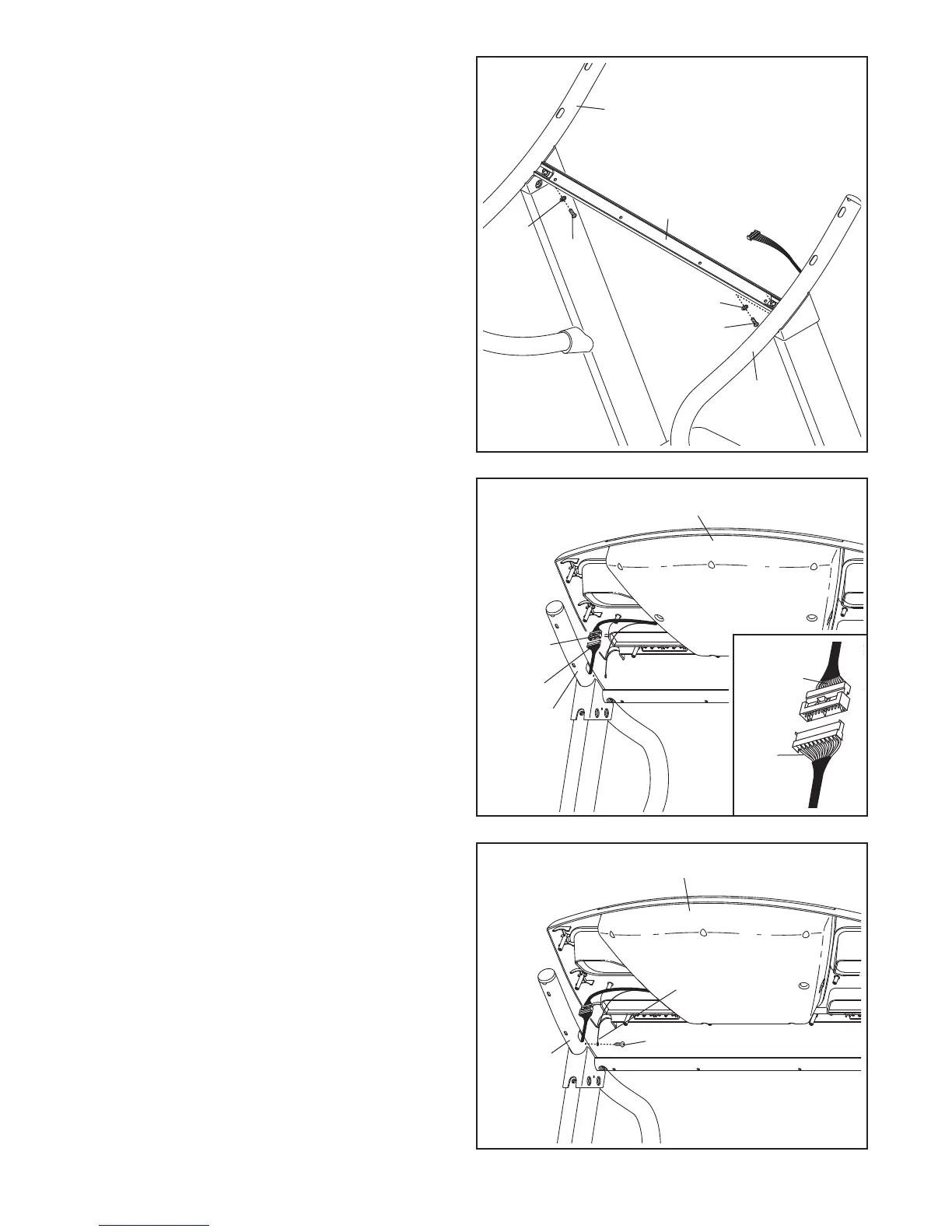
11. Attach the Crossbar (106) to the Left and Right
Handrails (107, 104) with two 1/4" x 3/4" Bolts
(10) and two 1/4" Star Washers (14). Do not
tighten the Bolts yet.
1
1
106
104
1
07
14
10
14
10
12. Have a second person hold the console assem-
bly near the Right Handrail (104) and the Left
Handrail (not shown). Connect the Upright Wire
(79) to the console wire. See the inset drawing.
The connectors should slide together easily
and snap into place. If they do not, turn one
connector and try again. IF THE CONNECTORS
ARE NOT CONNECTED PROPERLY, THE
CONSOLE MAY BE DAMAGED WHEN YOU
TURN ON THE POWER.
Console Assembly
12
Console
Wire
79
104
79
Console
Wire
13. Attach the ground wire from the console assem-
bly to the Right Handrail (104) with a #8 x 1/2"
Ground Screw (3). Note: It may be difficult to
turn the Ground Screw.
Set the console assembly on the Right Handrail
(104) and the Left Handrail (not shown). Be
careful not to pinch the wires. Insert the con-
nectors and the excess wire into the Right
Handrail.
Console Assembly
13
Ground
Wire
3
104




 To Next Page