english
11
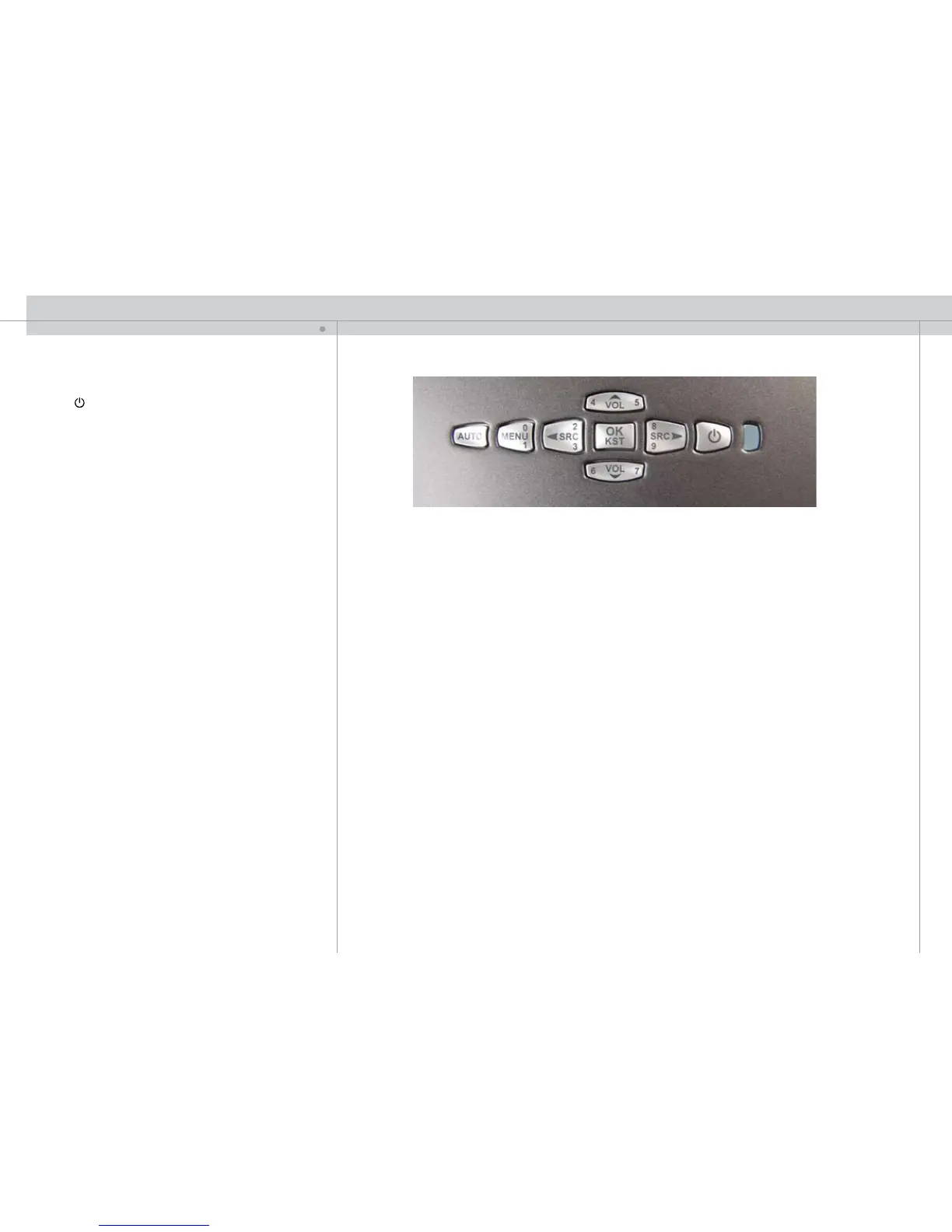
The keypad is illuminated for operation in dark environments. Several keys have multiple
functions.
POWER
Switches the projector between on and standby modes. Press firmly
(1 sec) to switch on. Press firmly (1 sec) twice to switch off.
AUTO
Adjusting the projector to display a correct image, including position,
width, height and overall stability.
MENU
Activates the menu system. Use the four arrow keys to navigate and
«OK» to activate.
ARROW KEYS
Use the arrow keys to navigate the menu system, or to control speaker sound volume
or source selection when not in the menu
OK
Confirm menu option when menu system is activated.
0-9
These keys are used for PIN code entry.
SRC
Use these keys to select active source.
VOL
Use these keys to adjust volume of the built-in monitor speaker.
KST
Engage digital keystone correction when not in menu mode. Use arrow keys to adjust.
KEYPAD
11
F



 To Next Page