english
13
REMOTE CONTROL
H
REMOTE CONTROL
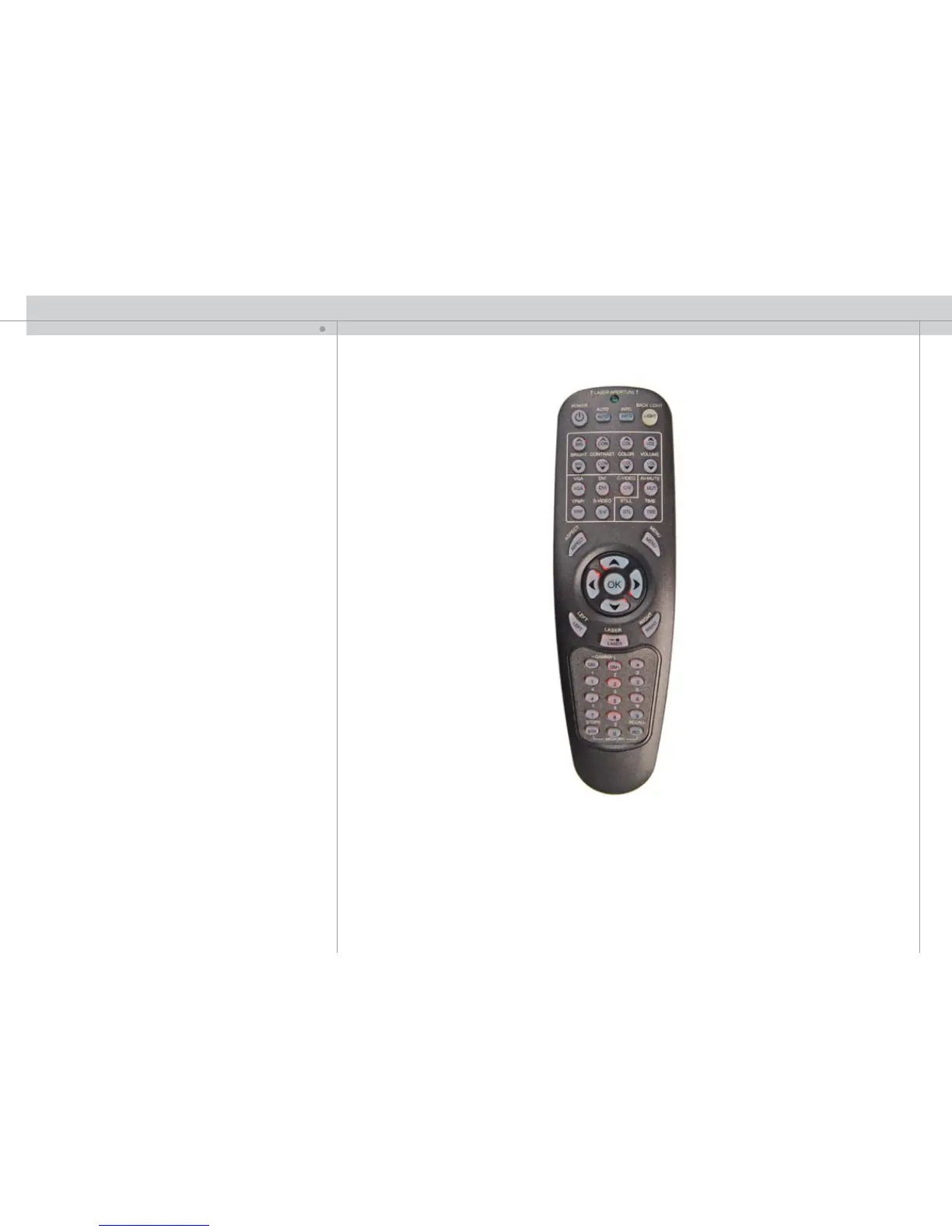
The remote control allows flexible access to the projector settings, either through
direct keys, or through the menu system. The remote control is backlit for use in dark
environments. It also has a datajack that allows for wired connection to the projector.
When the wire is connected, the IR (infra-red) beam and internal batteries are switched
off. The remote control may also be used to control presentations by mimicing mouse
functionality (LEFT, RIGHT keys and arrow keys).
The remote control can be operated either in ‘broadcast mode’, or ‘individual mode’.
When several projectors are in use in an installation, individual control may be convenient.
Individual control is available either by wired remote control, using the data-jack, or by
using an individual number code. For individual control, first set the individual RC ID
code using the projector menu system, see the MISC sub menu. Then, to select a
specific projector to control, first press the ‘*’ button in the lower keypad area, then the
code as set in the target projector. A code can be in the range ‘0’..’255’. ‘0’ is reserved
for broadcast. To select another target, repeat the process by pressing ‘*’ and a new
code. To exit individual control, press ‘*’’*’ twice or press ‘*’ and ‘0’.
POWER
Switches the projector between on and standby modes.
AUTO
Adjusting the projector to display a correct image, including position, width, height and
overall stability.
INFO
Displays source and projector status on screen.
BACKLIGHT
Switches the backlight on and off. The backlight will switch off automatically after ten
seconds.
BRIGHT
Adjusts image brightness.
CONTRAST
Adjusts image contrast.
COLOR
Adjusts color saturation of the image.
VOLUME
Adjusts the internal monitor speaker volume.
C-VIDEO
Selects the composite video input as signal source.
S-VIDEO
Selects the super video input as signal source.
YPbPr
Selects component video input.


 To Next Page