english
27
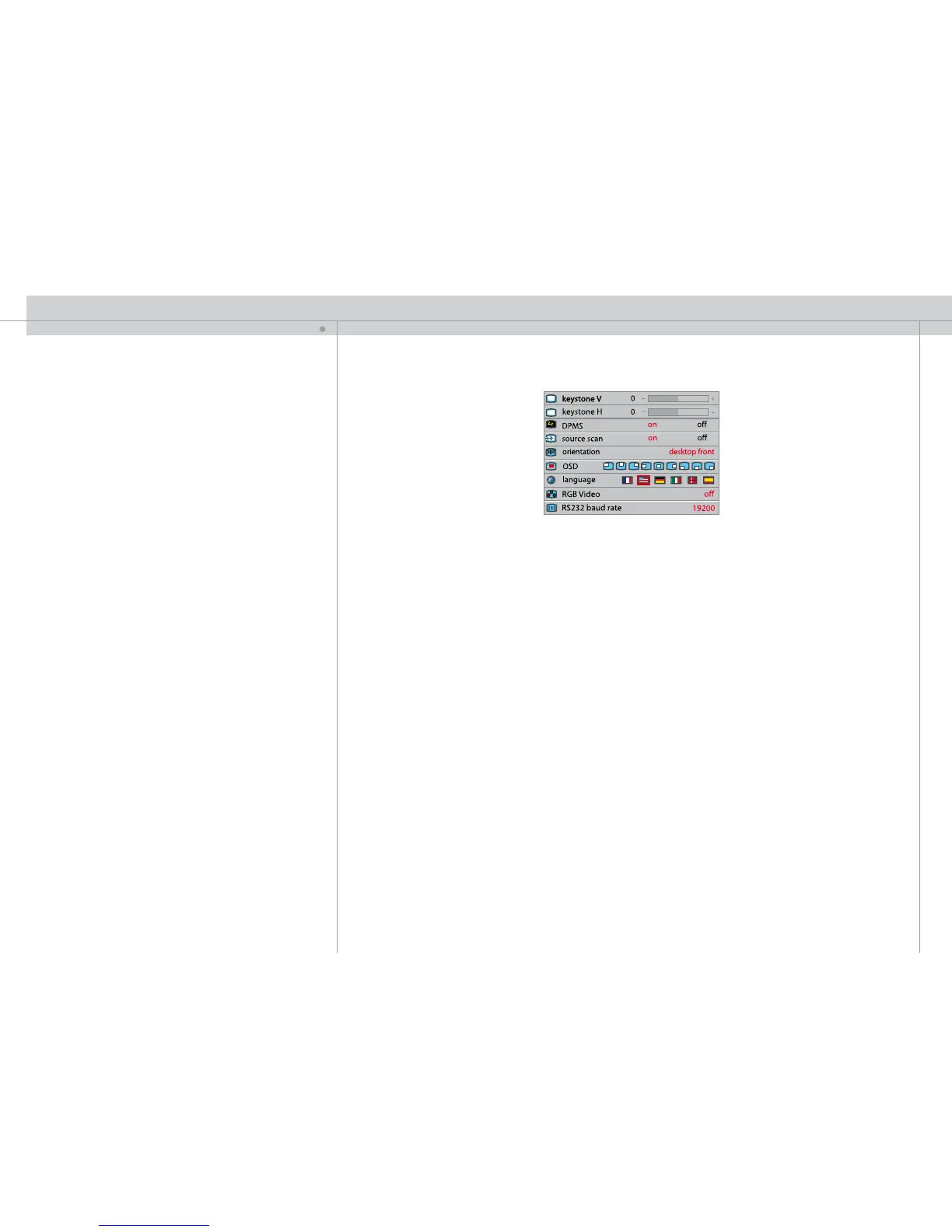
SET UP SUB MENU
keystone V
Adjust vertical keystone correction. Compensates for the geometrical distortion of the
projected image resulting from tilting the projector to shoot higher up on the wall.
keystone H
Adjust horizontal keystone correction. Compensates for the geometrical distortion of the
projected image resulting from shooting the image at an angle sideways to the screen.
DPMS
Activate/deactivate DPMS (Display Power Management Signalling). When DPMS is on,
the projector will switch off following the powering off or disconnection of the signal
source. The projector will switch back on when the signal source is reactivated.
source scan
Switches source scan on and off. With source scan on, the projector will search for
another source if the current source is disconnected or switched off. With source scan
off, the projector will remain at the selected source input even if the source is switched
off or disconnected.
orientation
Select between desktop front, desktop rear, ceiling front and ceiling rear mode. The
image will be flipped and reversed accordingly.
OSD
Select where to have the On Screen Display.
language
Select between languages.
RGB video
Selects RGB video on the component video input (YPbPr). Requires composite sync
connected to the composite video input.
RS232 baud rate
Select baud rate to secure good transmission. Longer cable runs usually means you
need to set lower baud rates.
FOR ALL
MENU SYSTEM



 To Next Page