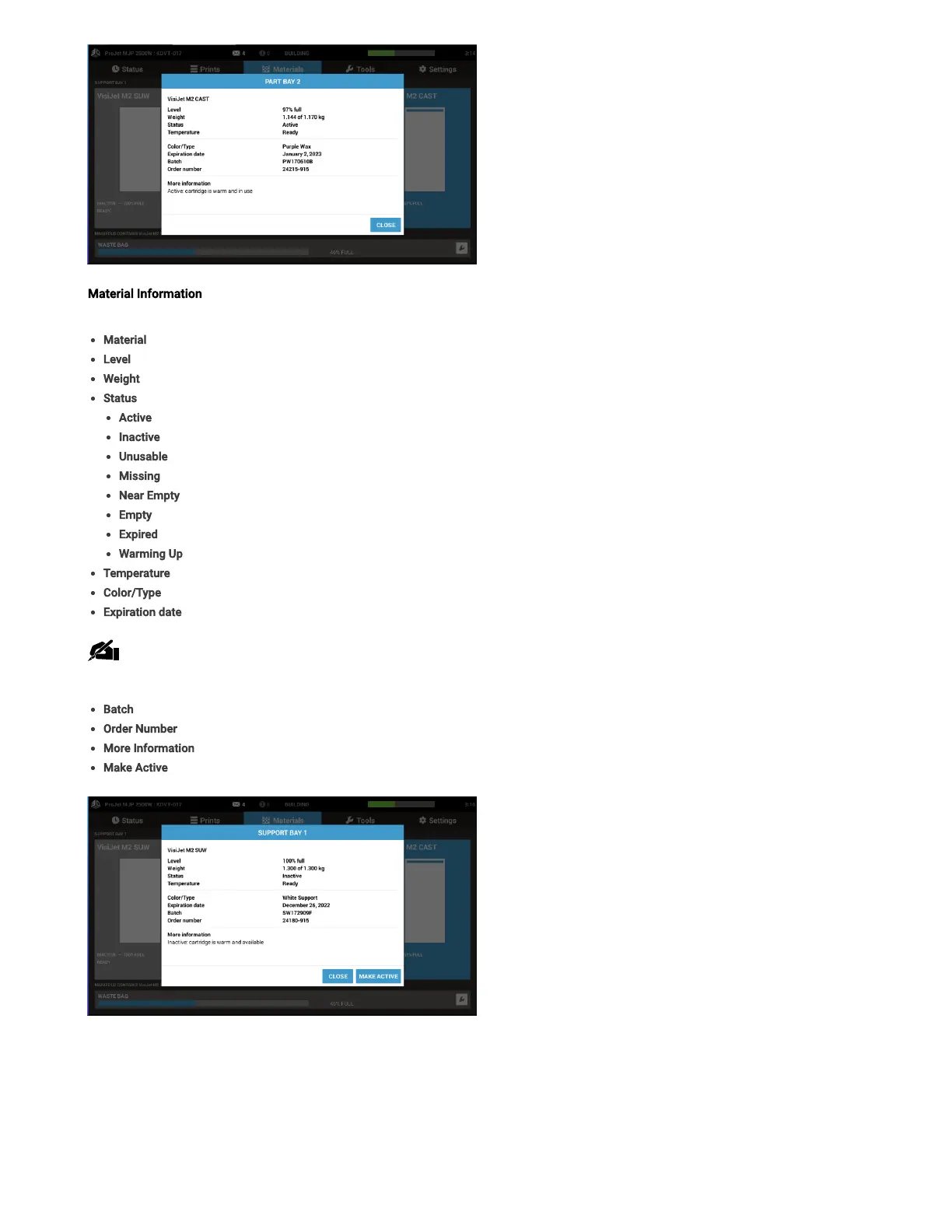
Material Information - Clicking on the material level in any one of the four of the material status screens will bring up an information box about
that particular cartridge of material. Information listed here is:
Material- Type of material in cartridge
Level- Percentage of material remaining in cartridge
Weight- Weight of material in cartridge
Status- Current information about materials
Active– current cartridge in use for printing
Inactive– cartridge available, but not currently in use
Unusable– cartridge has a fault and cannot be used, contact service for assistance
Missing– no cartridge installed
Near Empty–cartridge is almost empty
Empty–cartridge is empty
Expired–cartridge is expired and needs to be replaced
Warming Up– cartridge is warming up to print ready temperature
Temperature – Status of material for printing
Color/Type- Description of what material is, for example color, and characteristics
Expiration date- Date material expires on
Note:When an expired cartridge is inserted, the printer will reject it. If a job is printing when the cartridge expires, it will to continue to
complete the job before declaring the cartridge is no longer available for use.
Batch - Date batch of material was made
Order Number - The order number of the material
More Information - Additional status on the cartridge
Make Active - Sets cartridge as the current one in use for printing
Tools Tab (D)
The following information can be accessed under the Tools tab.



 To Next Page