NOTE: It is important to verify the type of material currently in the MDM before proceeding with these steps.
NOTE: Cartridges cannot be removed from a cold printer. The printer must be warm before drawer will open and cartridges can be
removed.
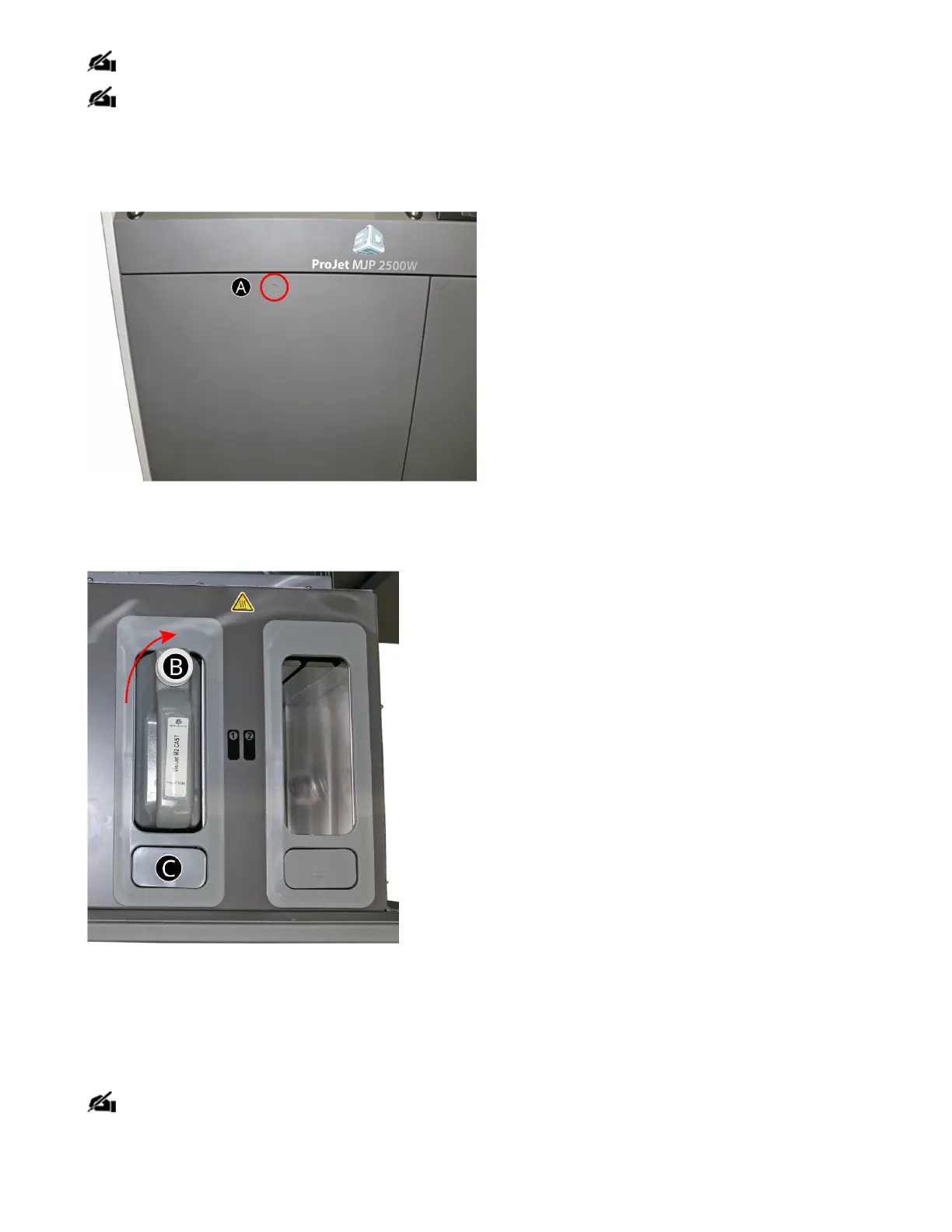
The MDM drawer (A) is a push/push mechanism. Push to open drawer, push to lock drawer.
1. Open the MDM drawer by pushing in at the recessed dimple.
2. Pull the MDM drawer open.
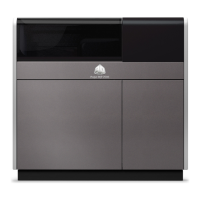
3. Turn the material cap (B) a 1/2 turn to clockwise to tighten the vent cap.
4. Press the release button (C) on the front. You will hear the cartridge release. Pull the cartridge out of the slot.
5. Dispose of the empty cartridge according to local regulations.
. Wearing nitrile gloves and eitherprotective sleeves or a lab coat to protect arms, use a disposable paper towel and wipe all material from the container
seal assembly, if necessary you can use some isopropyl alcohol on the paper towel to wipe up the excess material.
NOTE: It is important to always wear nitrile gloves and either protective sleeves or a labcoat to protect arms when coming in contact with
materials to avoid getting materials on skin. Contact with skin may cause an allergic reaction.



 To Next Page