Home
ProLights
DJ Equipment
EclProfile CT+
Page 26 (13 Accessories Installation)
ProLights EclProfile CT+ - 13 Accessories Installation; Optic (Code Eclprl)
36 pages
Manual
Save Page as PDF
To Next Page
To Next Page
To Previous Page
To Previous Page
Loading...
PROLIGHTS - EclProfile
CT+
24
13 - ACCESSORIES INST
ALLA
TION
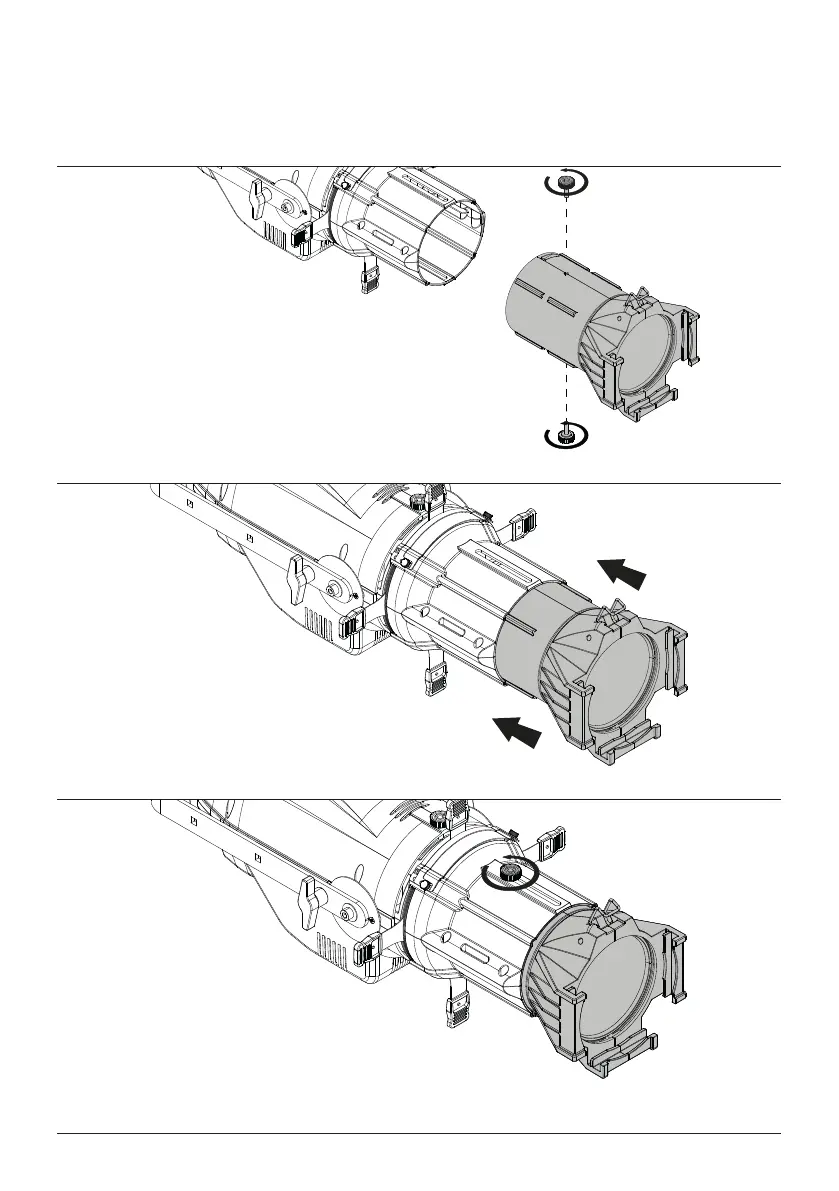
OPTIC (CODE ECLPRL)
Optics are available as optional accessories.
1.
Loosen and remove the two marked knobs.
2.
Mount the side desired optic.
3.
Insert and tighten the knobs.
Fig.8
25
27
Table of Contents
Main Page
Default Chapter
3
Table of Contents
3
Safety Information
4
1 Packaging
7
Package Content
7
Optional Accessories
7
2 Technical Drawing
8
3 Installation
9
Mounting
9
4 Connection to the Mains Supply
10
5 Start up
10
Connect and Disconnect Power from the Product
10
6 Product Overview
11
7 DMX Connection
12
Connection of the Control Signal: DMX Line
12
Instructions for a Reliable DMX Connection
12
Connection Daisy Chain
12
Connection of the DMX Line
12
Construction of the DMX Termination
13
DMX Addressing
13
8 Control Panel
14
Display and Buttons Layout
14
9 Menu Structure
15
10 Rdm Functions
18
11 Error Messages
19
12 DMX Charts
20
13 Accessories Installation
26
Optic (Code Eclprl)
26
Gel Filter Frame (Code Eclprtpg)
27
Gobo Holder (Code Eclprgh)
28
Steel Iris Diaphram (Code Eclpriris)
30
Soft Edge Filter (Code Eclprsef1)
31
Soft Focus Diffusion (Code Eclprsmoothf1)
32
The Pole Operated Yoke (Code Eclprpoyo)
33
14 Maintenance
34
Maintenance and Cleaning the Product
34
Replacing the Fuse
34
Visual Check of Product Housing
34
Troubleshooting
35


 To Next Page