SMARTbAT
6
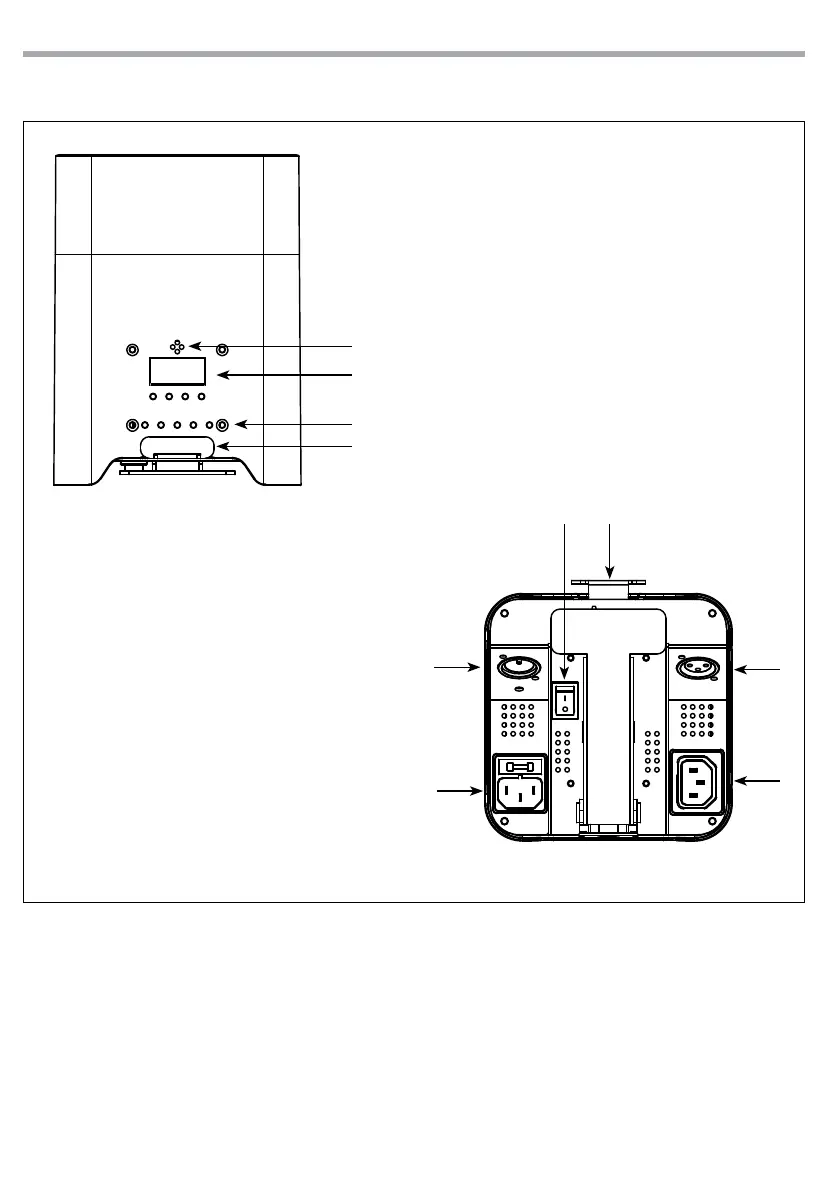
1.3 OPERATING ELEMENTS AND CONNECTIONS
Fig.4
Fig.3
Bottom panel
Side panel
2
4
4
1
3
6
9
8
7
5
1. MICROPHONE to control the show by the
external audio signal.
2. CONTROL PANEL with display and 4 button
used to access the control panel functions
and manage them.
3. CHARGE BATTERY LED.
4. Adjustable foot support for tilt regulation (up
to 20°).
5. ON/OFF SWITCH.
6. DMX IN (3-pole XLR):
1 = ground, 2 = DMX -, 3 = DMX +.
7. POWER IN mains plug for connection to a
socket (100-240V 50/60Hz) via the supplied
mains cable. The support for the mains fuse
is located near the mains plug. Only replace a
blown fuse by one of the same type.
8. DMX OUT (3-pole XLR):
1= ground, 2 = DMX -, 3 = DMX +.
9. POWER OUT: connect to supply power to the
next unit.


 To Next Page