SMARTbAT
8
- 3 - FUNCTIONS AND SETTINGS
3.1 OPERATION
Switch on the SMARTBAT with the power switch. The unit is ready for operation and can be operated via a
DMX controller or it independently performs its show program in succession.
After operation, switch o the unit with the power switch.
3.2 BASIC SETUP
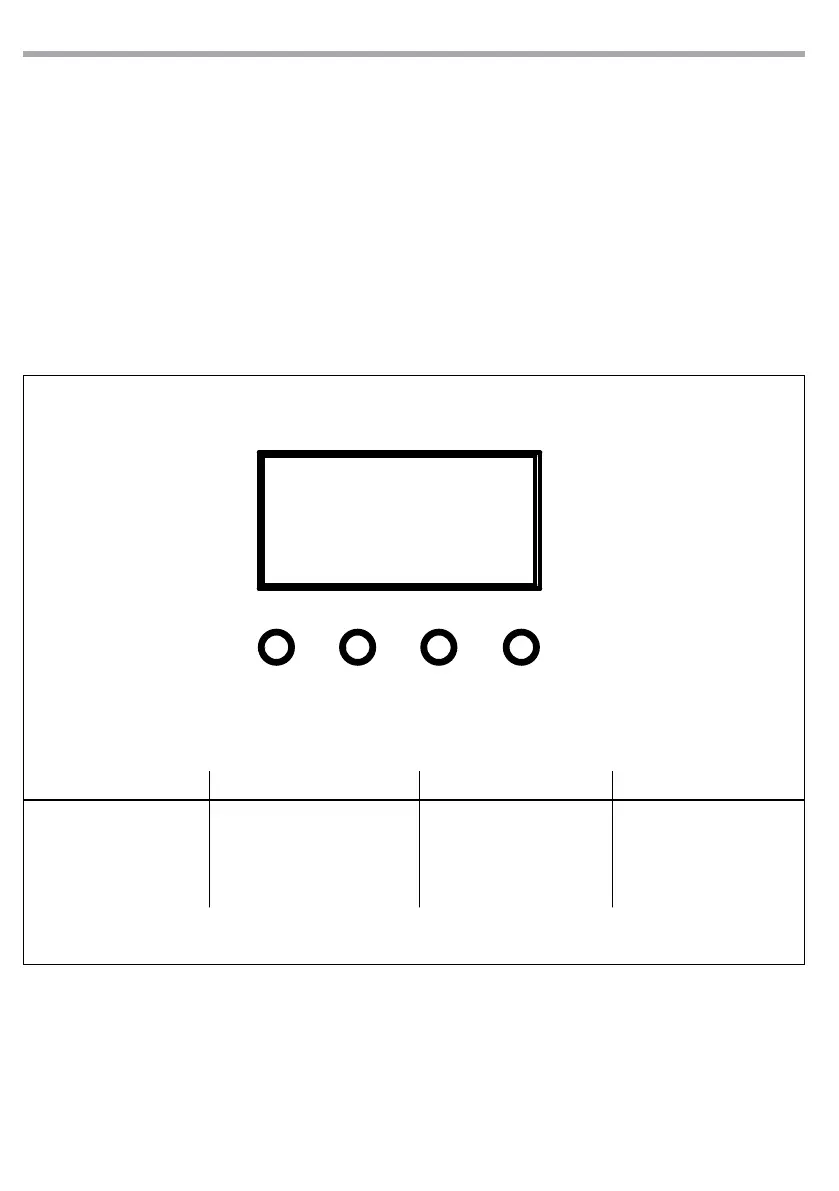
The SMARTBAT has a LED display and 4 buttons for access to the functions of the control panel (g. 6).
MENU UP DOWN ENTER
Used to access the menu or
to return a previous menu
option
Button to select the values
in ascending order of the
function
Button to select the values
in descending order of the
function
Used to select and store the
current menu or conrm the
current function value or
option within a menu
Fig.6 - Functions of the buttons
3.3 RICHARGE
To recharge SMARTBAT, plug the power cable into a mains socket (100-240V ~ / 50-60Hz).
NOTE - The charging time are 5 h and autonomy is 8h
MENU UP DOWN ENTER


 To Next Page