SMARTbAT
14
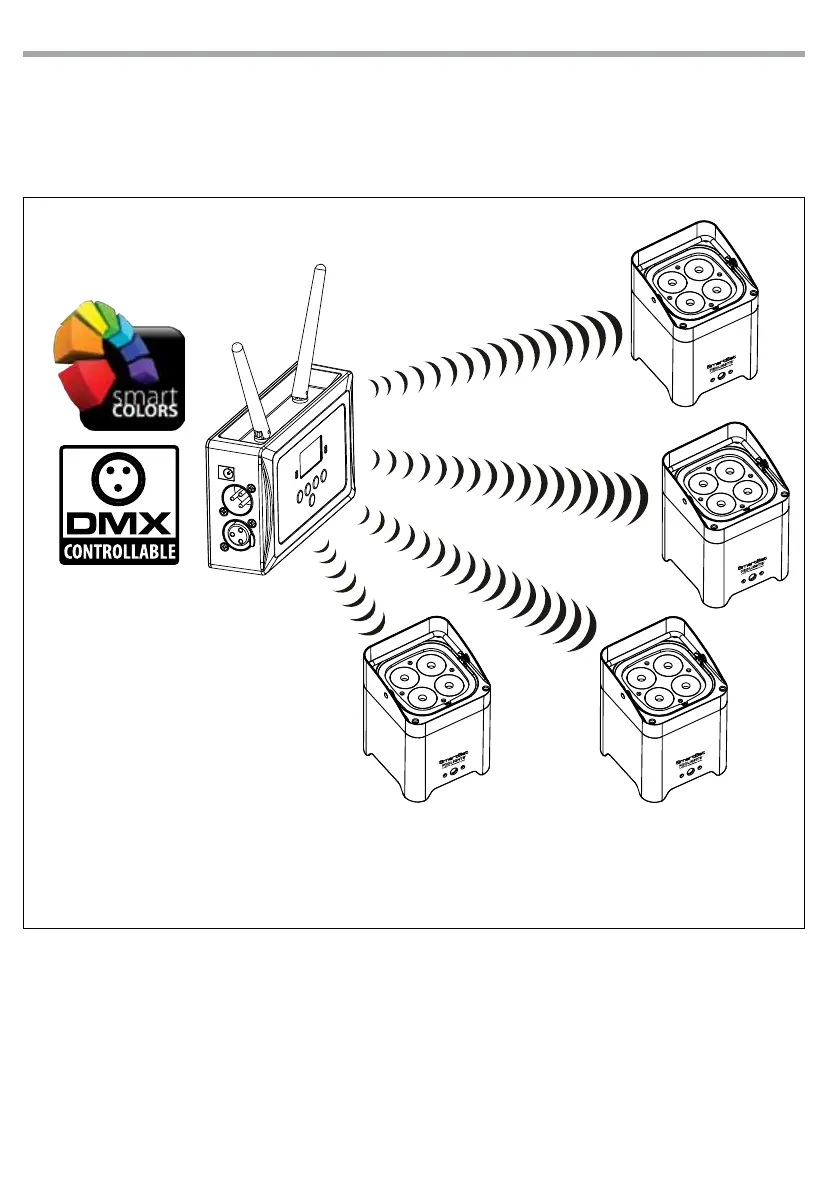
Fig.9 - Conguration with WIFIBOX
WIFIBOX: SEGNALE DI INGRESSO
1) WIFI (con App SmartColors)
2) DMX (con un Controller DMX)
WIFIBOX:
MODALITÀ TRASMETTITORE
(tipo di canale per la comunicazione
wireless dei dati)
1) Manual Channel
2) Auto Channel
SMARTBAT:
MODALITÀ RICEVITORE
1) drCH --> se la WIFIBOX è impostata su Manual Channel
2) drAU --> se la WIFIBOX è impostata su Auto Channel
Nota: Per funzionare corretamente, tutti gli SMARTBAT devono essere congurati con lo stesso indirizzo
e modalità DMX.
3.15 OPERATION WITH WIFIBOX
This mode allows you to wirelessly connect more units SMARTBAT, all managed through a unit WIFIBOX
(sold separately). For the unit WIFIBOX, transmitter signal, will set the input signal, WIFI or DMX. For the
conguration of the devices refer to the manual of WIFIBOX available on “www.musiclights.it”.
3.16 DIMMER MODE
• Enter in Dimmer mode to select specic dimming curve, press the button MENU so many times until
shows [dIM], and press the button ENTER to conrm.
• Press the button UP/DOWN to select [OFF - dIM1 - dIM2 - dIM3].
• Press ENTER button to store.
• Press the MENU button to go back or to meet the waiting time to exit the setup menu.


 To Next Page