WiFiBoX
4
1
2
3
5 6 7
4
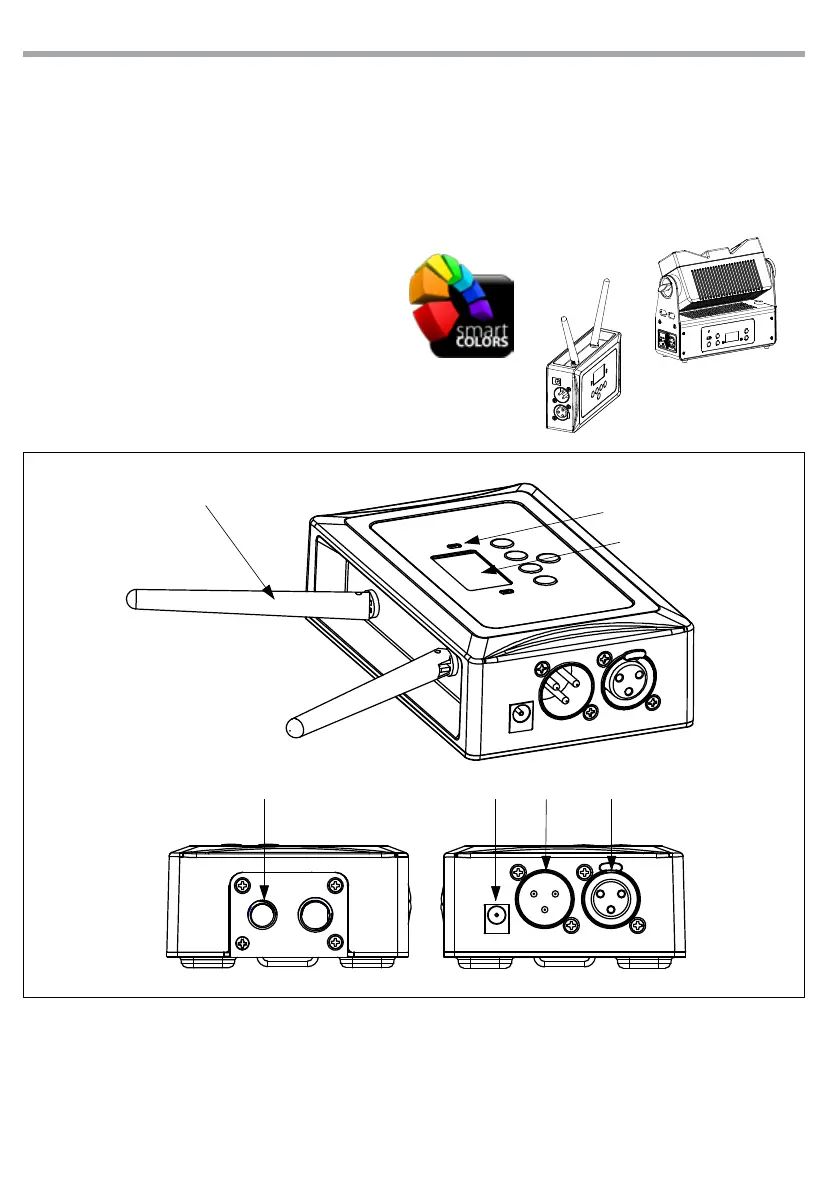
1.3 OPERATING ELEMENTS AND CONNECTIONS
1. POWER STATUS
RED: powered
GREEN (ashing): operation
2. CONTROL PANEL with display and 4 button
used to access the control panel functions
and manage them
3. WIRELESS ANTENNA
4. THREADED HOLES for mounting at high
altitude
5. POWER IN: DC 9V
6. DMX IN (3-pole XLR)
1 = ground, 2 = DMX -, 3 = DMX +
7. DMX OUT (3-pole XLR)
1= ground, 2 = DMX -, 3 = DMX +
Rear panel
- 1 - INTRODUCTION
1.1 DESCRIPTION
WIFIBOX is a new-generation light control system, conceived to obtain an easy and versatile platform for
LED projectors. The signal transmission is managed wired and wireless (through Wi-Fi), both in input and
output, even allowing to control the xtures through a smartphones applications “Smarcolors”, available
for IOS and Android devices.
1.2 TECHNICAL SPECIFICATIONS
• Signal Input: XLR 3p, Wi-Fi
• Signal Output: XLR 3p, Wi-Fi
• Power supply: DC 9V (included)
Fig.1



 To Next Page