187
OPERATING FROM THE CONTROL PANEL
Turning the appliance on or off
Plug in the appliance.
Press
to turn the appliance on.
To turn o the appliance, press
again.
MODE
Repeatedly press
to select the appropriate operating mode. The selected
mode indicator light will illuminate on the control panel.
COOL MODE
The exhaust hose needs to be used during COOL MODE operation.
1. Repeatedly press
until the COOL indicator light illuminates.
2. Repeatedly press
or to select the desired room temperature.
The
and buttons are used to increase or decrease the temperature
settings in 1°C increments.
The temperature range can be set from 17°C to 30°C.
NOTE: The temperature can be displayed in either degrees Fahrenheit or
degrees Celsius. To convert from one to the other, press and hold
and
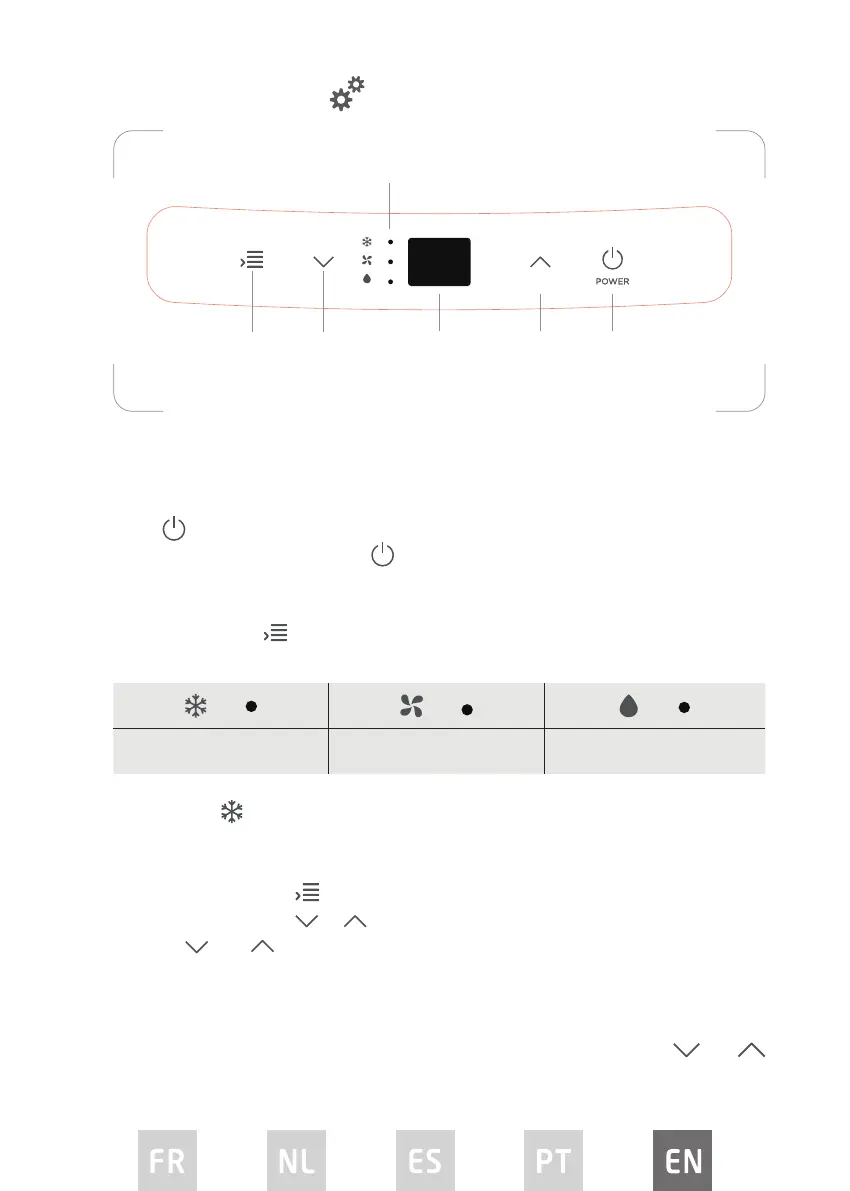
OPERATION
Mode selection
button
Decrease
temperature
button
Display
Selected mode indicator lights
Increase
temperature
button
Power
button
CONTROL PANEL
COOL FAN DRY / DEHUMIDIFY


 To Next Page