EN 41
14. How can I do a turn the camera lens 180° if I want to hang the camera on the ceiling wall?
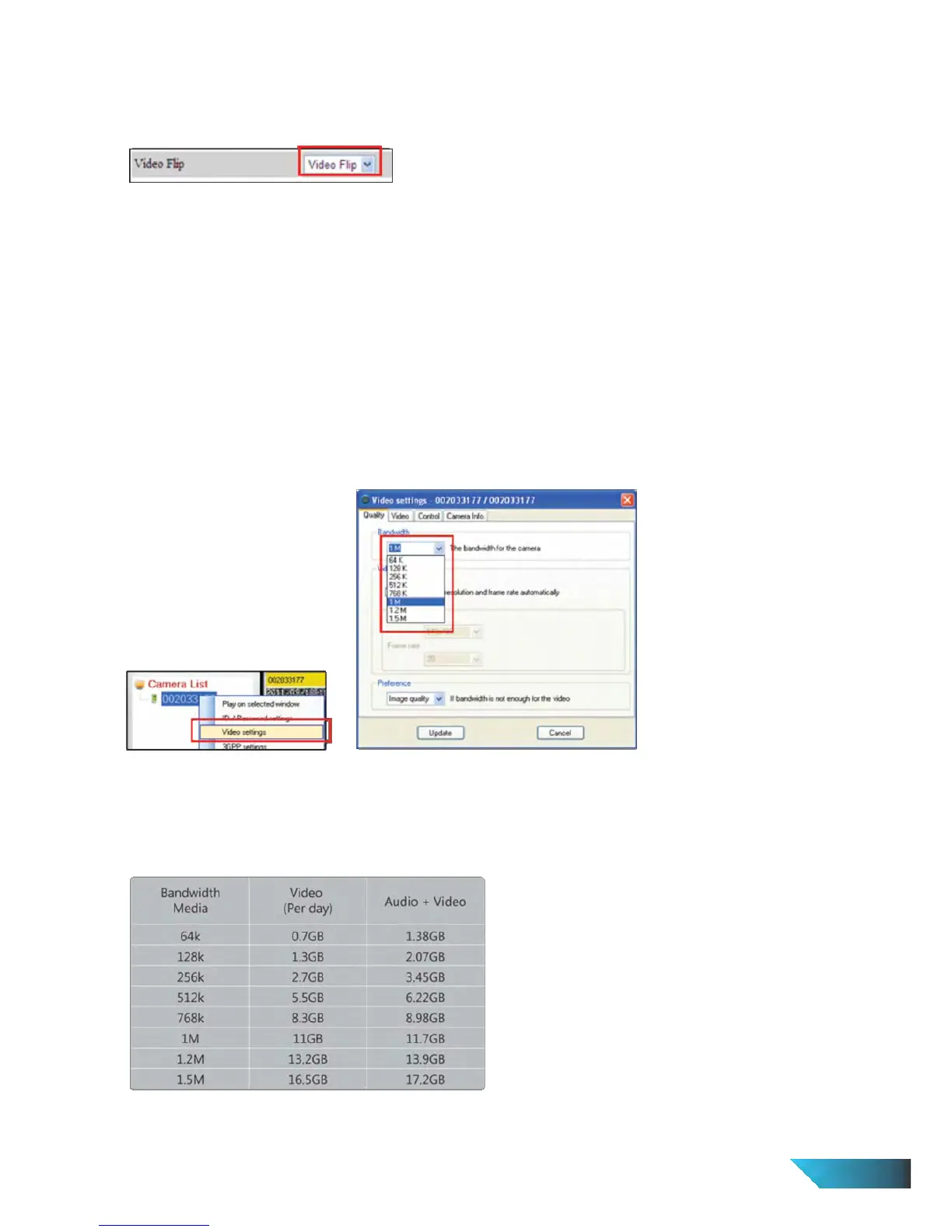
Go to the web configuration page of the camera > Login Credential > Video > Video Flip > Select Video Flip >
Save & Apply
I can see the video in a remote place, but the video quality is not good and sometimes the video will disconnect
and reconnect again by itself.
This is probably due to the internet bandwidth (internet speed) is not big enough. You can decrease the
bandwidth settings of the IP Camera.
From LiveView > Under Camera List > Right click and select Video Settings > Quality > Bandwidth > Choose the
bandwidth you want to set > Update
15. Does the IP Cam provide the recording function?
You can do the recording of the video/audio of the IP Cam from the LiveView Software with the LiveView Software
version later than the version number v1.1. Another software LivePlay is needed to play the recorded video/audio
files.
16. What is the recommended hard disk capacity I should prepare for the video recording?
Unit : Giga Bytes/day
Either recording to LiveView, NAS or Micro-SD card
The storage size is independent of video resolution, bandwidth and frame rate


 To Next Page