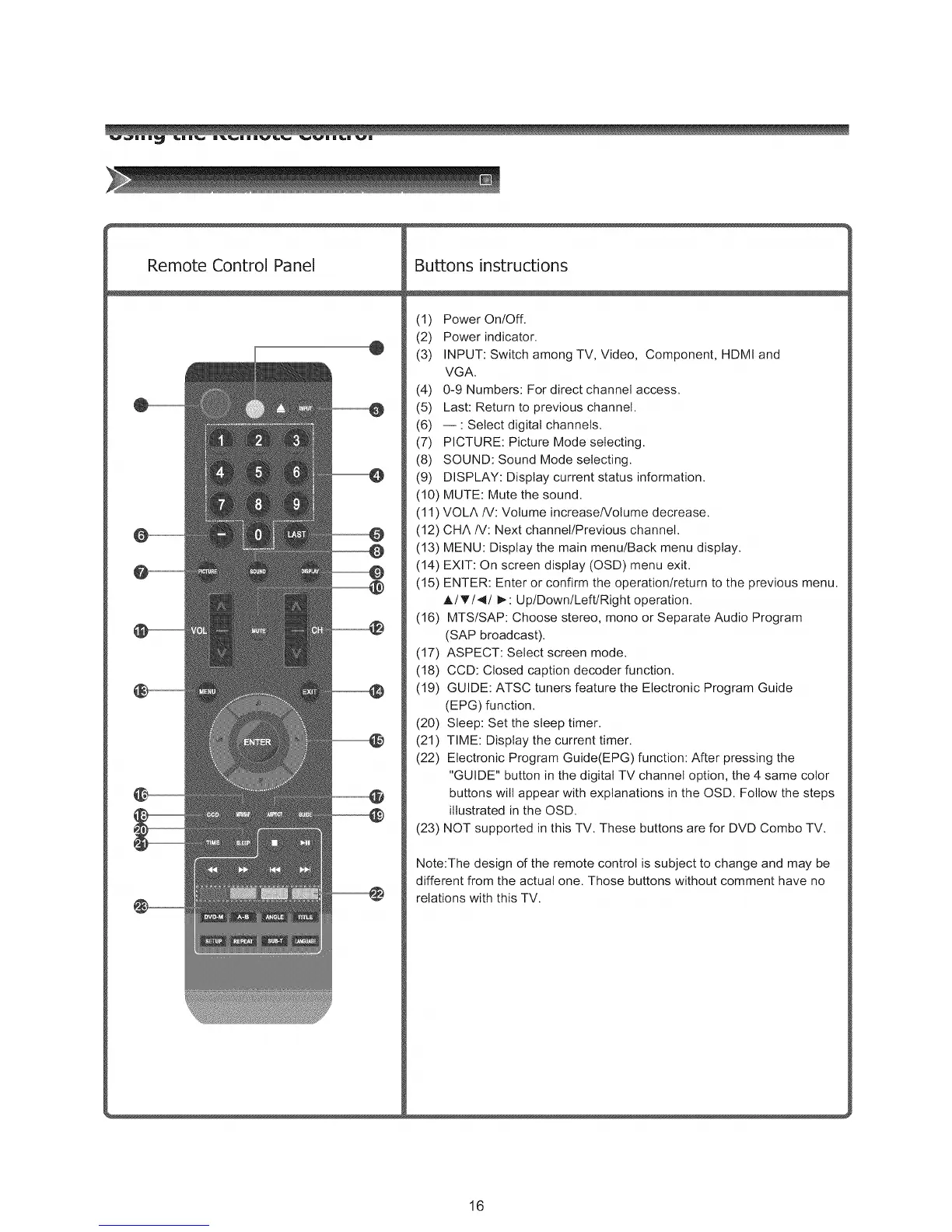
Remote Control Panel
@
Buttons instructions
(1) Power On/Off.
(2) Power indicator.
(3) INPUT: Switch among TV, Video, Component, HDMI and
VGA.
(4) 0-9 Numbers: For direct channel access.
(5) Last: Return to previous channel.
(6) -- : Select digital channels.
(7) PICTURE: Picture Mode selecting.
(8) SOUND: Sound Mode selecting.
(9) DISPLAY: Display current status information.
(10) MUTE: Mute the sound.
(11 ) VOLA IV: Volume increase/Volume decrease.
(12) CHA IV: Next channel/Previous channel.
(13) MENU: Display the main menu/Back menu display.
(14) EXIT: On screen display (OSD) menu exit.
(15) ENTER: Enter or confirm the operation/return to the previous menu.
A/_'/4/I_: Up/Down/Left/Right operation.
(16) MTS/SAP: Choose stereo, mono or Separate Audio Program
(SAP broadcast).
(17) ASPECT: Select screen mode.
(18) CCD: Closed caption decoder function.
(19) GUIDE: ATSC tuners feature the Electronic Program Guide
(EPG) function.
(20) Sleep: Set the sleep timer.
(21) TIME: Display the current timer.
(22) Electronic Program Guide(EPG) function: After pressing the
"GUIDE" button in the digital TV channel option, the 4 same color
buttons will appear with explanations in the OSD. Follow the steps
illustrated in the OSD.
(23) NOT supported in this TV. These buttons are for DVD Combo TV.
Note:The design of the remote control is subject to change and may be
different from the actual one. Those buttons without comment have no
relations with this TV.
16



 To Next Page