Changing the TV Settings
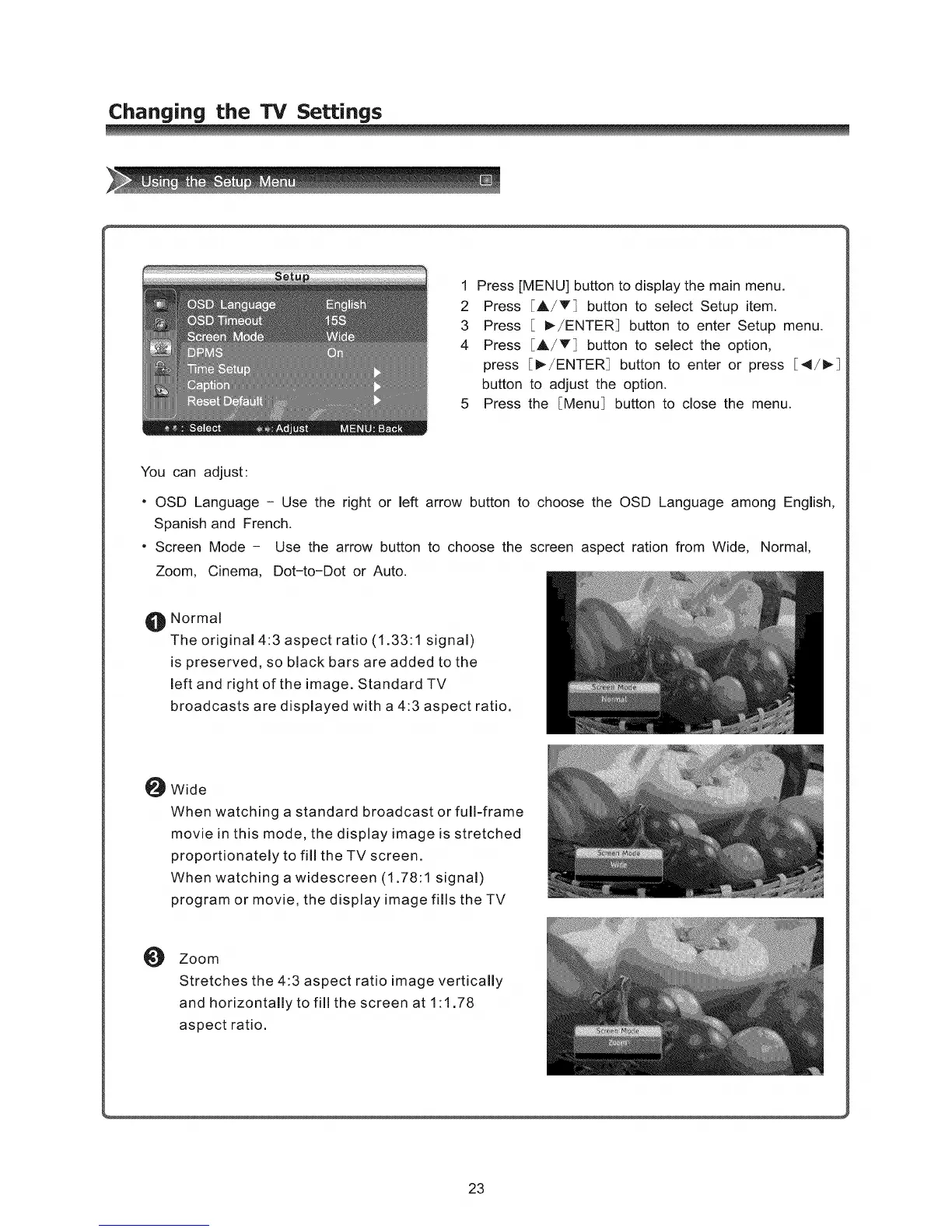
1 Press [MENU] button to display the main menu.
2 Press [A/T] button to select Setup item.
3 Press [ I_/ENTER] button to enter Setup menu.
4 Press [A/T] button to select the option,
press [_-/ENTER_ button to enter or press [41/_
button to adjust the option.
5 Press the [Menu_ button to close the menu.
You can adjust:
. OSD Language - Use the right or left arrow button to choose the OSD Language among English,
Spanish and French.
• Screen Mode - Use the arrow button to choose the screen aspect ration from Wide, Normal,
Zoom, Cinema, Dot-to-Dot or Auto.
O Normal
The original 4:3 aspect ratio (1.33:1 signal)
is preserved, so black bars are added to the
left and right of the image. Standard TV
broadcasts are displayed with a 4:3 aspect ratio.
O Wide
When watching a standard broadcast or full-frame
movie in this mode, the display image is stretched
proportionately to fill the TV screen.
When watching a widescreen (1.78:1 signal)
program or movie, the display image fills the TV
O
Zoom
Stretches the 4:3 aspect ratio image vertically
and horizontally to fill the screen at 1:1.78
aspect ratio.
23



 To Next Page