Changing the TV Settings
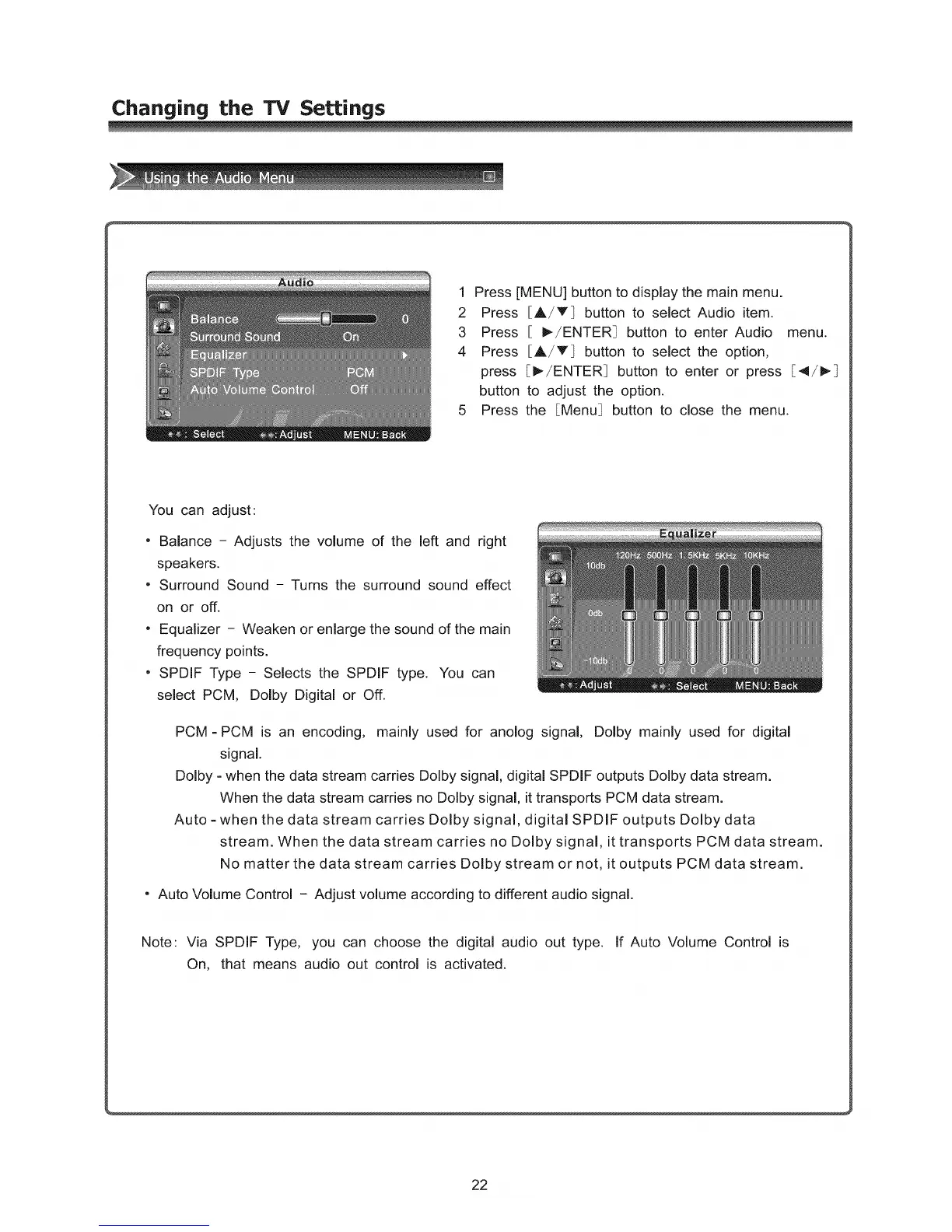
1 Press [MENU] button to display the main menu.
2 Press [A/T] button to select Audio item.
3 Press [ I_/ENTER_ button to enter Audio menu.
4 Press [A/T] button to select the option,
press [_/ENTER_ button to enter or press [4/_
button to adjust the option.
5 Press the [Menu] button to close the menu.
You can adjust:
- Balance - Adjusts the volume of the left and right
speakers.
- Surround Sound - Turns the surround sound effect
on or off.
" Equalizer - Weaken or enlarge the sound of the main
frequency points.
" SPDIF Type - Selects the SPDIF type. You can
select PCM, Dolby Digital or Off.
PCM = PCM is an encoding, mainly used for anolog signal, Dolby mainly used for digital
signal.
Dolby =when the data stream carries Dolby signal, digital SPDIF outputs Dolby data stream.
When the data stream carries no Dolby signal, it transports PCM data stream.
Auto =when the data stream carries Dolby signal, digital SPDIF outputs Dolby data
stream. When the data stream carries no Dolby signal, it transports PCM data stream.
No matter the data stream carries Dolby stream or not, it outputs PCM data stream.
" Auto Volume Control - Adjust volume according to different audio signal.
Note: Via SPDIF Type, you can choose the digital audio out type. If Auto Volume Control is
On, that means audio out control is activated.
22



 To Next Page