PLM-8000 Operation Manual
8
4.3 Installation and Preparation
4.3.1 Preparation before use
(1) Open the box.
(2) Make sure all articles are there (printing paper, dust cover, Operator’s Manual
etc.).
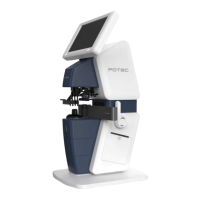
(3) Set the device on the table.
Don’t install the machine under bright light or avoid surrounding bright
light and direct sun light for better result.
Move the device with both hands at the lower part of the main body
(4) Remove protection tapes on lens holder, marking lever, table lever and UV,Blue
cover.
(5) Remove dusts, especially on the cover glass.
4.3.2 Instruction and operation sequence
(1) Connect the power cord on the bottom parts of device
to provide power.
Only operate the instrument with the power supply indicated on the
rating plate. Otherwise, it may result in fire or electric shock.
Be sure to turn OFF the power switch before connecting or
disconnecting the cables. Also, do not handle them with wet hands.
Otherwise, you may get an electric shock that may result in death or
serious injury.
(2) Turn the power switch on.
Make sure the device operates properly after turning on the power
switch.
While the device is starting up, do not place the lens on the lens
holder.
The initial screen is displayed on the LCD monitor and the device
is initialized.
Wait until the measurement screen is displayed.
If a problem occurs during start up, screen will display the error
message
Do not turn off the device before finishing initialization.
(3) Confirm that the measurement screen is displayed
(4) If the brightness of the screen is too bright or too dark,
change it in User Setup mode.
(5) Touch buttons what you want.
Refer to operation manual.


 To Next Page