08
09
W W W . D Y E P A I N T B A L L . C O M W W W . D Y E P A I N T B A L L . C O M
RIZE
™
BOARD
SE TTINGS AND F UNC TI ONS
BOARD SETTINGS AND CONF IGURATION MODE
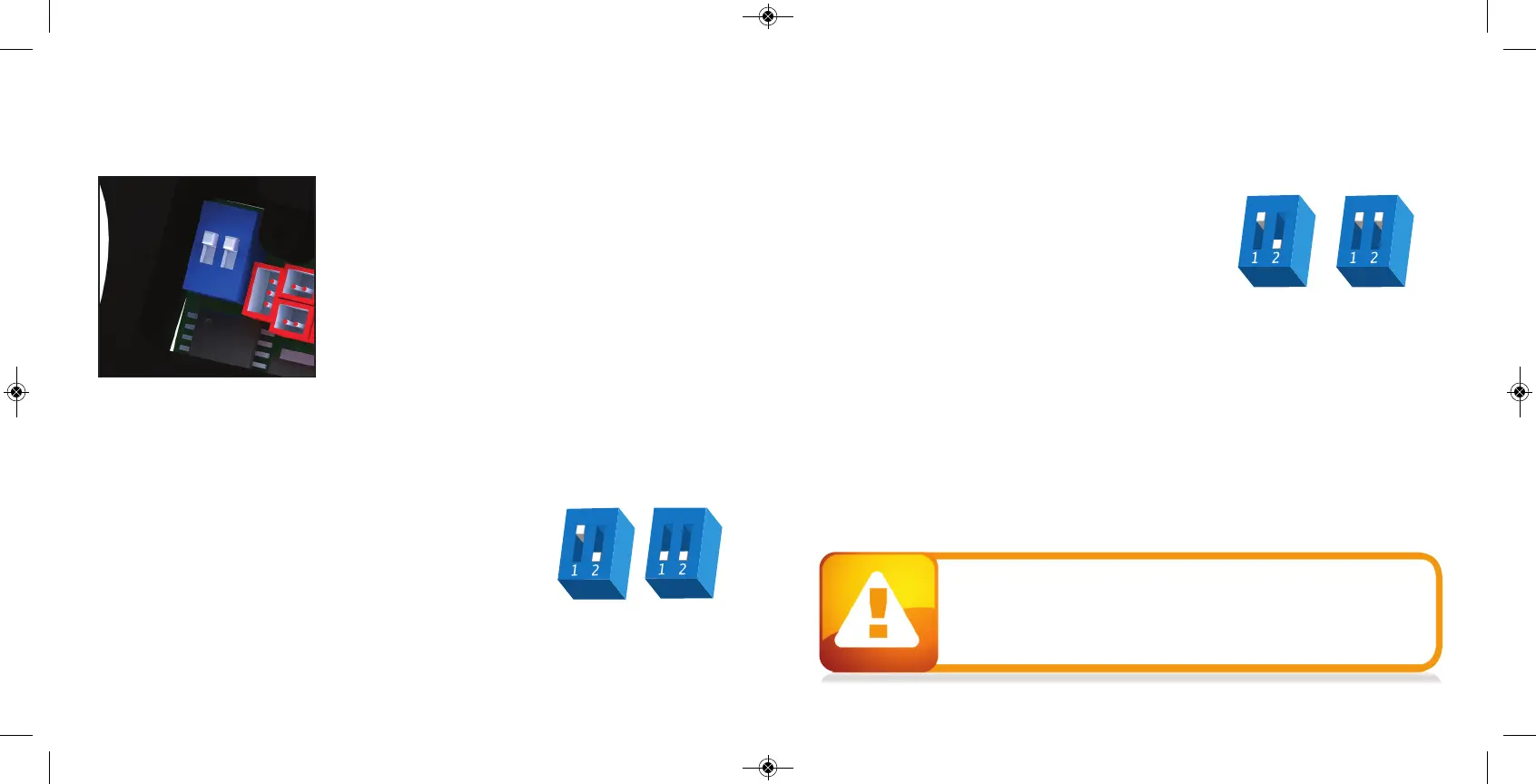
There are five setting s you can alter o n the RIZE ™ bo ard with
the DIP switches insid e the g rip frame ( see fig ure 1) :
ABS A nti Bo lt Stick.
Trigger Sensitivity This setting ad justs the delay
between two trigg er p ulls.
Dwell This is the time the solenoid is
activated fo r.
Rate Of F ire This setting is for a
djusting the
maximum rate o f fire
Firing Mode This is the firing mod e the RIZE ™ uses.
There are two DIP switches mounted on the board of the RIZE ™ ( See fig ure 1) . The first one is
used for the A BS setting and the second one is used to access a co nfig uratio n mo de which
chang es the other four setting s.
Anti Bolt Stick - W hen A BS is activated , the d well is increased after
15 seco nd s of non- use fo r the next shot f
ired . This help s to p revent
bo lt- stick, but may result in hig her velocity for the first shot.
FIGURE 1
ABS ON
(DEFAULT)
ABS OF F
CONF IGURATION MODE - The following setting s can only b e
mo dified in co nfig uration mod e. To activate the configuratio n
mo de, turn your marker off and set DIP switch 2 to the ON
po sition. Next, turn your marker on. The LED's cycle through
all colors fo r one second to indicate that you have entered
the co nfig uratio n mo de.
To cycle through d ifferent settings, p ull and rele
ase the trig ger.
Config uratio n mo de has 4 setting s that can b e chang ed .
TO CHANGE A VALUE OF A SETTING
1. While in the config uration mode, choo se the setting you wish to chang e by pulling the trig ger
to cycle throug h different o ptio ns.
2. When the LED ind icates the color of the setting you wish to chang e, pull and hold the trig ger
until the LED starts to flash.
3. The LED will flash as many times as
the previo us setting was and it will then turn off. Now p ull
the trigger as many times as yo u wish the new setting to b e. Note: Yo u must enter a value at this
po int, if you d o not wish to alter the setting then re- enter the p revious value.
4. W hen do ne, the LED will cycle throug h all the co lors again to indicate setting was saved and
turn b ack to green. You can now chang e another setting or quit the c
onfiguratio n mo de.
5. To exit co nfig uratio n mo de, set DIP 2 to the off position.
NORMAL
MODE
CONFIGURATION
MODE
RIZE
™
BOARD
SE TTINGS AND F UNC TI ONS
• The RIZE™ is not water resistant. Excess moisture can cause damage
to electronic parts.
• Keep the board and all electrical components clean of dirt, paint and moisture.
• To clean the board, use canned air. If a more aggressive cleaning method
is needed, lightly scrub the components with a soft, dry brush.
Heavy scrubbing will damag e the board.


 To Next Page