Configuring the Display
18
Channel Settings
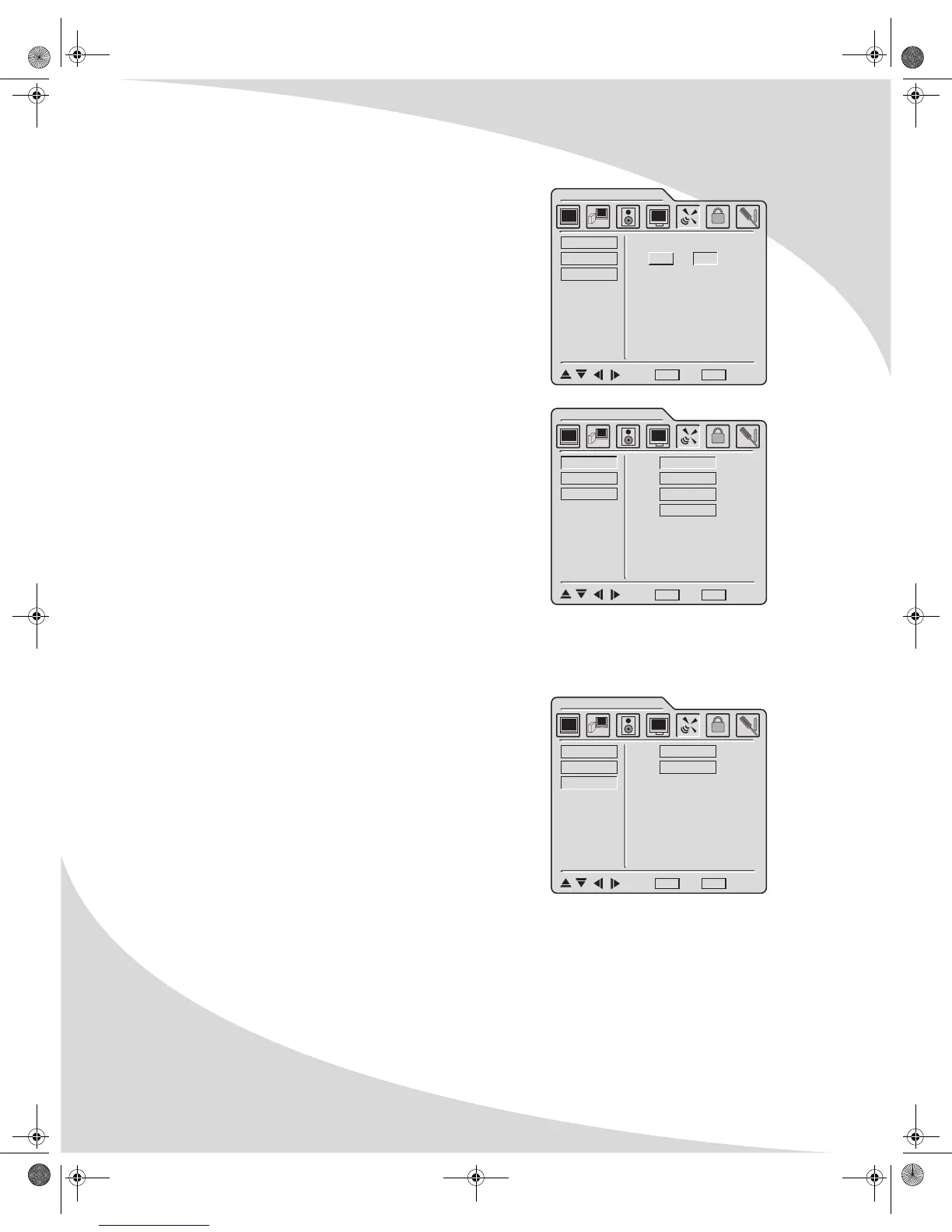
The Channel Settings menu allows you to select which
television channels are available for viewing, manually or
automatically. It contains the following menu items.
System
A sub-menu that sets the type of television signal source
in use. The options are as follows:
• Antenna—A standard television antenna
• Cable—A cable TV signal
• Cable-IRC—A type of cable signal primarily used on
the east coast of the US
• Cable-HRC—A type of cable signal primarily used on
the west coast of the US
Auto Scan
When selected, automatically scans all television
channels for valid signals and makes unavailable any channels with insufficient signal
strength.
Ch. Edit
A sub-menu that allows you to manually add and delete
available channels. Select ADD to make the current
channel available and DELETE to make it unavailable.
SYSTEM
AUTO SCAN
CH. EDIT
CHANNEL SETTINGS
ENTER
ENTER
ON OFF
: Select MENU : Exit ENTER : Enter
CHANNEL SETTINGS
SYSTEM
AUTO SCAN
CH. EDIT
ANTENNA
CABLE
CABLE-IRC
CABLE-HRC
: Select MENU : Exit ENTER : Enter
CHANNEL SETTINGS
SYSTEM
AUTO SCAN
CH. EDIT
ADD
DELETE
: Select MENU : Exit ENTER : Enter
OMPLTV32C.book Page 18 Thursday, June 2, 2005 9:07 AM



 To Next Page