2
t_ {)MPLT\ 3-qt b,,,,tc Pa_e 25 Tlnu_da_ Feblu.]l_ l_ 2ctn_ _)44 \M i,' -,._
_, - . # ,_£%,
+ +
Configuring the Display
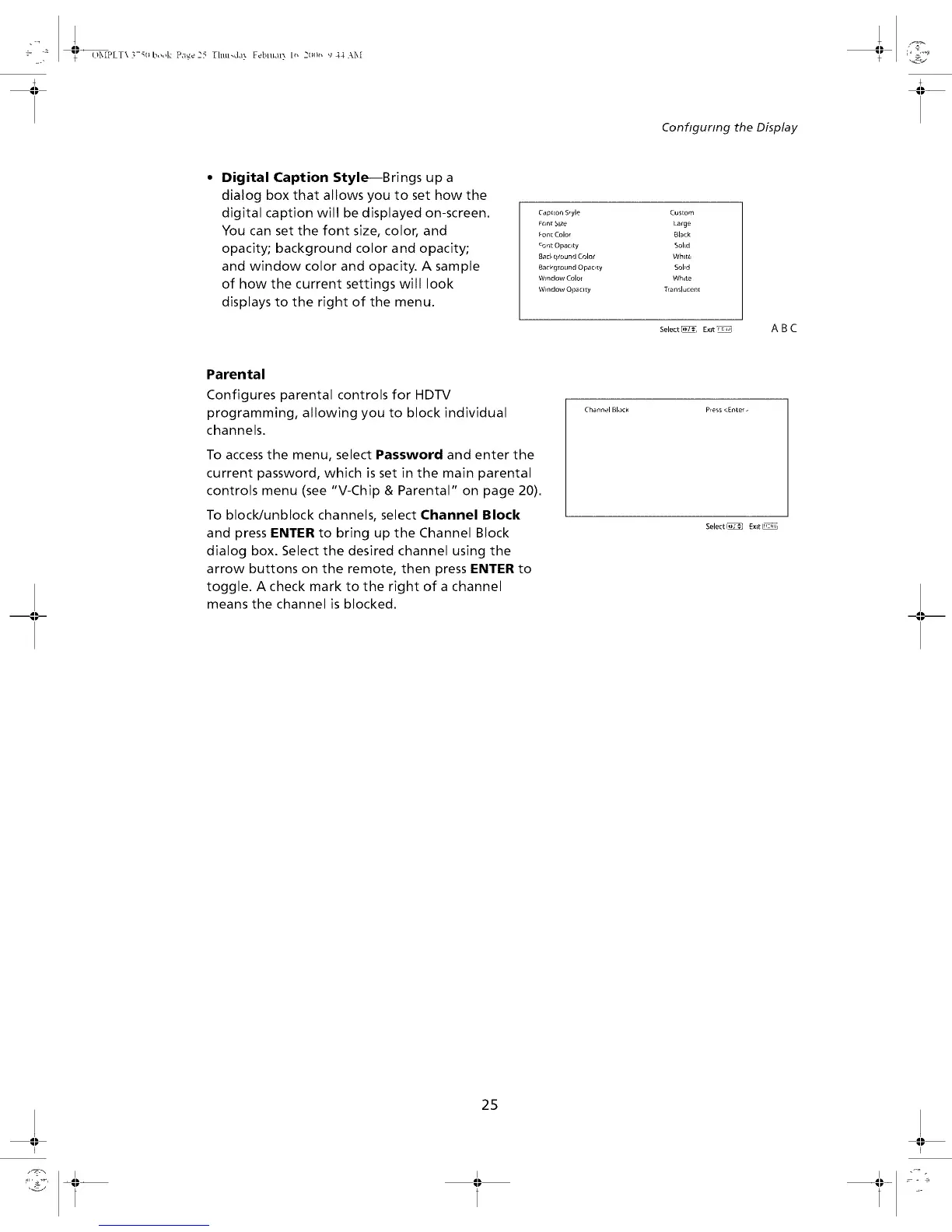
• Digital Caption Style--Brings up a
dialog box that allows you to set how the
digital caption will be displayed on-screen.
You can set the font size, color, and
opacity; background color and opacity;
and window color and opacity. A sample
of how the current settings will look
displays to the right of the menu.
Cap[ion S_yle
_ont Slze
_on[ Color
cont Opacity
8ac_ c_ound Color
Background Opacr[y
Window Colo_
Window Opaclty
Cus[om
Large
51a-k
Sohd
White
Sobd
White
Translucent
Select _ E_lt_
ABC
Parental
Configures parentalcontrolsfor HDTV
programming, allowing you to blockindividual
channels.
To access the menu, select Password and enter the
current password, which is set in the main parental
controls menu (see "V-Chip & Parental" on page 20).
To block/unblock channels, select Channel Block
and press ENTER to bring up the Channel Block
dialog box. Select the desired channel using the
arrow buttons on the remote, then press ENTER to
toggle. A check mark to the right of a channel
means the channel is blocked.
Channel Block Press <Enter.
Select I_ Exit I_
25


 To Next Page