CAUTION! If any obstacles are situated between the remote control and the receiver
ofthetouchscreen,theremotecontrolmaynotworkproperly.
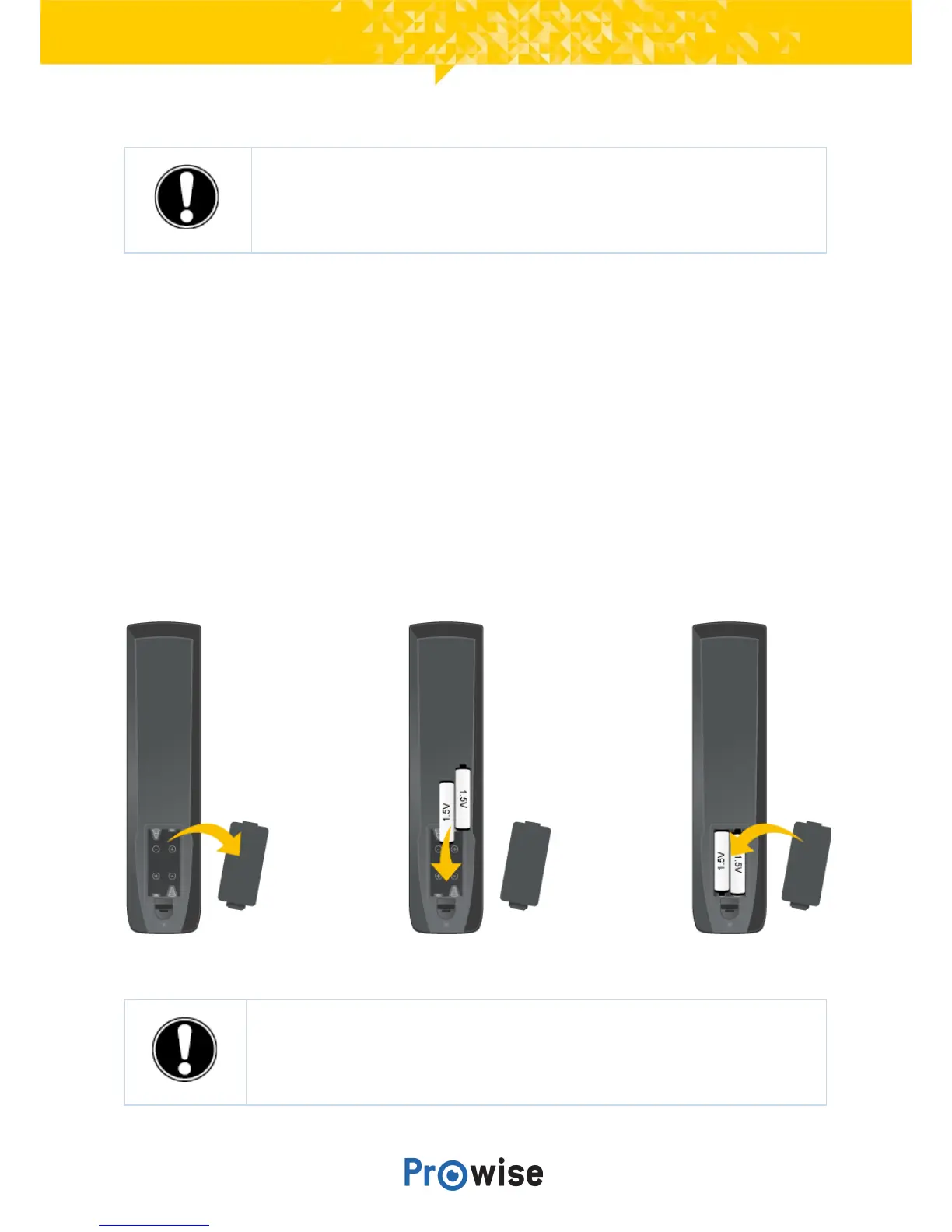
10.3.Insertingthebatteries
Beforeusingtheremotecontrolforthefirsttime,youmustinsertthetwo(1.5VAAA)batteries,supplied
withtheremotecontrol.Oncethebatteriesarerunningoutandtheremotecontrolisnolongerworking
properly,youmustchangethebatteries.Youcandothisasfollows:
1. Carefullyremovethecoverplateonthereversesideoftheremotecontrol.
2. Insertthetwobatteries(1.5V,AAA)intotheremotecontrol.
3. Placethemwiththepositiveandnegativepolesasindicatedbythe(+)and(-)signsinthebattery
compartment.
4. Closethebatterycompartmentagainbycarefullyreplacingthecoverplate.
WARNING! Remove any leaking batteries as quickly as possible from the remote
control. Thoroughly wash your hands afterwards. The leaking chemicals are toxic and
mustnevercomeintocontactwiththemouth,skinoreyes.



 To Next Page