4. OncethetouchscreenandtheexternalPChavebootedup,navigateintheCentralmenuto‘Input’
andselectthecorrectHDMIsource.
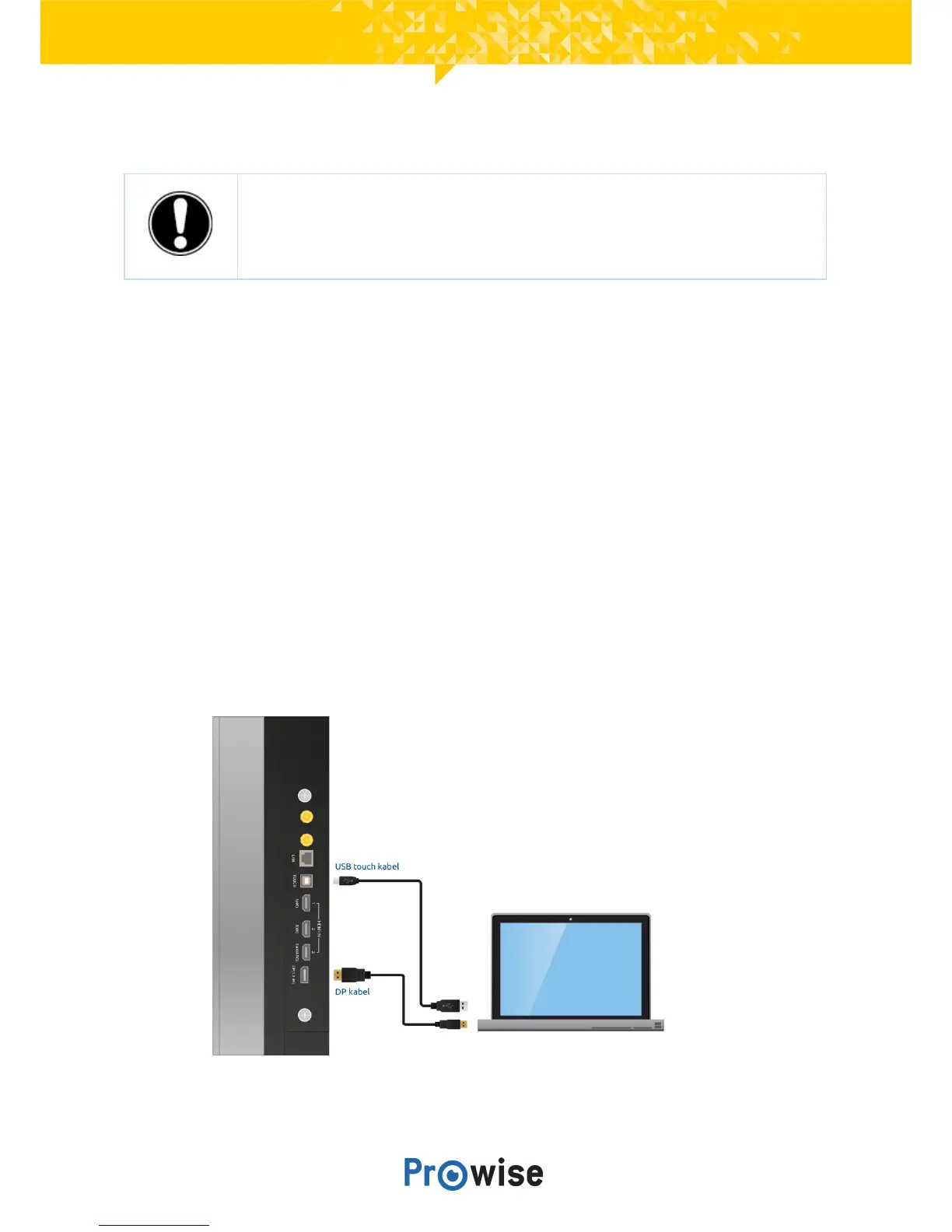
11.1.2.ConnectusingaDPcable
In addition to a DP connection (6), a USB touch connection is also available on the right-hand side of the
touchscreen.ThiscanbeusedtoconnectanexternalPCwithtouchfunctionality.
1. Connect a DP cable to the DP port of the external PC and to the DP input port (6) of the
touchscreen.
2. Connect the USB touch cable to the touch USB port of the touchscreen and to a USB port on the
externalPC.
3. Onceallcableshavebeenconnected,switchonthetouchscreenandtheexternalPC.
4. Once the touchscreen and the external PC have booted up, navigate in the Central menu to ‘Input’
andselecttheDPinputsource.



 To Next Page