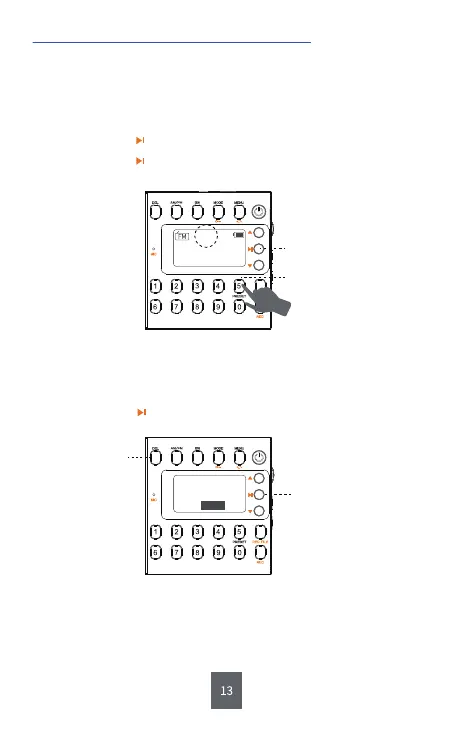
1) How Can I Save the Channel Manually?
Step1: Move to the channel you want to delete.
Step2: Long press <⑥DEL>.
Step3: Short press to confirm. Then the channel will be deleted
successfully.
2) How Can I Delete the Stored Channel Manually?
3. Save and Delete the Channel Manually
Tips :
a. Short press <⑰M+> or <⑱M-> to choose the stored channels you’ d
like to listen to or the one you’d like to delete.
b. Every step above should be finished within 5s, otherwise, the radio
will back to the interface of radio listening.
CH10
MHz
90.5
⑩ Long press: PRESET
⑧ Short press: Confirm
Message
Delete station
OK
⑥ Long press: DEL
⑧ Short press: Confirm
Step1: Long press <⑩PRESET/Number Button 5> and “CH00” will
flash on the display.
Step2: Input the number you like, such as 10.
Step3: Short press to confirm.
Step4: Short press to confirm again. Then the channel named
CH10 is saved successfully.


 To Next Page