Ⅲ
POWER SUPPLY
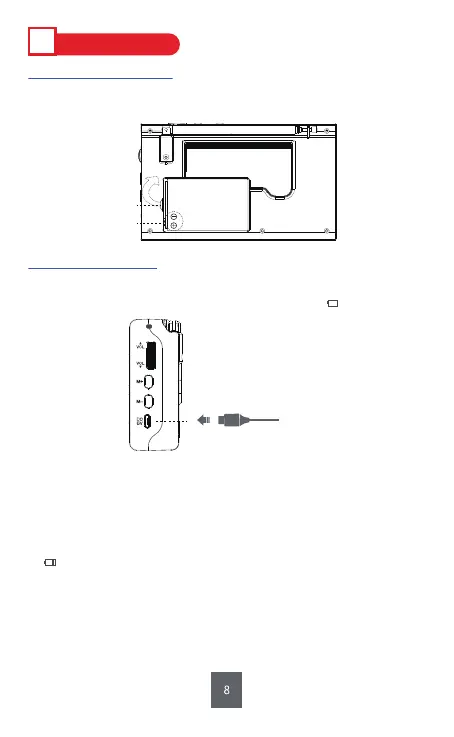
⑳ DC5V Charging Jack
Micro USB Cable
1. Battery Installation
Open the battery compartment cover. Then follow the electrode marks
inside to install the battery. Finally, replace the cover.
2. Charging Method
Low battery will affect the use of radio functions and its ability to search
channels. Please charge the radio when the battery icon " " flashes on
the screen.
Tips :
a. Please charge the battery for 6 hours on the first charge. After that, please charge it
for 4 hours.
b. To protect the radio, please charge the radio with standard DC5V/0.5-2A charger
(or other devices that can supply this type of power).
c. Usually, please charge the radio with the radio off. When charging, the battery icon
“ ” will flash on the display; in contrast, it will not flash when fully charged.
Once fully charged, it’s recommended to continue charging for 1-2 hours to
ensure the max power of the battery.
d. If an adapter is important for you, please send message “PRUNUS Charger” to
E-mail: wanwanus@outlook.com (reply in 1 working day) to get PRUNUS quality
charger with indicator at 60% discount.
A
BL-5C
Electrode marks
Opening


 To Next Page