5. E-axis assembly
76 Original Prusa i3 MK3S+ kit assembly
STEP 44 Extruder preparation and mounting
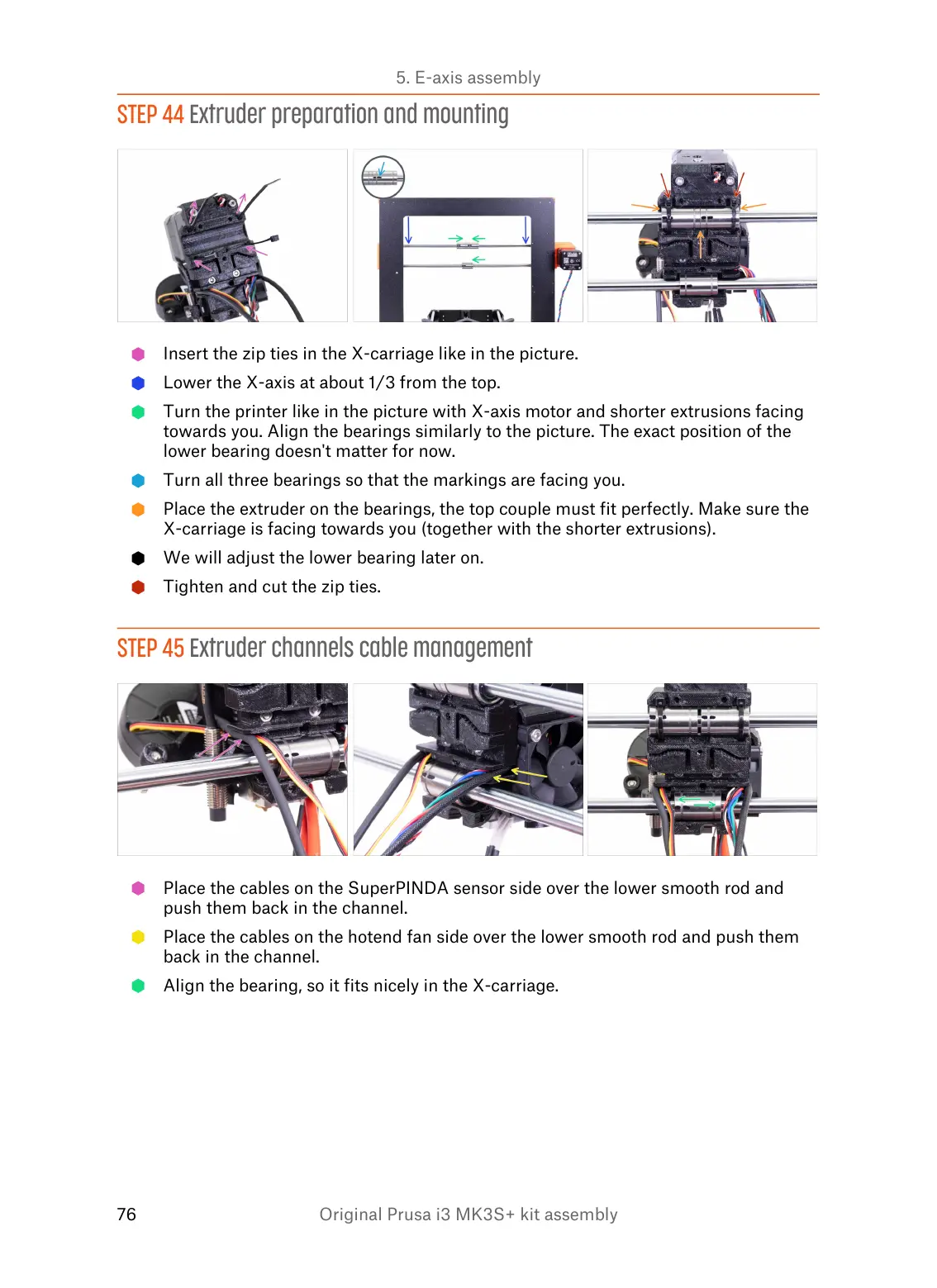
Insert the zip ties in the X-carriage like in the picture.
Lower the X-axis at about 1/3 from the top.
Turn the printer like in the picture with X-axis motor and shorter extrusions facing
towards you. Align the bearings similarly to the picture. The exact position of the
lower bearing doesn't matter for now.
Turn all three bearings so that the markings are facing you.
Place the extruder on the bearings, the top couple must fit perfectly. Make sure the
X-carriage is facing towards you (together with the shorter extrusions).
We will adjust the lower bearing later on.
Tighten and cut the zip ties.
STEP 45 Extruder channels cable management
Place the cables on the SuperPINDA sensor side over the lower smooth rod and
push them back in the channel.
Place the cables on the hotend fan side over the lower smooth rod and push them
back in the channel.
Align the bearing, so it fits nicely in the X-carriage.













 To Next Page