VP Keypad Access Device
11
rev. 7-2017 114A3868.E
- One of 18 AWG, 2-conductor, shielded cable coming from
the intercom base station if intercoms are being used.
- One of RG59U video cable if a pinhole camera is being
used.
- One of 18 AWG, 2-conductor cable for the presence sensor
if it is being used.
5
Strip back the outer insulation and shield foil from both of
the 18 AWG, 4-conductor, shielded cables (coming from the
controller or previous AI device in line and going out to the
next AI device in line), being careful not to cut the bare shield
wire. Strip ¼ inch of insulation off the end of each of the
individual colored conductor wires.
6
Remove the terminal blocks from the keypad circuit board by
sliding them up and off.
7
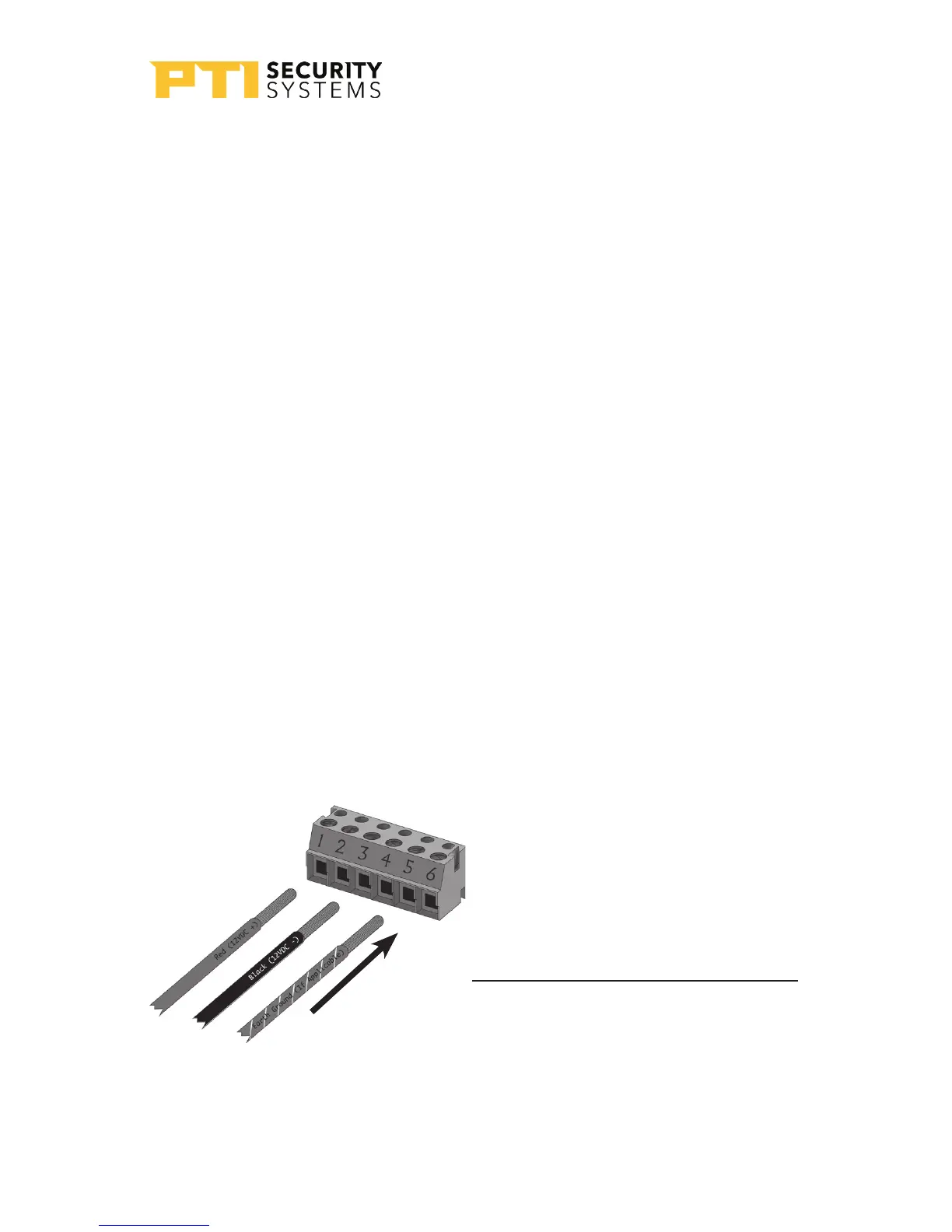
For Terminal Block P1 “Drawing 8: Terminal block P1
wiring” on page 1111: Insert both red wires (coming in
from the power supply and going out to the next AI device)
into terminal slot 1 on the first terminal block (P1).
Terminal Block P1 (Left)
1. Red DC
+ *
2. (see footnote)
3. Black DC
-
4.
5. Earth Ground if applicable
6.
* If using AC power, place the AC
wires in slots 1 and 2. We recommend
12-18 VDC, but 12-18 VAC can be used.
Drawing 8: Terminal block P1
wiring


 To Next Page