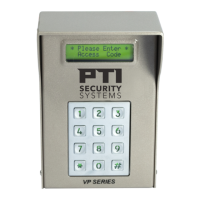
VP Keypad Access Device
20
114A3868.E rev. 7-2017
Operation
VP Keypad Setup Function
To enter setup mode:
In the event the password is changed and then forgotten, you can
disconnect power from the keypad and then hold the program
button while reconnecting power. This will bypass the password
prompt and enter the setup mode directly. When using this
method, you will also be prompted to Restore Factory Defaults.
Select yes to restore all default factory settings including the
password.
Numeric values are entered directly into the unit using the number
keys. When an option is presented, use the * key to scroll through
the available settings.
To enter setup mode:
1. Press the
*, 0 and # simultaneously
2. Enter the factory password
8898
3. Press the # key
Press the # key to advance through each setup parameter.
A parameter is automatically saved when you press # and move
to the next parameter.
A time-out is built into the system that will exit Setup mode if
there is no input on the keypad for an extended period of time
If a time-out occurs, the current parameter WILL NOT be saved.
There are two (2) ways to exit Setup mode:
• Press the
7, 8, and 9 keys simultaneously
• Go through all of the setup functions


 To Next Page