DIAMENTOR E2
Operating Controls and Indicators
D651.131.00/05 en 11
3 Operating Controls and Indicators
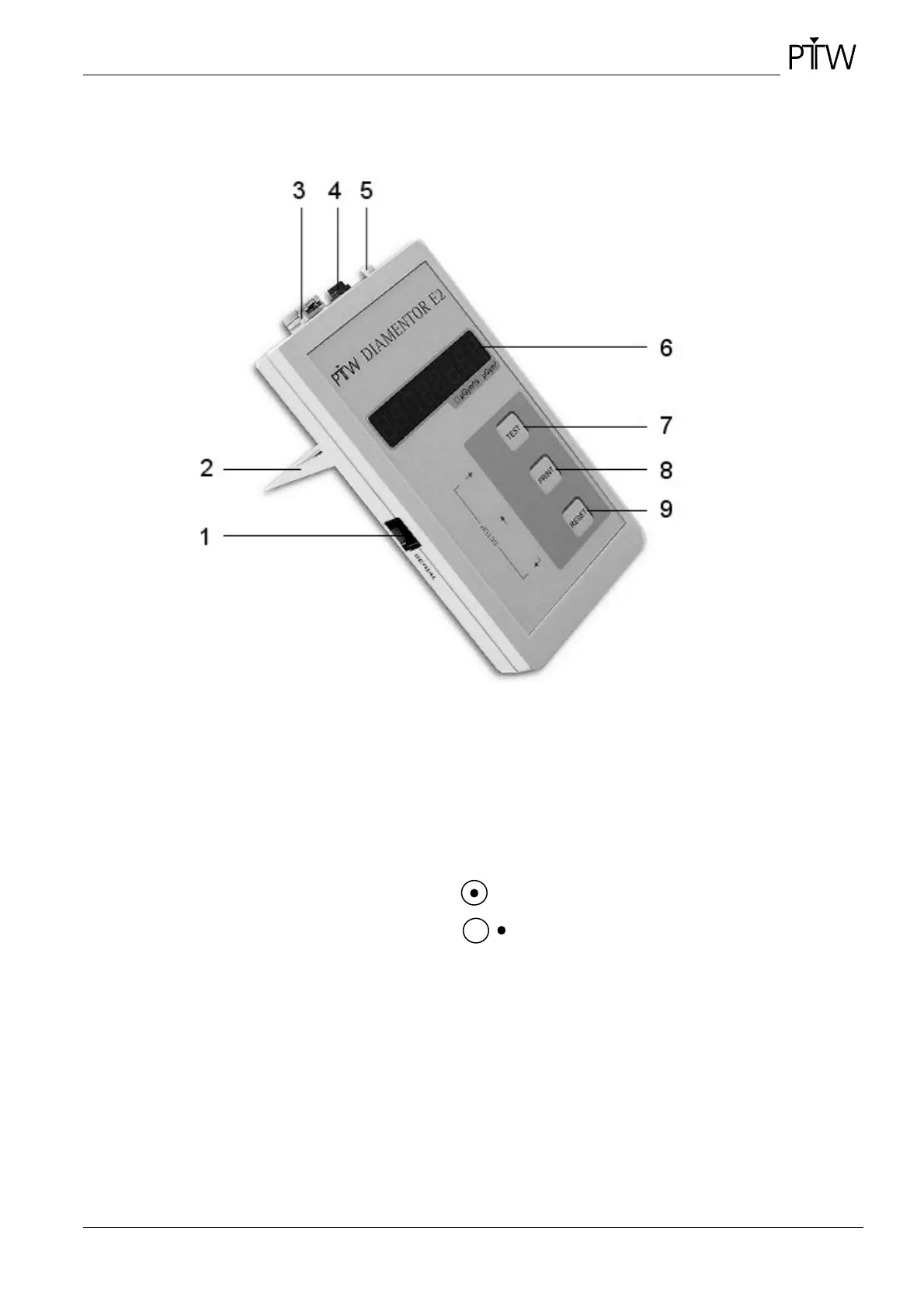
Figure 3: DIAMENTOR E2
1 Socket SERIAL for connection of label printer or PC (RS232 interface; RJ12 Western Plug)
2 Folding stand
3 Connection ionization chamber (connecting system A )
4 Connection adapter
5 On/Off switch Device switched on
Device switched off
6 Display (8 digit seven-segment display)
7 TEST (
→
) button to conduct a device test and for cursor control in the menu mode
8 PRINT (
↑
) button to print out the measured value on a connected printer and for cursor control in the
menu mode. If the print mode is set to ”Prn off” the print function is inactive.
9 RESET (
↵
) button to reset the reading to zero and to confirm settings and quit a menu in the menu
mode



 To Next Page