SOFTWARE INSTRUCTIONS
Page 22 TMC-7DSP/TMC-6DSP Color CCD Camera
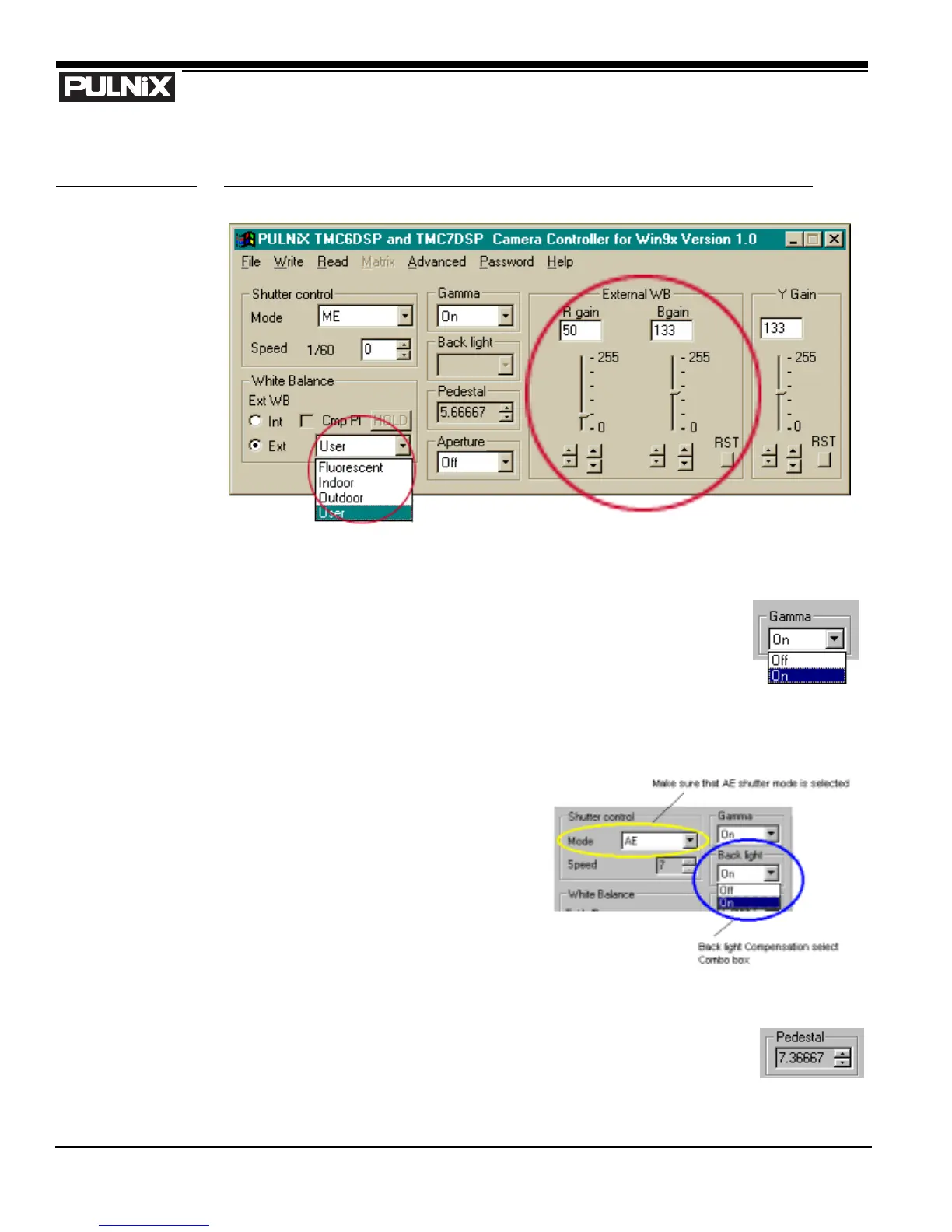
FIGURE 12. Setting Values in “User” External White Balance Mode
4.2.4 Gamma Control
Gamma correction can be switched on and off by using the Gamma Control Select
Combo box (right).
4.2.5 Back Light Compensation Control
Back light compensation can be switched on
or off by using the Back Light Compensation
Select Combo box (right). Note that the back
light compensation feature is only enabled
when AE (auto exposure) shutter mode is
selected.
4.2.6 Pedestal Control
Pedestal value is configurable from 0 to 8.5 (IRE) by using the arrow up/down keys
in the Pedestal box (right). Resolution is 4-bit (16 step). Default pedestal is set at
7.367 (IRE).


 To Next Page