SOFTWARE INSTRUCTIONS
Page 24 TMC-7DSP/TMC-6DSP Color CCD Camera
4.2.10 (a) Writing the Current Setting onto the Hard Disk as a File
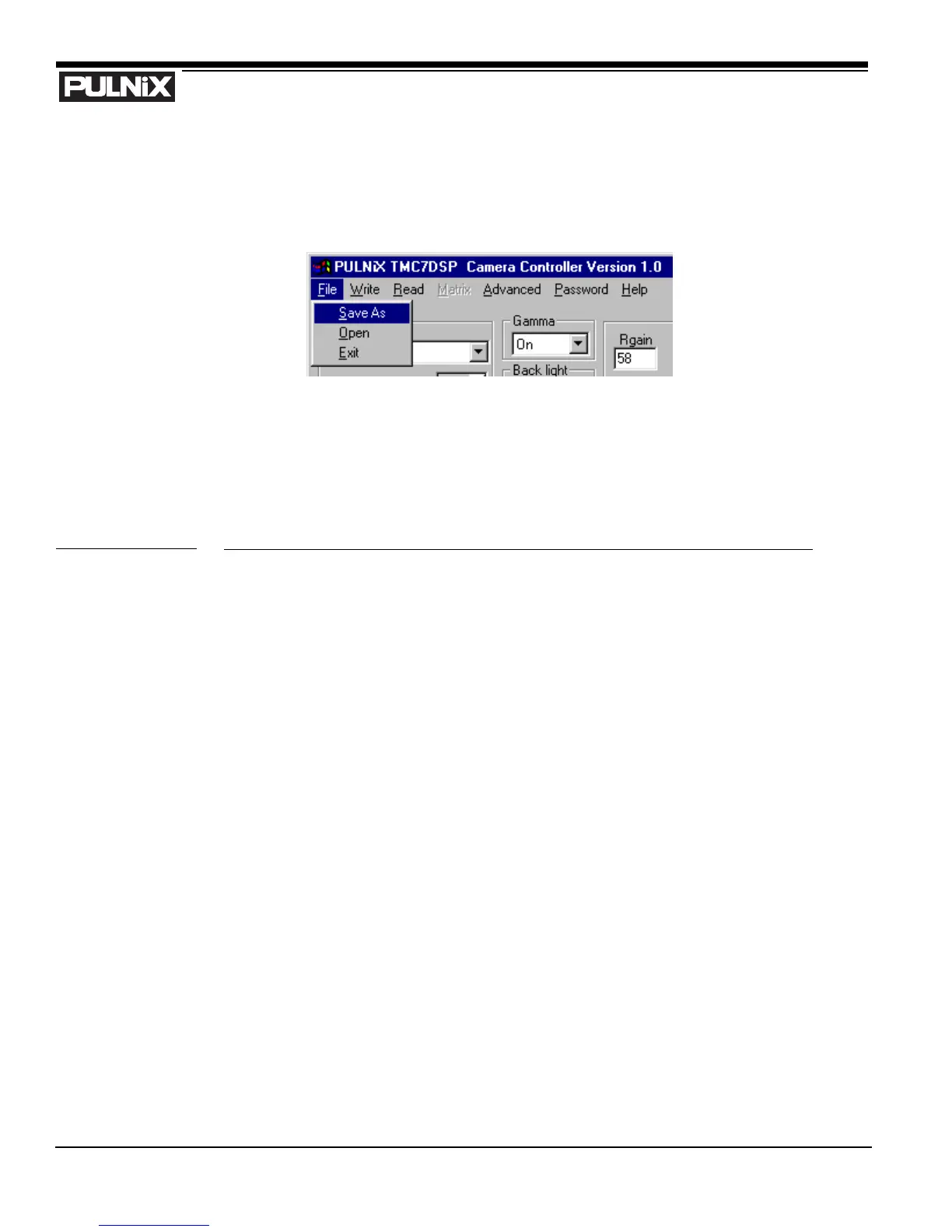
TMCDSP allows you to save your current setting as a text file on your PC’s hard disk. From the menu
bar, select “File” -> “Save As” (below).
The current setting is saved in ASCII format. An example is shown below (Figure 13, “ASCII Text
Format Example”). This text file can be modified or edited using any type of text editor tool. Character
‘#’ represents the start of a comment. All parameters are case sensitive and have a strict range of
variable. Please make sure that you have correctly modified the setting and set valid data before loading
the modified data file.
FIGURE 13. ASCII Text Format Example
AE #Shutter Mode
Auto #Shutter Speed
INT WB #White Balance
Off #Complete Pullin: 0: OFF 1: ON
On #Gamma selection
On #Backlight selection
7.36667 #Pedestal setup
Off #Aperture On Off
134 #Y Gain
0.25197 #RY Gain
0.13386 #BY Gain
-0.37500 #FY Hue
-0.06250 #BY Hue


 To Next Page