PuraTech
®
Owner’s Manual 12/11/2013 14
Installation Steps and Start-Up Procedures, Cont.
Complete the Installation
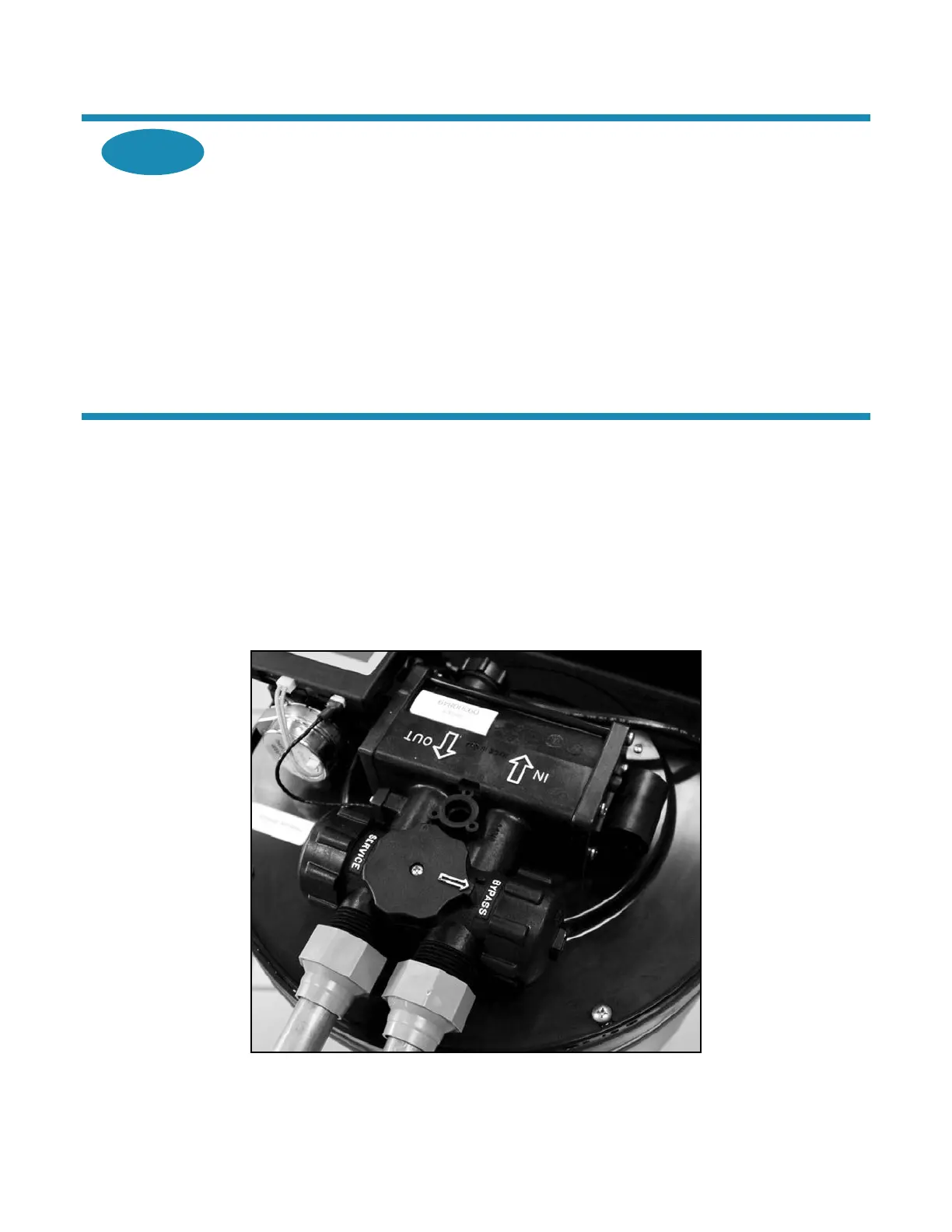
A. Ensure that the appliance is in the Service position. See Bypass Valve.
B. Ensure that the water supply is on.
C. Turn on the electricity and water supply to the water heater. For gas water heaters, return
the gas cock to “On.”
D. Open a cold water tap and allow the appliance to flush for 20 minutes or until approximately
72 gallons (270 L) have passed through the appliance. This procedure is required to meet
NSF requirements. Verify the flow rate on the controller, which indicates water flow.
(See Figure 1.)
E. Replace the cabinet cover.
Bypass Valve
The bypass valve can isolate the appliance should the appliance malfunction or leak. It can also permit the use
of untreated water for watering plants, shrubs, or lawns.
The bypass valve is attached to the main control valve. See Figure 6. To engage the bypass valve, turn the
knob to the Bypass position. The appliance will be bypassed and all water to the home is raw, untreated water.
To prevent untreated water from entering the home, water should not be used inside the home when the
appliance is in Bypass mode. Ensure that the appliance is returned to Service mode when the appliance is
repaired or the use of untreated water is complete by turning the knob to the Service position.
To blend hardness back into the water using the bypass, turn the knob slightly from the Service position toward
the Bypass position.
Figure 6: Bypass Valve



 To Next Page