8
How to use your PCRN
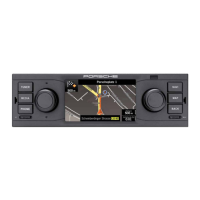
Introduction to the control
elements
Switching the PCRN on and o
On/off via ignition
Switch on the ignition.
The PCRN is active.
On/o via the left-hand knob
If you do not wish the PCRN to be active perma-
nently, then you can switch it on and o using the
knob on the left-hand side.
Press the left-hand knob (volume control)
for at least one second.
Risk of damage. The PCRN contains sensi-
tive electronic components that require
special maintenance and care.
Please observe the following points:
- The screen is easily scratched.
- Never expose the device to any liquid. Any
liquid entering the device may damage it
beyond repair.
Clean your PCRN carefully and regularly using
a dry, clean and soft cloth (microbre cloth)
or a cleansing brush.
Never exert excessive force on the surface
when cleaning.
Never use any solvents such as ethyl alco-
hol, paint thinner, petroleum ether or alcohol
(ethanol, methanol or isopropyl alcohol) or
any cleaner containing abrasives.
Remove ngerprints with a damp cloth or mild
detergent.
Never spray cleaning agent or other liquids
directly onto the screen. Instead, apply the
liquid to a cloth and wipe the screen carefully.
In case of any malfunction, never attempt
to open the PCRN yourself! If defective, have
the device serviced by a qualied workshop.
We recommend to hand over the device to a
Porsche partner where the work is performed
by qualied technicians using the correct
parts and tools.
Adjusting the volume
Turn the left-hand knob .
Depending on the situation, this changes the
volume of
- the active audio source,
- a trac announcement,
- a navigation announcement,
- the phone ring tone during an incoming call,
- the hands-free feature during a call.
Muting
To mute the audio source:
Briey press the left-hand knob .
Playback of the audio source is muted.
Unmuting
To unmute and resume playback, press
or turn the left-hand knob again.
The mute function can also be used to cancel
trac announcements (TA).
Selecting a mode
Press key TUNER, MEDIA, PHONE, NAVI or
MAP to access the PCRN's modes.


 To Next Page
 Loading...