www.PyleUSA.com6 www.PyleUSA.com 7
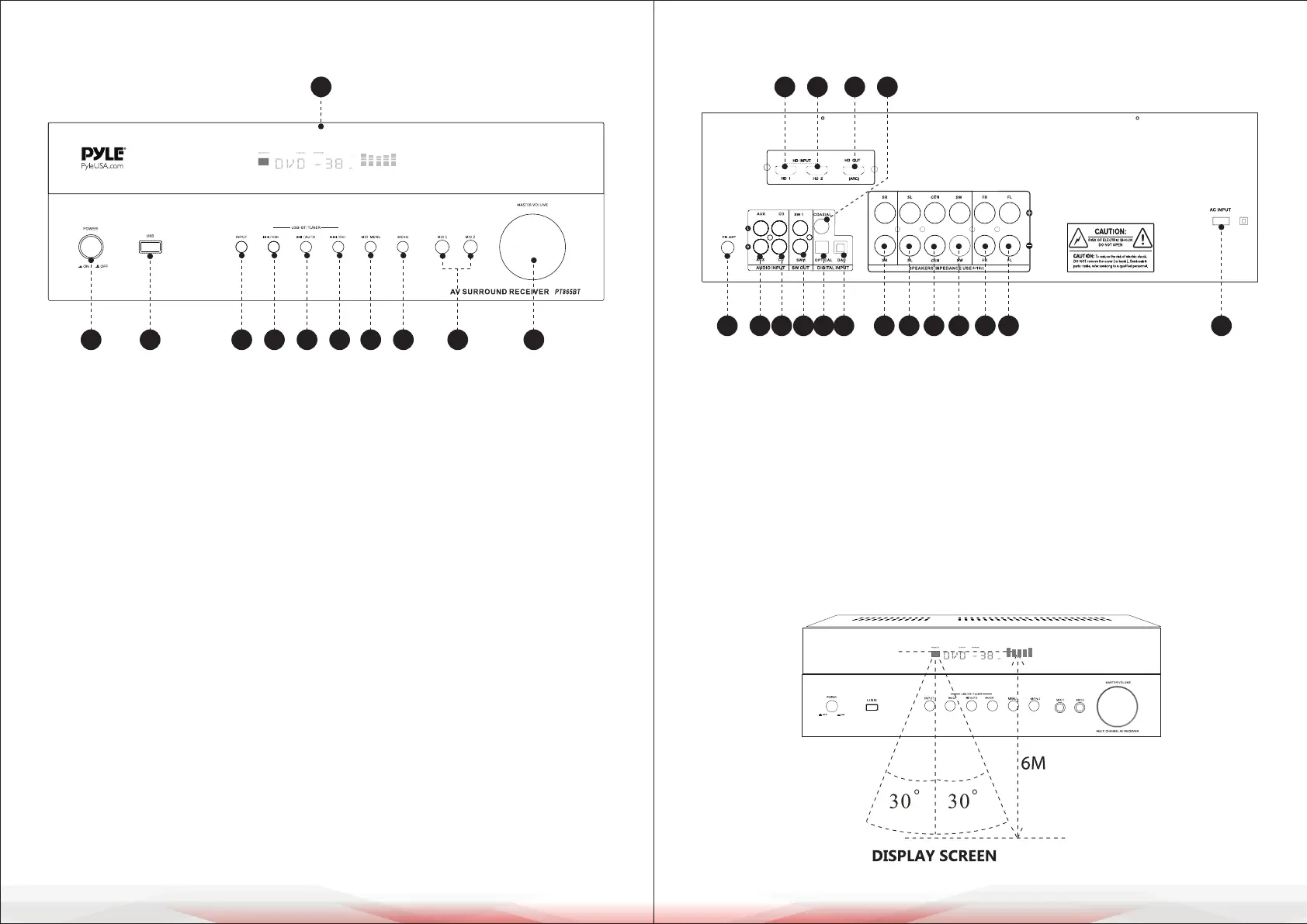
PANEL FUNCTION DESCRIPTION
1. Power switch
2. USB ports
3. Input selection button: Press this button to select input sources:
HD/HD2/COAX/OPT1/FM/CD/AUX/BLUE/USB/ARC/DAC.
Note: The DAC signal display activates only when the signal cable is connected.
4/5/6. Function buttons: ‘/CH-’, ‘/AUTO’, ‘/CH+’
These buttons enable Bluetooth (BT), USB, and FM operations:
• BT (Bluetooth) or USB mode: Press these buttons for previous track, play/
pause, and next track functions.
• FM radio mode: Press these buttons to tune stations (-), auto-save stations,
and tune stations (+).
5. Microphone menu button: Press this button to adjust microphone
parameters using the master volume/multi-function knob.
Adjust microphone volume, treble, bass, echo, and delay settings.
6. Main menu button: Press this button to adjust total volume, bass, and treble
using the master volume/multi-function knob.
7. 6.35mm Microphone jack (Group 2)
8. Master volume/multi-function knob: Rotate this knob to control overall
volume. Use it to adjust music and microphone parameters via the main menu
and microphone menu, respectively.
9. Display screen
REAR PANEL FUNCTION DESCRIPTION
1. FM radio antenna interface
2. AUX audio input
3. CD audio input
4. Active subwoofer output port
5. Digital Optical ber input port
7. Right surround speaker output
8. Left surround speaker output
9. Center speaker output
REMOTE CONTROL FUNCTION
1 2 3 4 5 6 7 8 9 10
11
1 2 3 4 5 6 7 8 9 10 11 12 13
14 15 16 17
10. Passive subwoofer output
11. Right front speaker output
12. Left front speaker output
13. Power cable input port
14. HD signal 1 Input port
15. HD signal 2 Input port
16. HD signal output ARC
17. Digital coaxial input port



 To Next Page