www.PyleUSA.com8 www.PyleUSA.com 9
SYSTEM CONNECTION
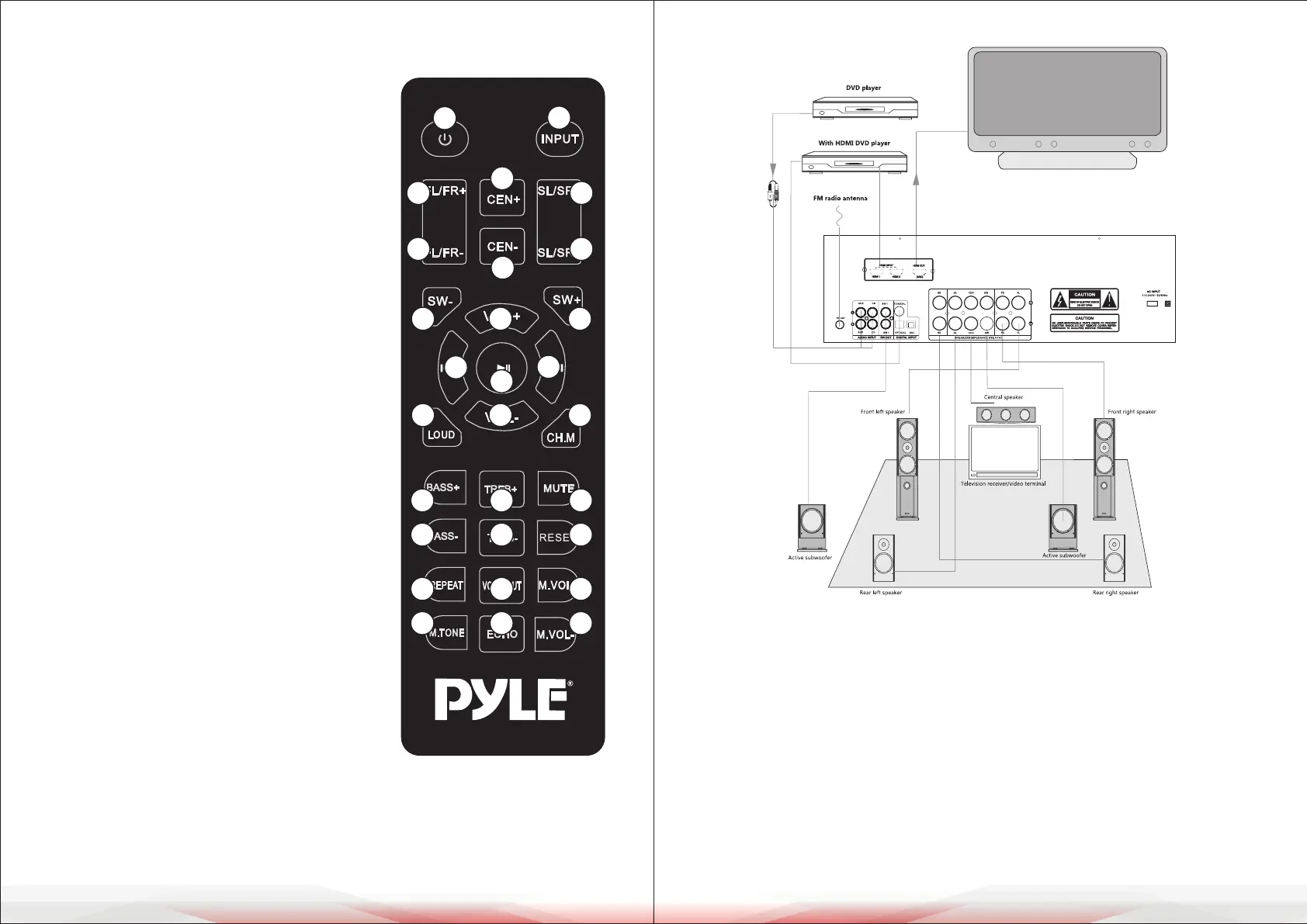
When connecting audio cables as shown in the illustration, consider the following:
1. Match the colors of the audio cable to the red and black ports of the amplier’s
R and L connections. Ensure consistency in polarity on both ends to prevent
audio distortion or weak bass output.
2. Ensure the stripped wire ends of the audio cable do not touch or cross, as
this may cause a short circuit and damage the system.
3. Insert the audio cable rmly into both the amplier and audio equipment
ports. Tip: Gently tug the cable to conrm a secure connection and avoid
noise caused by movement.
4. Power on the system before connecting the amplier and audio equipment
with the sound cable.
Remote Control Buttons
1. Power button:
Press OFF to shut down (turn o display)
2. Center volume up
3. Front channel volume up
4. Center volume down
5. Front channel volume down
6. Total volume up
7. Sub channel volume down
8. Play/pause (Auto radio search)
9. Previous song (Previous radio station)
10. Total volume down
11. Loudness
12. Treble volume up
13. Bass volume up
14. Treble volume down
15. Bass volume down
16. Signal source switch button
17. Surround channel volume up
18. Surround channel volume down
19. Sub channel volume up
20. Next (Next band radio station)
21. Channel 2.1/5.1 Switch key
22. Mute
23. System reset
24. Microphone volume up
25. Microphone volume down
26. Cancel voice in karaoke
27. Repeat playback on USB ash drive
28. Microphone echo delay setting
29. Microphone volume menu setting
Note:
Some keys must correspond to specic modes to function, otherwise, they will
be invalid.
1
2
3
4
16
5
17
18
7
11
19
21
6
10
9
20
13
15
27
29
12
14
26
28
22
23
24
25
8



 To Next Page