AUTO ALIGNING TIME CLOCK INSTRUCTIONS
Model 2500/2650
14 888.479.7264
TROUBLESHOOTING, PRINT ADJUST & MASTER RESET
3
DELETING A SETTING
2
1
COLUMN RESET
Slide the “SETTING” switch to right.
Press the 2nd, 5th and 6th column buttons at same time to reset to default
settings.
Re-program time clock.
Setting
Enter Back Clear
Reset
+
TROUBLESHOOTING
TIME CARD MISFEED
In the event the time card will not feed, re-feed the time card. If issue persists, please
check list for possible causes:
TIME CARD MISFEED
POSSIBLE CAUSES ACTION
Time card inserted too hard into time clock Re-Feed Card
Time card held too long Re-Feed Card
Time card inserted into time clock on an angle Re-Feed Card
Time card is wet or damaged Use new time card
IMPAIRED PRINTING
SYMPTOM PROBABLE CAUSE ACTION
Time card feeds
with no printing
Ribbon not installed properly Check that ribbon cartridge is
properly installed. See page 13.
Punches print outside
of date box
Print needs adjustment
Follow Print Adjustment
instructions on page 10.
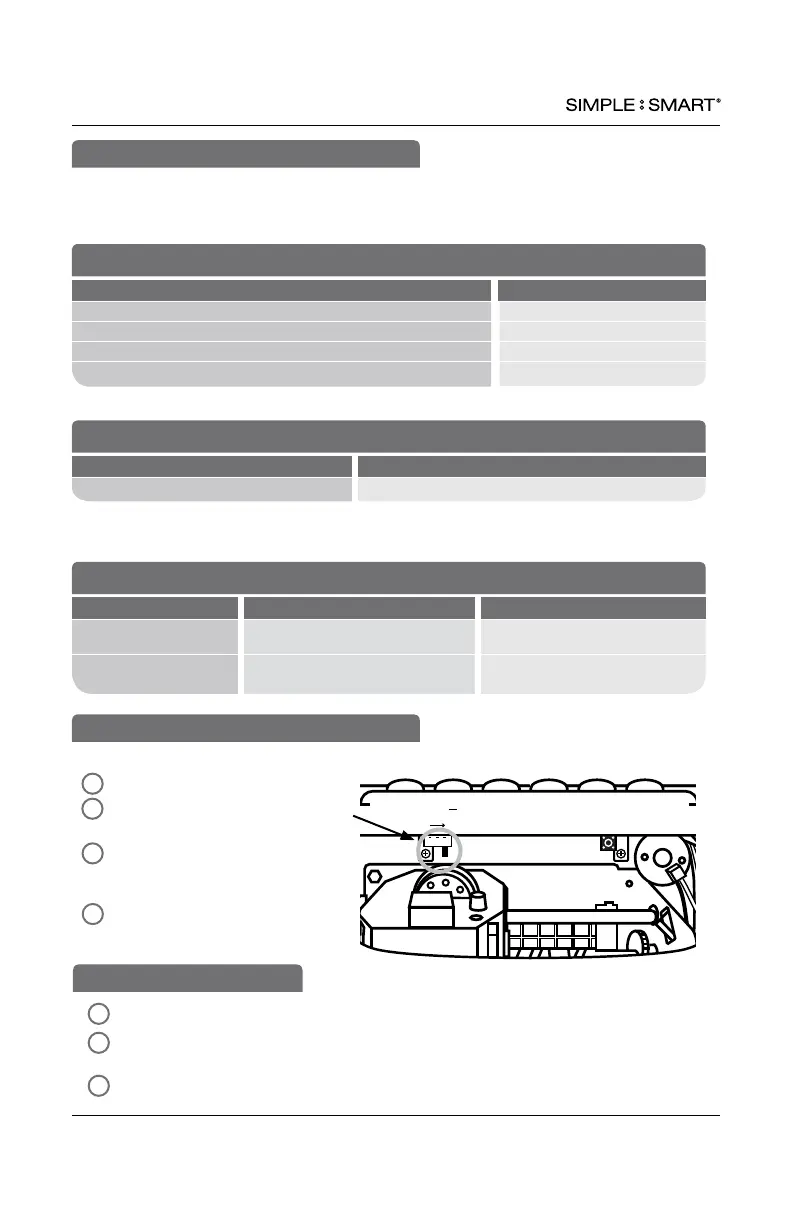
Erases time clock’s memory & restores default factory settings.
1
2
3
Unlock & remove time clock cover.
Slide SETTING switch to right to
begin “reset” setting mode.
In SETTING mode, press the 1st,
5th and 6th column buttons at the
same time.
Re-program time clock.
MASTER RESET
IMPAIRED PRINTING
In the event the time clock printing is impaired, please check list for possible causes:
WRONG SIDE PRINTING
PROBABLE CAUSE ACTION
Time card is facing wrong way
Make sure correct date on time card side is facing user
4


 To Next Page