AUTO ALIGNING TIME CLOCK INSTRUCTIONS
Model 2500/2650
9pyramidtimesystems.com PROGRAMMING
8
7
10
9
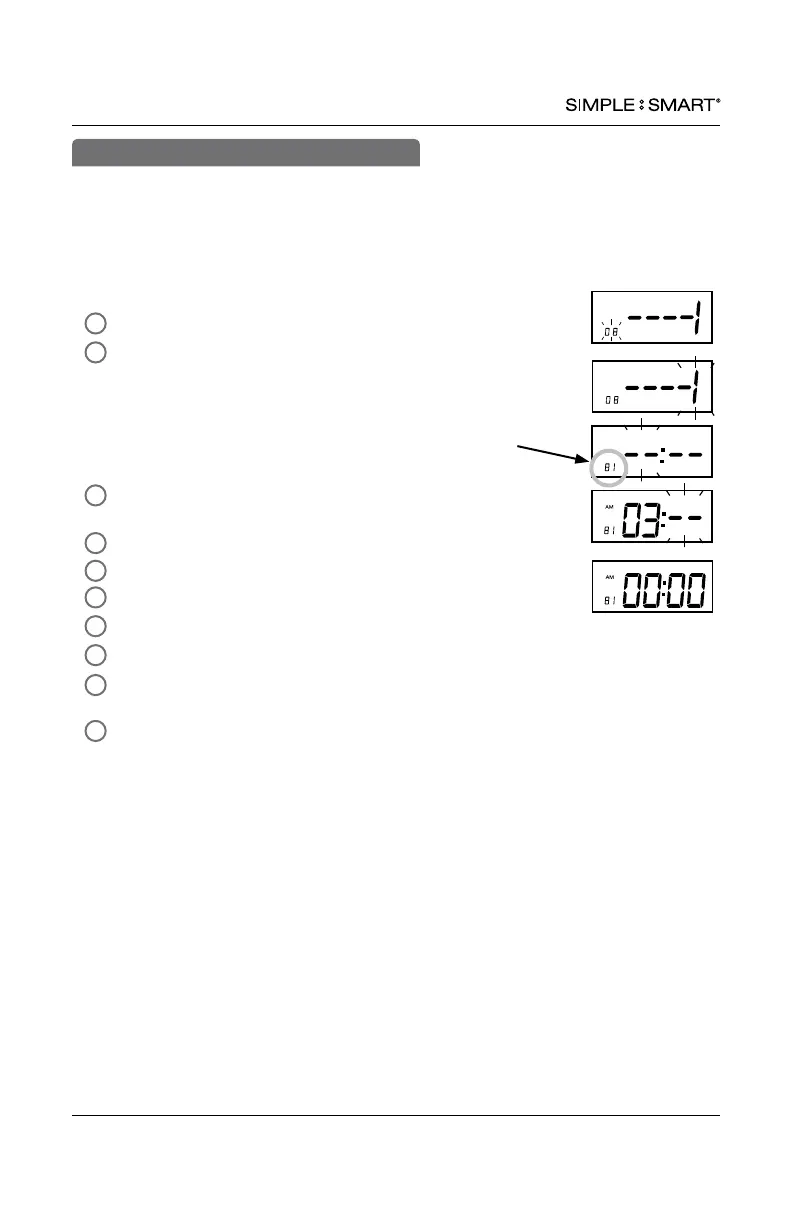
In SETUP mode, Press “ENTER” to begin “08” setting mode.
Press “+” or “-” to select column 1-6 for print punch.
column 1= ---1
column 2= ---2
column 3= ---3
column 4= ---4
column 5= ---5
column 6= ---6
Press “ENTER” to conrm setting. The indicator light will
activate for the selected column.
Press “+” or “-” to select desired hour for column auto advance.
Press “ENTER” to conrm setting.
Press “+” or “-” to select desired minute for column auto advance.
Press “ENTER” to conrm setting.
The setting mode advances to column 2 (
– – –
2).
Repeat steps 3-7 (total of 6 settings allowed) to continue to next
setting or slide the “SETTING” switch to the left to exit setting mode.
The setting mode advances to “09”.
4
2
5
6
3
1
This function automatically advances the In/Out buttons to the next column at a
selected time. Employees will not need to manually select the column for In/Out
punches, however, the automatic selection may be overridden by pressing the In/Out
button to select the desired column. This feature is recommended for single shift only.
User may override automatic column advance by simply pressing the In or Out button
for desired column.
08-AUTOMATIC COLUMN ADVANCE
8 = setting mode #
1 = column #


 To Next Page