AUTO ALIGNING TIME CLOCK INSTRUCTIONS
Model 2500/2650
8 PROGRAMMING 888.479.7264
5
This feature sets the time clock to automatically adjust the time for
USA Daylight Saving Time.
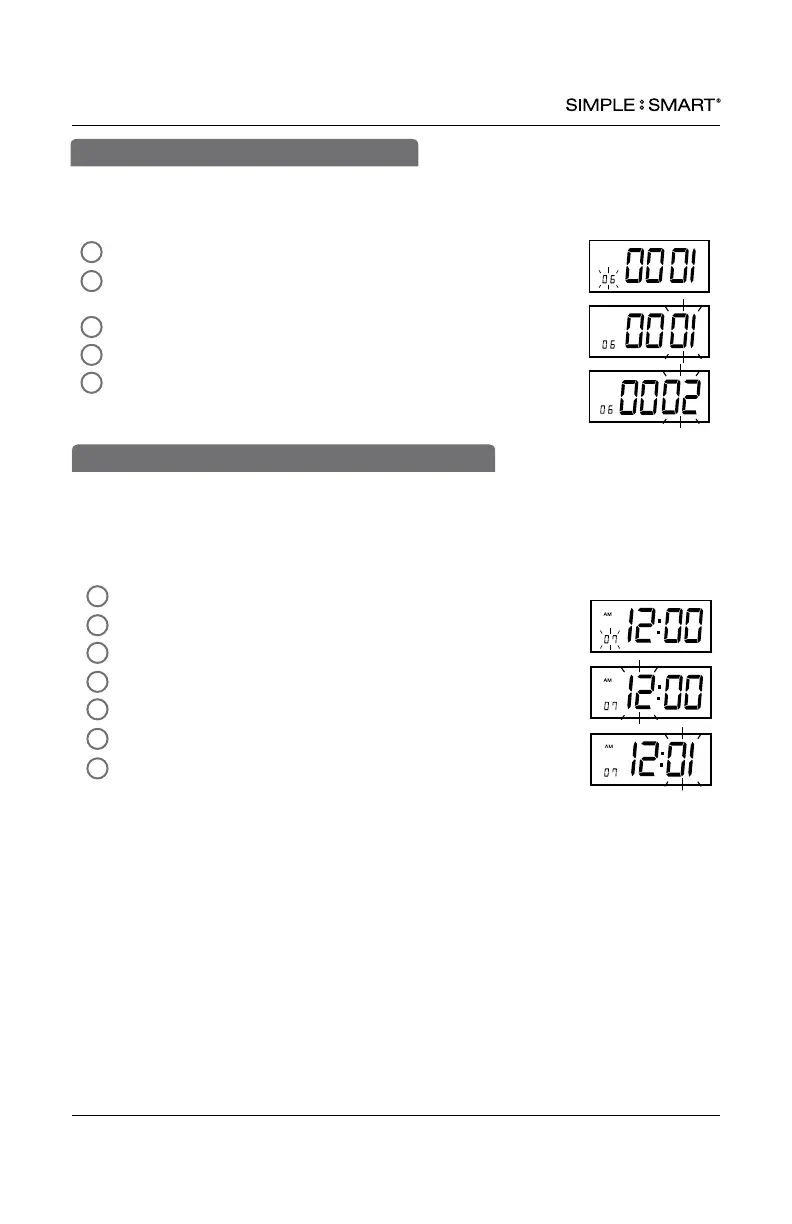
In SETTING mode, Press “ENTER” to begin “06” setting mode.
Press “+” or “-” to select desired Daylight Saving Time mode.
01-Automatic DST, 02-No DST
Press “ENTER” to conrm setting.
The setting mode advances to “07”.
Continue to next steps or slide the SETTING switch
to the left to exit setting mode.
2
1
4
3
06-SET DAYLIGHT SAVING TIME
This function allows you to set the time of the day the time clock will advance to the
next day/row on the time card (default setting 12am). For example, if your company
has a shift beginning at 8am, it is recommended to set the row advance time for 6am to
ensure employees punching in will have all in/out punches in the same row on the time
card.
In SETUP mode, Press “ENTER” to begin “07” setting mode.
Press “+” or “-” to subtract or advance hour.
Press “ENTER” to conrm.
Press “+” or “-” to subtract or advance minute.
Press “ENTER” to conrm.
The setting mode advances to “08”.
Continue to next steps or slide the SETUP switch to the
right to exit setting mode.
4
2
5
6
3
1
7
07-SET AUTOMATIC DAY/ROW ADVANCE TIME


 To Next Page