AUTO ALIGNING TIME CLOCK INSTRUCTIONS
Model 2500/2650
7pyramidtimesystems.com PROGRAMMING
04-SET TIME
In SETTING mode, Press “ENTER” to begin “04” setting mode.
Press “+” or “-” to subtract or advance hour.
Press “ENTER” to conrm.
Press “+” or “-” to subtract or advance minute.
Press “ENTER” to conrm.
The setting mode advances to “05”.
Continue to next steps or slide the SETTING switch to the
left to exit setting mode.
4
2
5
6
3
1
7
This function sets the time clock to display and print time in either
AM/PM (12 hour) or Military time.
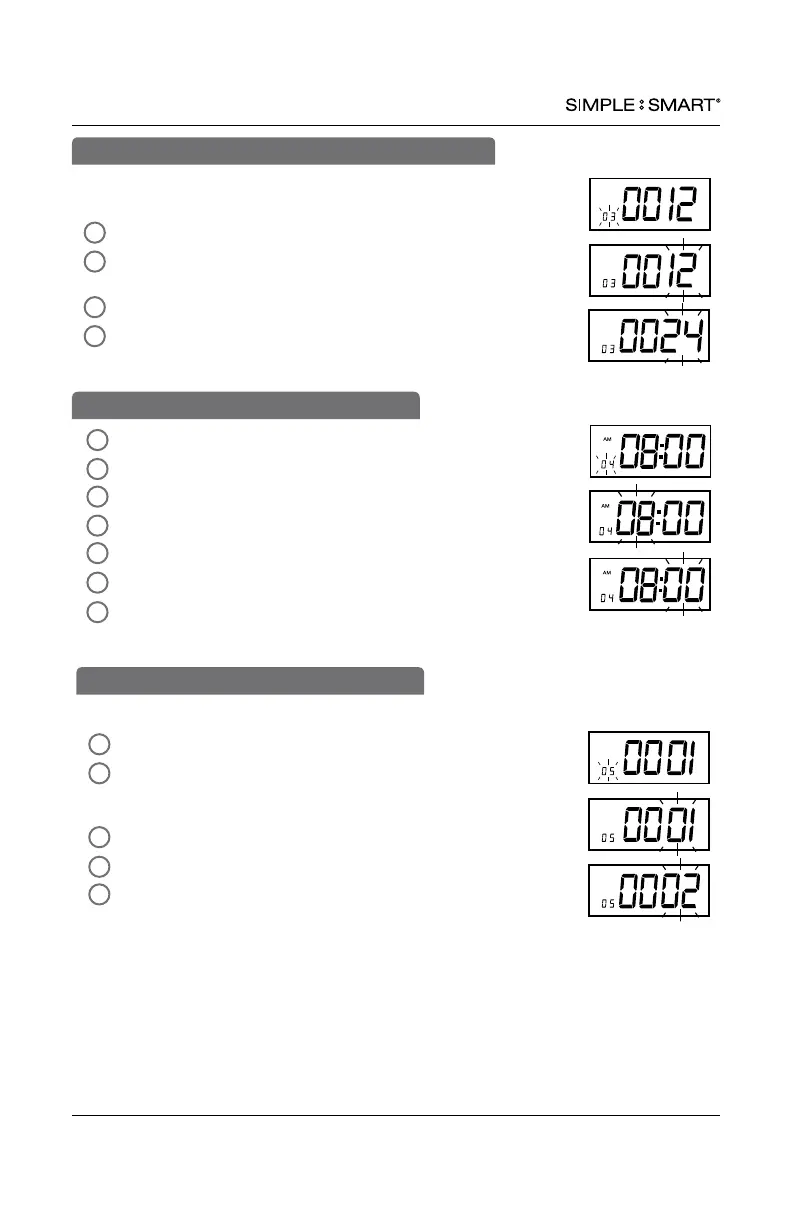
In SETTING mode, Press “ENTER” to begin “03” setting mode.
Press “ENTER” to select “12” for AM/PM or “+” and “ENTER”
to select “24” for Military time.
The setting mode advances to “04”.
Continue to next steps or slide the SETTING switch to the
left to exit setting mode.
4
2
3
1
03-SET PRINT & DISPLAY TIME FORMAT
This function sets how the minutes will print on the time card.
In SETTING mode, Press “ENTER” to begin “05” setting mode.
Press “+” or “-” to select desired printing mode.
01-standard minutes (60 minute format)
02-minutes in hundredths (ie. 12:45 will print as 12:75)
Press “ENTER” to conrm setting.
The setting mode advances to “06”.
Continue to next steps or slide the SETTING switch to the
left to exit setting mode.
4
2
5
3
1
05-SET MINUTE PRINT FORMAT


 To Next Page