AUTO ALIGNING TIME CLOCK INSTRUCTIONS
Model 2500/2650
6 PROGRAMMING 888.479.7264
PROGRAMMING
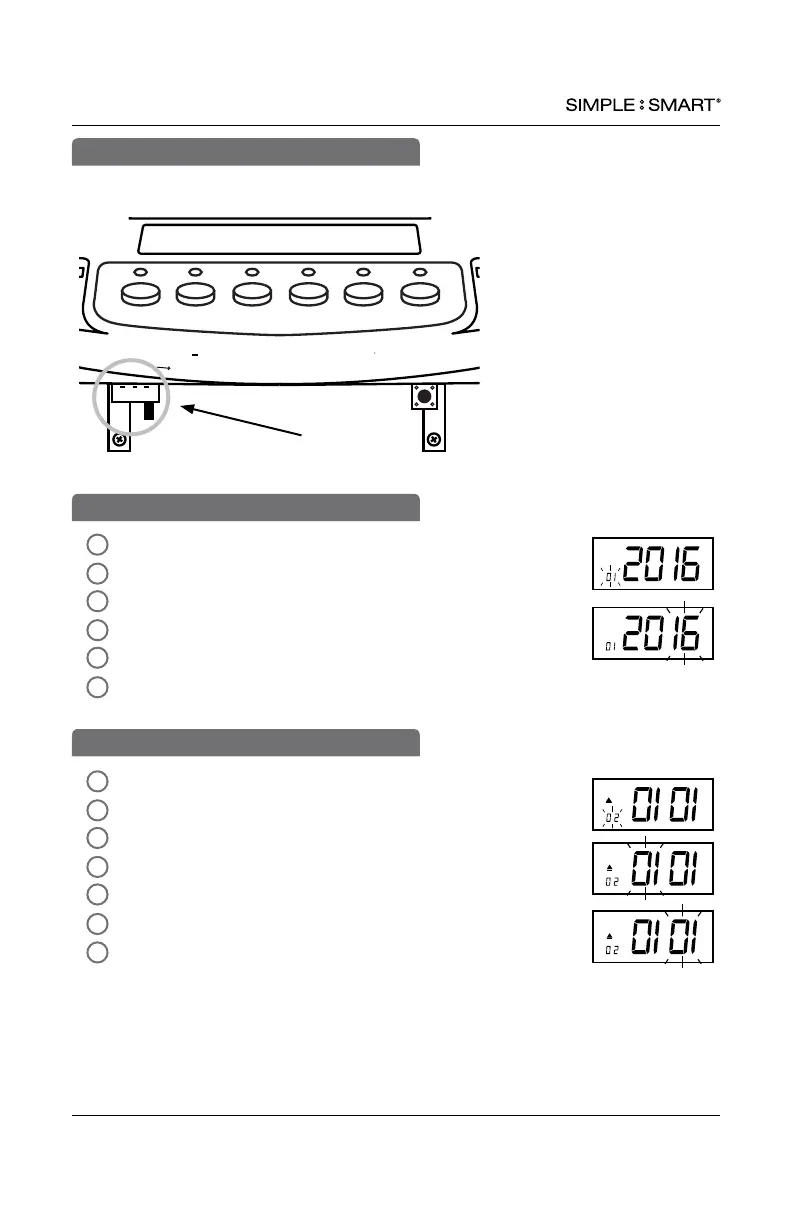
To activate setting mode, slide the black “SETTING” switch to the right.
In SETTING mode, Press “ENTER” to begin “01” setting mode.
The default setting is 2016. Press “ENTER”
To change the year, press “+” or “-” to advance to current year.
Press “ENTER” to conrm.
The setting mode advances to “02”.
Continue to next steps or slide the SETTING switch to the
left to exit setting mode.
4
2
5
6
3
1
In SETTING mode, Press “ENTER” to begin “02” setting mode.
Press “+” or “-” to advance to current month.
Press “ENTER” to conrm.
Press “+” or “-” to advance to current date.
Press “ENTER” to conrm.
The setting mode advances to “03”.
Continue to next steps or slide the SETTING switch to the
left to exit setting mode.
4
2
5
6
7
3
1
02-SET DATE
IN OUT IN
OUT IN OUT
Enter Back
Clear
Reset
+
Setting
01-SET YEAR
02-SET DATE


 To Next Page