Installation Instructions
Manual for S4 series
Jumper Settings
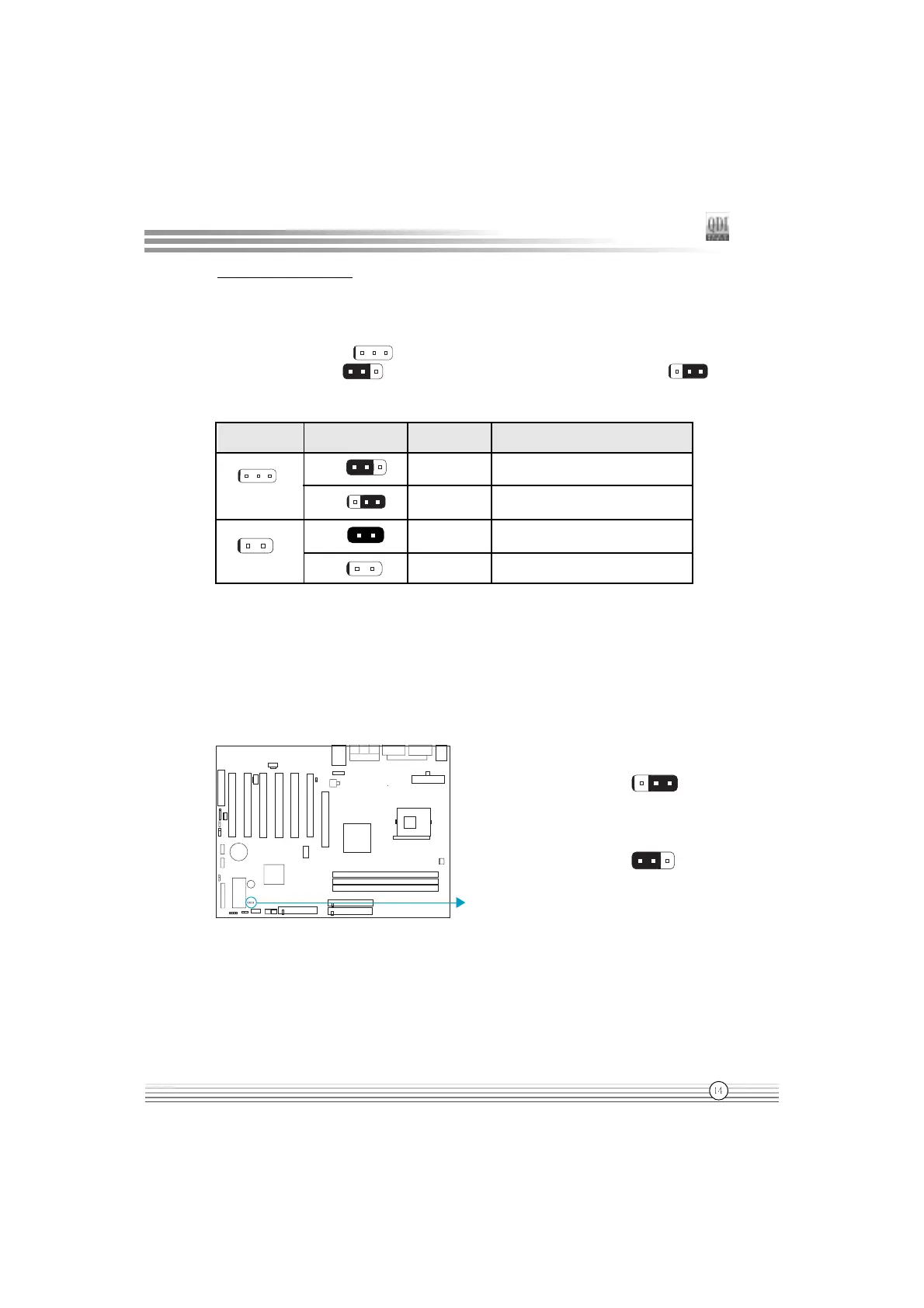
Jumpers are located on the mainboard, they represent, clear CMOS jumper JCC, enable
BIOS Protection function jumper JAV etc. Pin 1 for all jumpers are located on the side with a
thick white line ( Pin1→ ), refer to the mainboards silkscreen. Jumpers with three
pins will be shown as to represent pin1 & pin2 (1-2)connected and
to represent pin2 & pin3 (2-3)connected.
3-pin
2-pin
set pin1 and pin2 closed
Symbol
Jumper
set the pins closed
set pin2 and pin3 closed
set the pins opened
Description
1-2
2-3
close
open
Represent
Enable/Disable onboard audio (JSD)
( Available on S4-A/AL)
If you want to use the on-board audio, set JSD with pin2 & pin3 closed (default), Otherwise,
set JSD with pin1 & pin2 closed for disabling this function.
Enable onboard audio:
Enable slave CNR audio only
(Default)
Disable on-board audio:
Enable Primary CNR audio
JSD
JSD
1
2
3
1
2 3

 To Next Page
 Loading...