II
Jumper Settings............................................................ 14
Enable/Disable on-board Audio (JSD)................................ 14
Enable Front/Back Panel USB Device Wake-up Function
(JUSB1/JUSB2).................................................................. 15
BIOS Protection Jumper (JAV)........................................... 15
Clear CMOS(JCC).............................................................. 16
3. BIOS Description................................................... 18
Utility Support................................................................. 18
AWDFLASH.EXE................................................................ 18
AWARD(Phoenix) BIOS Description.......................... 19
Entering Setup.................................................................... 19
Load Fail-Safe Defaults.................................................... 19
Load Optimized Defaults.................................................... 19
Standard CMOS Features Setup....................................... 19
QDI Innovation Features.................................................... 23
Advanced BIOS Features Setup........................................ 25
Advanced Chipset Features Setup.................................... 28
Power Management Setup................................................. 30
PNP/PCI Configuration Setup.............................................. 33
Integrated Peripherals........................................................ 34
PC Health Status.................................................................38
Password Setting...............................................................39
Boot with BIOS defaults..................................................... 39
Appendix....................................................................... 40
QDI Utility CD ......................................................................40
Norton AntiVirus.................................................................40
LogoEasy II......................................................................... 41
BIOS-ProtectEasy...............................................................42
RecoveryEasyII.................................................................. 43
SpeedEasy II......................................................................48
BootEasy............................................................................ 49
Installation Guide(Spanish).................................................51
Installation Guide(French).................................................. 54
Installation Guide(Italian).................................................... 58
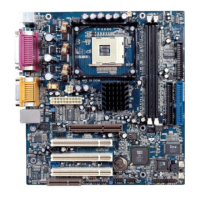
Mainboard Layout
CONTENTSCONTENTS
CONTENTSCONTENTS
CONTENTS

 To Next Page
 Loading...