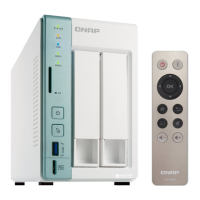
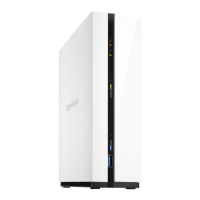
The QNAP TS-216G is a user-friendly NAS (Network Attached Storage) device designed for home and office environments, offering robust data security, multimedia playback, and various backup options. It supports two 3.5-inch SATA hard drives or 2.5-inch SATA solid-state drives, with hot-swapping capabilities for all drives.
Function Description:
The TS-216G serves as a centralized storage solution, enabling users to store, share, and manage data securely. It facilitates smooth multimedia playback and offers comprehensive backup options, including local, remote, and cloud backups. The device runs on the QTS operating system, providing a versatile platform for various applications and services. It supports NAS migration, allowing users to transfer data and settings from an existing NAS to a new one, and offers troubleshooting features for common issues like locating the NAS or managing failed drives.
Important Technical Specifications:
- Processor: ARM 4-core Cortex-A55 2.0 GHz
- CPU Architecture: ARM 64-bit
- Encryption Engine: AES-256
- Pre-installed Memory: 4 GB RAM
- Maximum Memory: 4 GB RAM (non-expandable)
- Flash Memory: 4 GB eMMC
- Drive Bays: 2 x 3.5-inch SATA 6 Gbps
- Drive Compatibility: 3.5-inch SATA hard disk drives and 2.5-inch SATA solid-state drives. For a comprehensive list of compatible drive models, users should refer to the QNAP compatibility website.
- Hot-swapping: Supported for all drives.
- Network Interfaces:
- 1 x Gigabit Ethernet (GbE) RJ45 port (supports 1 GbE, 100 Mb, and 10 Mb speeds).
- 1 x 2.5 Gigabit Ethernet (2.5 GbE) RJ45 port (supports 2.5 GbE, 1 GbE, 100 Mb, and 10 Mb speeds).
- Wake-on-LAN: Supported on both GbE and 2.5 GbE RJ45 ports.
- USB Ports:
- Rear: 2 x USB 2.0 Type-A
- Front: 1 x USB 3.2 Gen 1 Type-A (with One Touch Copy functionality)
- Buttons: Power, Reset, USB One Touch Copy
- Form Factor: Tower
- Dimensions (H x W x D): 165 x 102 x 220.6 mm (6.5 x 4.02 x 8.69 in)
- Net Weight: 1.45 kg (3.2 lbs)
- Power Supply Unit: 48W adapter, 100-240V
- System Battery: CR2032 lithium battery (3V, 225 mAh). Users are warned about the risks of swallowing and advised to replace with the same type to avoid explosion.
- Fans: 1 x 70 mm, 12V DC fan
- Operating Temperature: 0°C to 40°C (32°F to 104°F)
- Relative Humidity: 5% to 95% non-condensing, wet-bulb temperature: 27°C (80.6°F)
- Security Slot: Kensington security slot
Usage Features:
- Easy Setup: The NAS can be set up using Qfinder Pro or through a cloud installation website, guiding users through drive installation, network configuration, and QTS initialization.
- Drive Installation: Supports both 2.5-inch and 3.5-inch drives. Installation involves removing the drive tray, fastening the drive, and inserting the tray back into the bay. Users are reminded to power off the NAS before installation and observe electrostatic discharge (ESD) procedures.
- USB One Touch Copy: A dedicated button on the front panel allows for quick data backups between a USB device and the NAS. This feature supports incremental backups, copying only modified or added files since the last backup. Configuration of this feature is done via Hybrid Backup Sync.
- Expansion Units: The TS-216G can be connected to various USB expansion units (e.g., TR-002, TR-004, TL-D800C) to increase storage capacity. Compatibility and required accessories for expansion units are detailed in the manual.
- QTS Operating System: The device runs QTS, offering a user-friendly interface for managing storage, applications, and network settings. Initialization includes setting up the NAS name, administrator password, time zone, and network configurations (DHCP or static IP).
- NAS Migration: Allows migration of data and settings from a source NAS to the TS-216G, provided both NAS models are compatible and run the same or a later QTS version. This process involves transferring drives and reconfiguring certain settings like network ports and Windows AD configurations. For incompatible models, data can be migrated using HBS 3.
- User and Group Settings Import/Export: Facilitates the transfer of user and user group settings between NAS devices, simplifying setup in multi-NAS environments.
Maintenance Features:
- LED Indicators: Various LEDs (Status, LAN, USB, Drive, 2.5 Gigabit Ethernet Speed/Activity, Gigabit Ethernet Speed/Activity) provide visual cues about the system's status, network connectivity, drive activity, and potential errors.
- Audio Alerts: The NAS uses short beeps to indicate system events such as startup, reset button presses (3 seconds for configuration reset, 15 seconds for configurations reset and reboot), operating system updates, and issues with USB One Touch Copy. Long beeps indicate fan malfunctions, disk volume issues (full capacity, degraded mode), drive rebuilding, or power events.
- Reset Button: Offers two levels of reset:
- Basic System Reset (3 seconds): Resets administrator password (to the first MAC address in uppercase), TCP/IP configuration (DHCP, jumbo frames disabled, port trunking to "Active Backup"), system port (8080), security level (Low), LCD panel password (blank), and VLAN (disabled).
- Advanced System Reset (10 seconds): Restores default factory settings. Users are advised to recreate the previous folder structure to retrieve old data.
- Troubleshooting: Provides guidance for common issues, such as Qfinder Pro failing to locate the NAS (suggesting removal and reinsertion of drives) and hot-swapping failed drives in RAID 1 configurations.
- RAID Recovery: Supports exclusive RAID recovery technology to recover inactive RAID 1 groups from degraded mode, even after unintentional disconnection or removal of healthy drives.
- Support Resources: QNAP provides extensive online resources including documentation, compatibility lists, service portals, product support status, downloads, community forums, and an accessories store.
Users are advised to keep the original packaging for potential returns or repairs. Unauthorized repairs or modifications void the warranty. The manual emphasizes general safety instructions, including storing the device in a secure location, ensuring only authorized personnel have physical access, allowing components to cool before touching, and observing ESD procedures. Power-related safety includes connecting to a properly grounded electrical outlet and having trained service technicians disconnect PSU cords before component replacement. Special warnings are given for the system battery (lithium button battery) regarding ingestion and replacement. Moving fan blades and other moving components also carry warnings to keep body parts clear.

 Need help?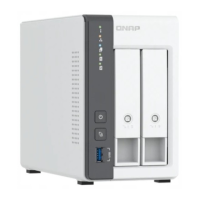

 To Next Page
 General