3. Basic Operations
This chapter describes basic NAS operations.
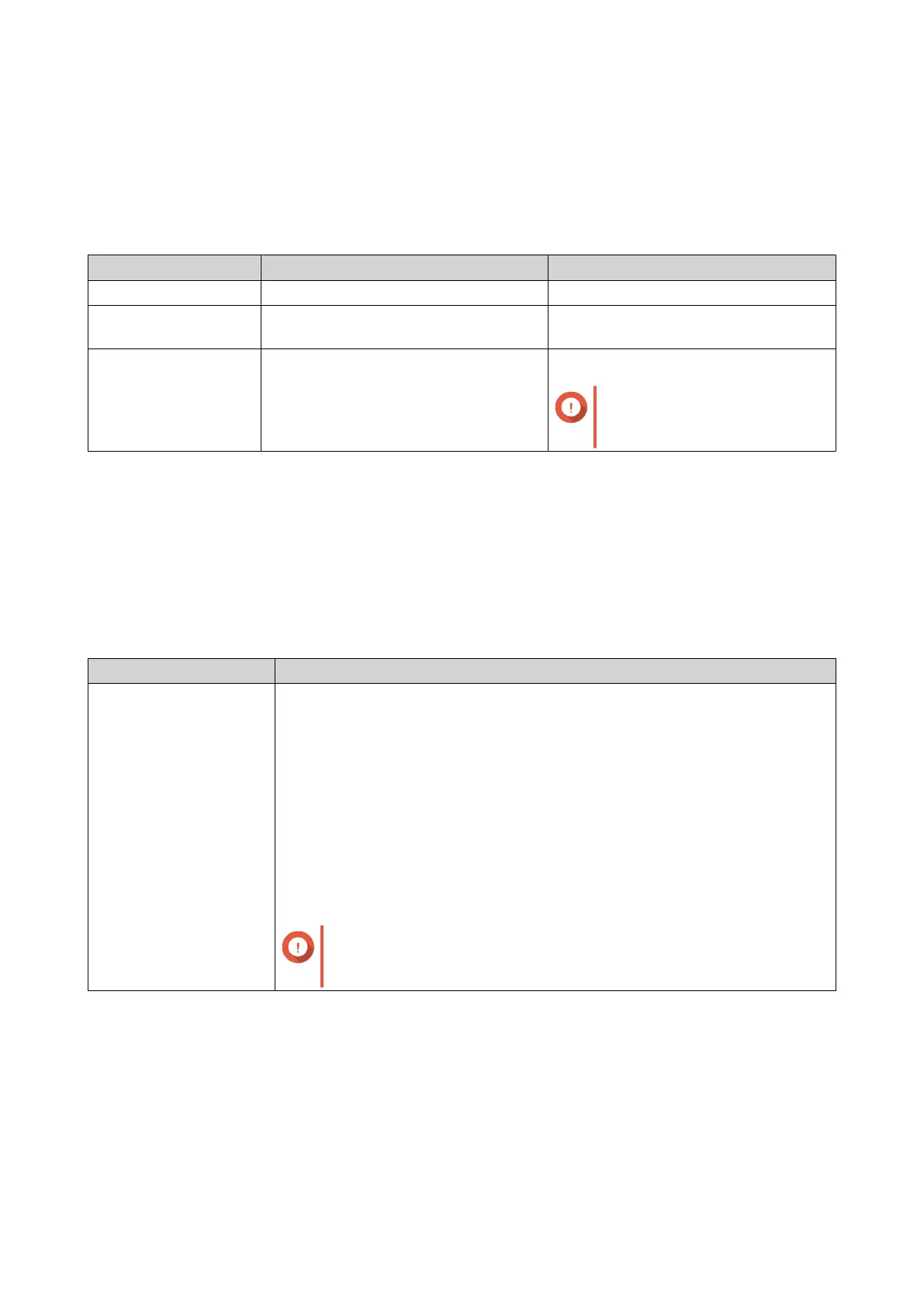
Power button
Operation User Action Result
Power on Press the button once. The device powers on.
Power o Press and hold the button for 3
seconds.
The device powers o.
Force power o Press and hold the button for 5
seconds.
The device powers o.
Important
Use this method only when
the device is unresponsive.
LEDs
LEDs indicate the system status and related information when the device is powered on. The following
LED information applies only when the drive is correctly installed and when the device is connected to the
network or to a host.
For details on the location of the LEDs, see Components .
System Status LED
Status Description
Flashes green and red
alternately every 0.5
seconds
• A drive is being formatted.
• The device is being initialized.
• The operating system is being updated.
• RAID rebuilding is in progress.
• Online RAID Capacity Expansion is in progress.
• Online RAID Level Migration is in progress.
• The rmware is being updated.
Important
When updating the rmware, do not remove the power cord
or USB cable, and do not force-exit the application.
TS-855eU User Guide
Basic Operations 46



 To Next Page