10
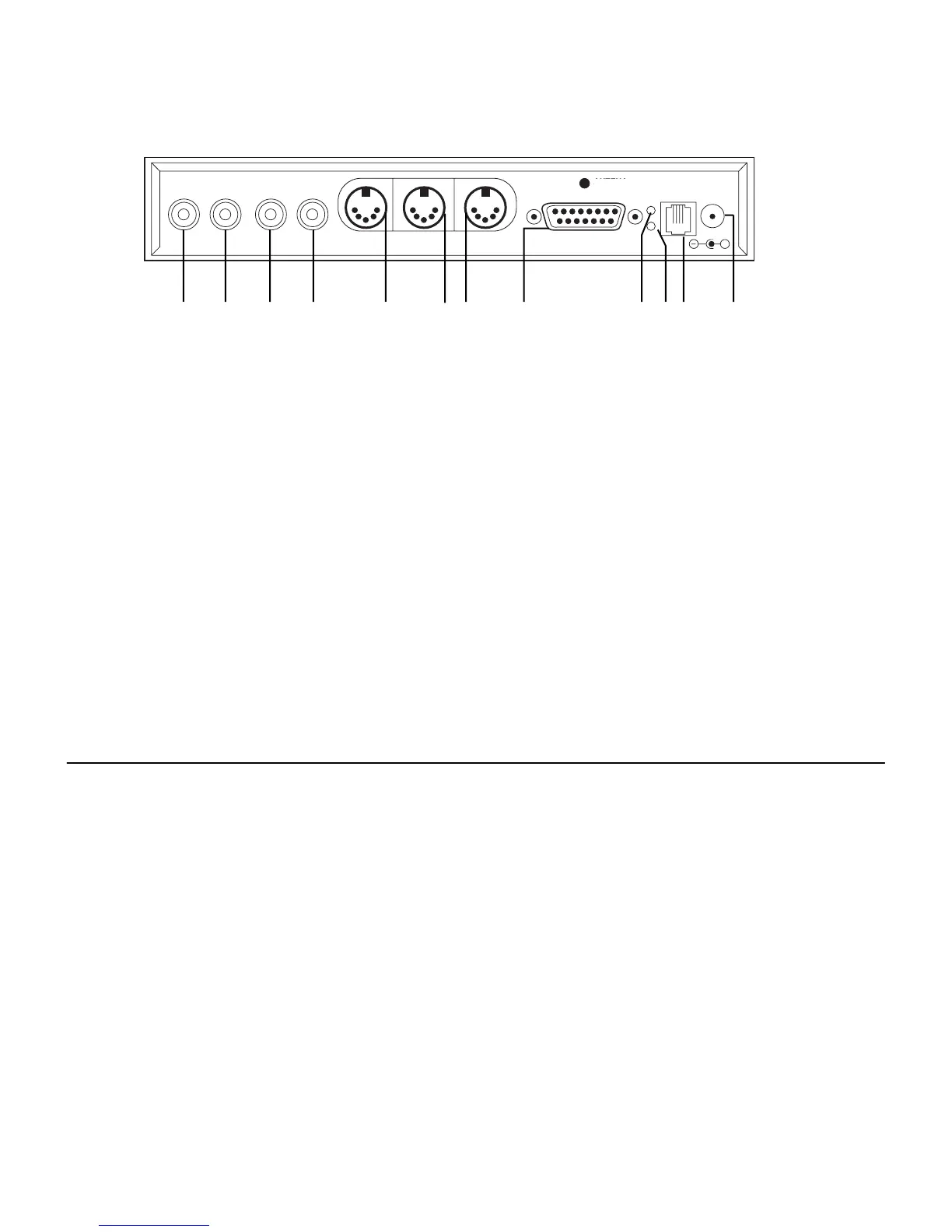
2000C Back Panel Description
2000C Back Panel Description
2000C Back Panel Description
NOTE: It is normal for this ER light to remain on when the power is turned off as well as when the
2000C is powered on without being connected to the Pianomation processor.
TIP: If the piano system will not play, check to make sure this light is not flashing. If it is flashing, a
condition has occurred in the Pianomation system. Unplug the system from the AC outlet, wait 2
minutes and reconnect. Power up the system and if the condition occurs again, call your dealer or
QRS tech support for instructions.
EXT IR SENSOR. This port provides you with the ability to add an optional remote control sensor.
This is convient when you want to hide the 2000C under the piano while retaining remote control
functionality.
Power Inlet. This is where the low voltage end of the AC adaptor plugs in.
NOTE: Use only the power adaptor provided by QRS. An adaptor with the incorrect characteristics
could result in damage to your system.
11
12
RIGHT
LINE IN LINE OUT MIDI OUT MIDI 1N MIDI THRU
TO PROCESSOR BOARD
ANTENA
IN
ER
EXT. IR
SENSOR
POWER
9-13.5VDC
0.2A
LEFT/AMI RIGHT LEFT
+
1 2 3 4 5 6 7 8 9 10 11 12
NOTES



 To Next Page