14
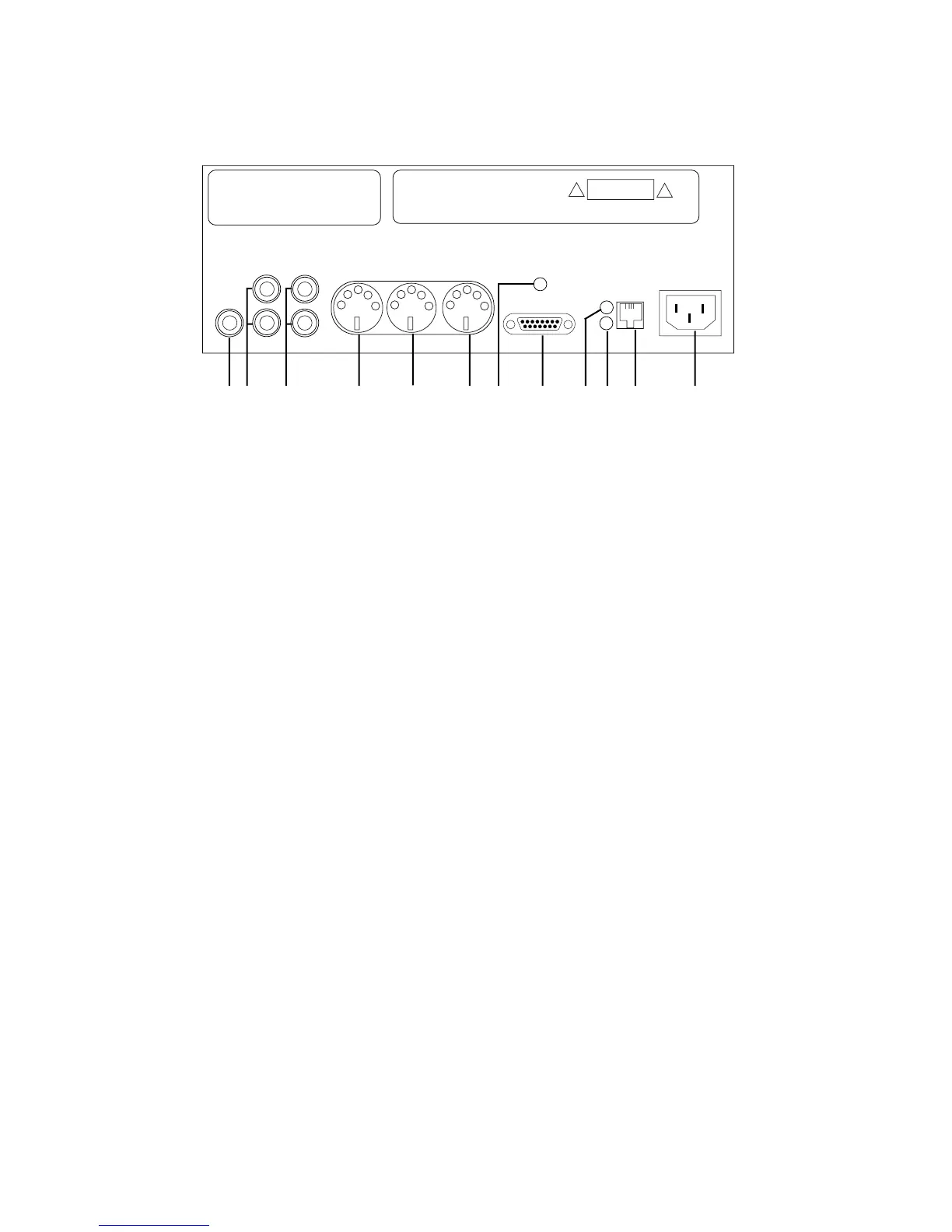
2000CD+ Back Panel Description
2000CD+ Back Panel Description
2000CD+ Back Panel Description
MIDI THRU - is a duplicate of the MIDI being received at the MIDI IN connector.
ANTENNA - For future use.
TO PROCESSOR BOARD - This DB-15 connector is connected to the Pianomation processor.
NOTE: DO NOT CONNECT THIS TO ANY OTHER DEVICE AS DAMAGE TO THE UNIT WILL
OCCUR.
IN - This indicator light should be lit whenever the 2000CD+ is playing from its internal CD or when
it is receiving AMI signal at its LEFT/AMI LINE IN. This light is helpful in troubleshooting problems
such as defective audio cables, CDs, external CD players, etc.
ER - This indicator should remain off during normal use of the Pianomation system. The ER light
does not indicate any conditions with the 2000CD+. When “on”, this light indicates a condition with
the Pianomation system itself. See Pianomation user manual for error descriptions.
EXT. IR SENSOR - This port makes it possible to locate the 2000CD+ in a hidden position and still
maintain line of sight operation from the hand held remote control.
AC POWER - Connect the 2000CD+ to your 120 VAC wall outlet with the provided power cable
only. This IEC power inlet is compatible with line voltage ranging from 90 to 240 AC, 50 or 60hz.
This wide input range makes international usage trouble free.
6.
7.
8.
9.
10.
11.
12.
LINE OUT LINE IN
LEFT
RIGHT
ami/LEFT
RIGHT
ANTENNA
TO PROCESSOR BOARD
IN
ER
EXT. IR
SENSOR
AC POWER
90 TO 240 VAC,15VA max.MIDI OUT
MIDI IN
MIDI THRU
AMI OUT
QRS Pianomation 2000CD+
Serial:
QRS Music Inc.,P/N 75390
2011 Seward Avenue
Naples, FL 34109
Power Rating 90 - 240VAC 15 VA max.
CAUTION
DO NOT OPEN
1 2 3 4 5 6 7 8 9 10 11 12



 To Next Page