8
1
2
3
4
5
6
7
8
9
10
11
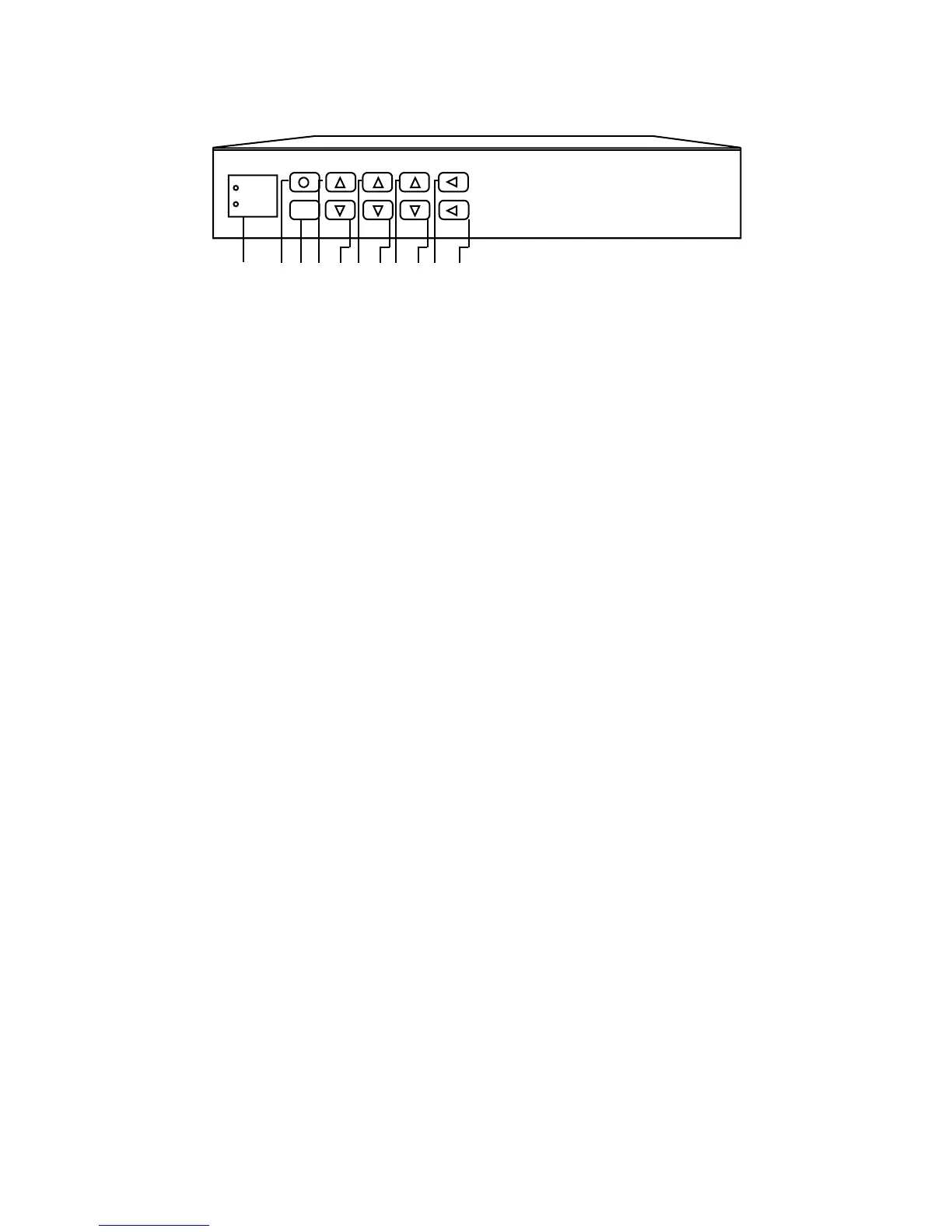
Pressing this button will power the entire system “ON” or “OFF”.
Use the “MUTE” button to silence both the piano and the orchestration.
Pressing the “PIANO VOLUME UP” button will increase the volume of the piano.
Pressing the “PIANO VOLUME DOWN” button will decrease the volume of the piano.
TIP: Pressing both buttons simultaneously will return the piano to the default level.
The “MASTER VOLUME UP” button increases the volume of the piano and orchestration.
The “MASTER VOLUME DOWN” button decreases the volume of the piano and orchestration.
TIP: Pressing both simultaneously will return all levels to their default volume.
Use the “AUDIO VOLUME UP” button to increase the volume of the orchestration.
Use the “AUDIO VOLUME DOWN” button to decrease the volume of the orchestration.
TIP: Pressing both of these buttons simultaneously will return the orchestration to its default value.
Press the “TREBLE” button and use the “AUDIO VOLUME UP or DOWN” button to boost or cut the high end
frequencies of orchestration.
Press the “BASS” button and the “AUDIO VOLUME UP or DOWN” button to boost or cut the low frequencies of the
orchestration.
TIP: Press the “TREBLE and BASS” buttons simultaneously to return to their default value.
This red LED indicates power ON, and when entering “TREBLE or BASS” mode will turn off, indicating that you
have entered the BASS or TREBLE adjust mode.
This is the “Infrared Sensor” that picks up your remote control commands. To avoid problems with the remote control function,
do not block this window.
Special function: “Piano Sync” (piano to orchestration synchronization) can be varied (+/-) 50 milliseconds to compensate for
large separations in piano and speaker placement. This adjustment is not recommended for normal system configurations
because misadjustment of sync will cause deterioration of the overall sound quality.
To enter sync mode, press the “PIANO DOWN” and the “MASTER UP” buttons simultaneously. The red power LED will turn
off indicating you have entered sync mode.
While in the sync mode, use the “PIANO UP” and “PIANO DOWN” buttons to make adjustments.
TIP: While in sync mode, pressing the “PIANO UP” and “PIANO DOWN” buttons simultaneously will set the sync back to the
default settings.
2000C Front Panel Description
2000C Front Panel Description
2000C Front Panel Description
QRS Pianomation 2000C
MUTE
Power
IR Sensor
ON/OFF
Piano
Volume
Master
Volume
Audio
Volume
BASS
TREBLE
TIP: When adjusting parameters, briefly tap the buttons to make changes one increment at a time. Pressing and
holding a button will step through its entire range rapidly.
11 1 2 3 4 5 6 7 8 9



 To Next Page