9
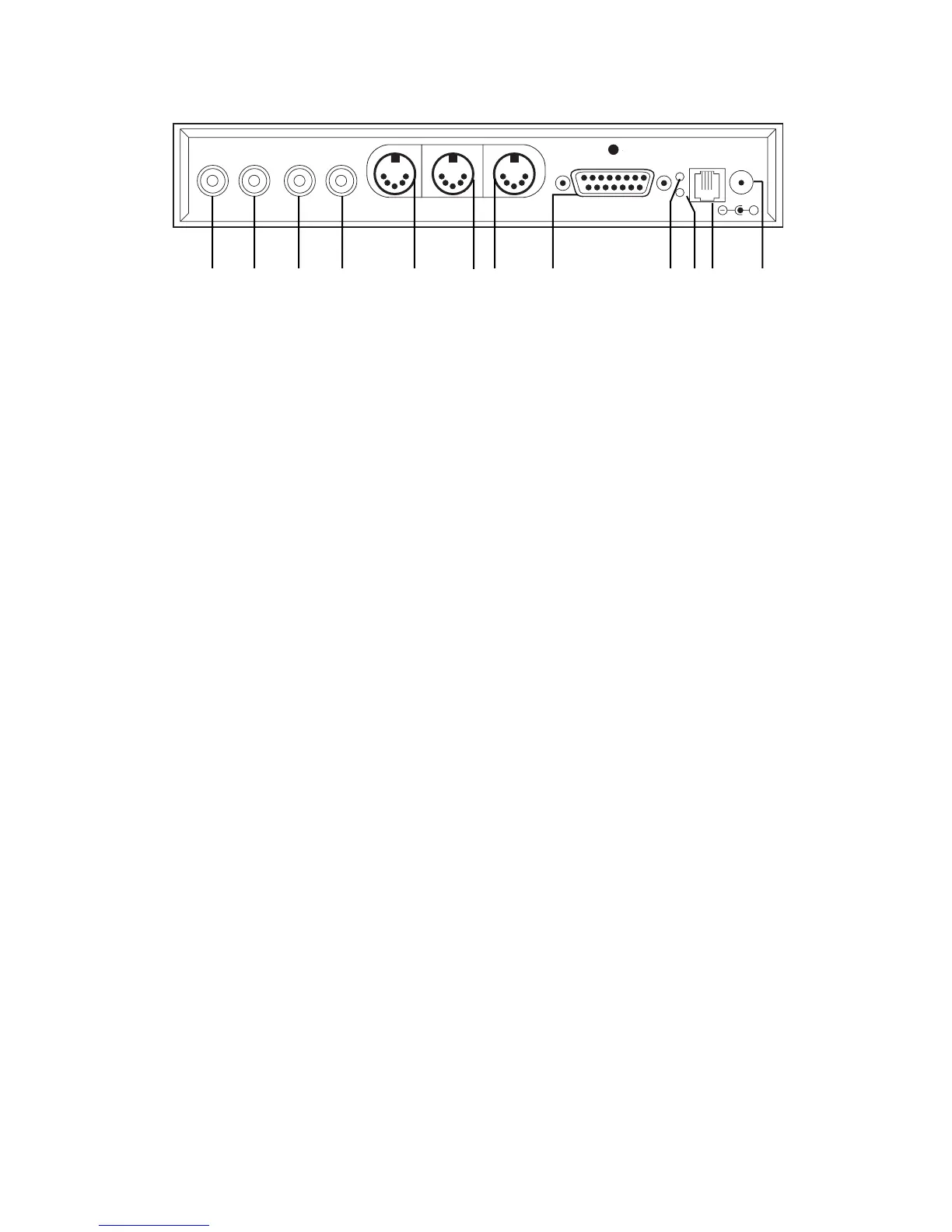
2000C Back Panel Description
2000C Back Panel Description
2000C Back Panel Description
NOTE: MAKE SURE POWER TO ENTIRE SYSTEM IS TURNED OFF BEFORE CONNECTING OR DISCONNECTING
ANY OF THESE CABLES.
TIP: Your 2000C has been designed to recognize the difference between a QRS MIDI signal and a standard music signal at the
line input jacks. This means if your system is configured for stereo sound you will be able to enjoy your standard compact disc
library in true stereo without having to push buttons. When you are playing QRS compact discs, the audio will be heard in
“emulated stereo” taking advantage of the stereo configuration.
NOTE: When using standard music discs through the 2000C, depending on the actual music, you may notice the very beginning
of the first song of the disc being clipped off. This is especially true for very slow fade ins. This is because the onboard
computer does not know what signal is coming in until it actually sees it. This possible muting is normal and helps assure that
when the 2000C is being driven with standard QRS MIDI discs, you won’t hear a burst of the MIDI data at the beginning of the
song.
Right channel line input. Connect to the right channel output of your CD player, VCR etc.
Left \ AMI channel line input. Connect to the left channel output of your CD player, VCR etc.
Right channel output. Connect to the right channel input of your powered speaker or stereo amplifier \ receiver. This
connection would be used as a single (mono) speaker.
Left Channel output. Connect to channel input of your powered speaker or stereo amplifier \ receiver. This connection
would be used as a single (mono) speaker.
MIDI OUT port. Connect to the MIDI input of any standard MIDI device. The MIDI source for the port is derived from the
left “LINE IN” \ AMI signal.
MIDI IN port. Connect to the MIDI output of any standard MIDI device.
TIP: When driving the Pianomation by means of the “MIDI IN” port, make sure that the device connected to the “LINE IN”
ports are not active. This will prevent 2 songs from playing at the same time.
MIDI THRU port. Connect to the “MIDI IN” port of the 2000C.
TO PROCESSOR BOARD port. This DB-15 connector is the port that connects to your Pianomation processor. Under no
circumstances should this connector be interfaced with any other device.
IN. This light is used to confirm that there is “AMI” signal present at the “LEFT/AMI” line in jack. This indicator is very
useful for basic system trouble shooting.
ER. This light indicates a condition has occurred within the Pianomation system. It is normal for this light to turn on
initially after powering the system on. The “ER” light should turn off within 3 seconds after turning the system on.
1
2
3
4
5
6
7
8
9
10
RIGHT
LINE IN LINE OUT MIDI OUT MIDI 1N MIDI THRU
TO PROCESSOR BOARD
ANTENA
IN
ER
EXT. IR
SENSOR
POWER
9-13.5VDC
0.2A
LEFT/AMI RIGHT LEFT
+
1 2 3 4 5 6 7 8 9 10 11 12



 To Next Page