August 3, 2018 7080-163D 27
MT. VERNON E2-C
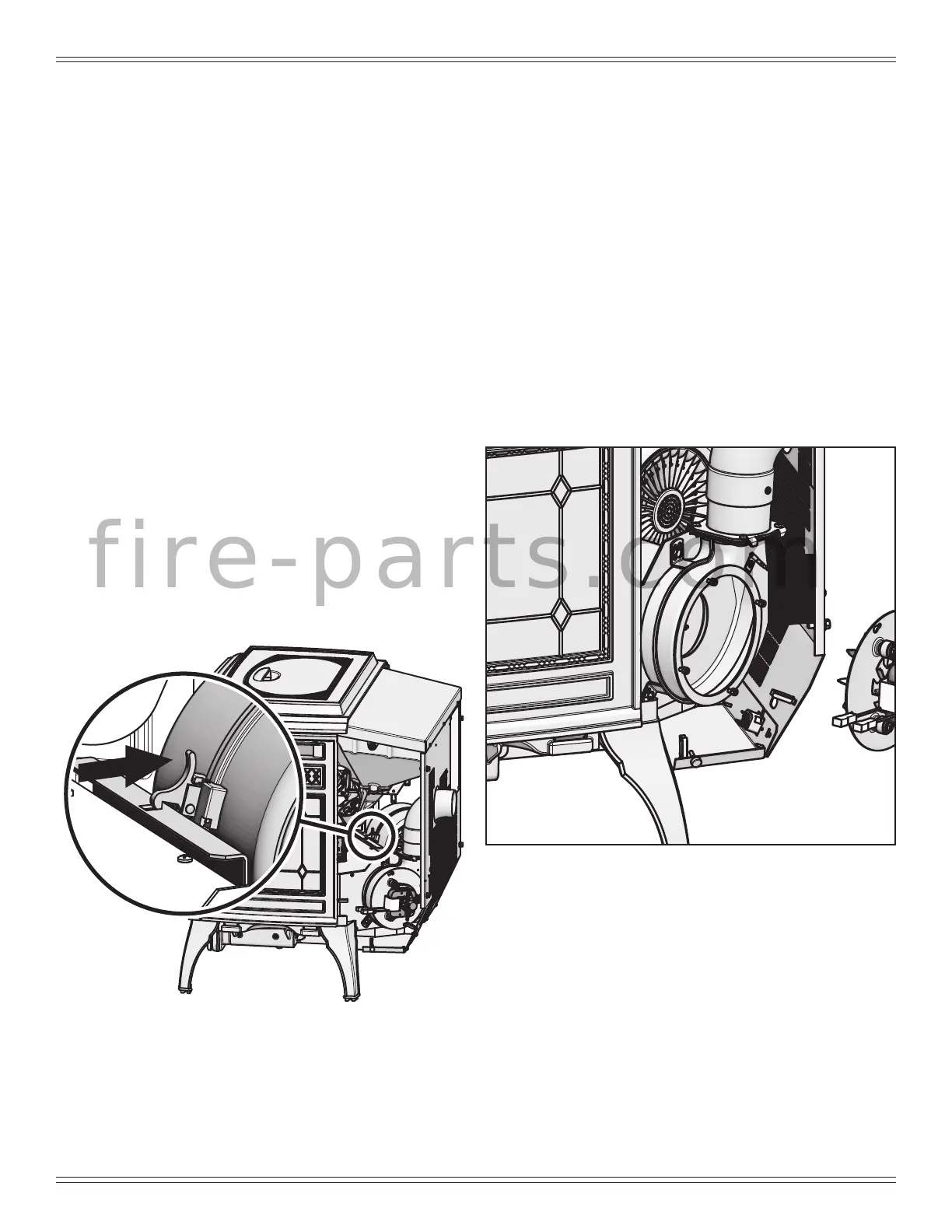
Figure 27.1
H. Convection Blower Replacement
1. Follow the proper shut down procedures.
2. Remove the left side panel by loosening the 2 screws
using a Phillips head screw driver or wrench (Figure
27.1).
3. Remove two lower sheet metal screws from the back
panel to allow more clearance.
4. Disconnect the wire terminals.
5. Reach behind the blower and release the latch by
pushing the top of the latch towards the blower (Figure
27.1).
6. Rock the top of the blower slightly and lift up. The
blower will pass out the left side of the appliance.
NOTE: You may need to loosen the surround to move it out
of the way.
7. Install replacement blower by placing the bottom ange
into the opening rst then rotate blower up into position.
8. When the blower is properly positioned the latch will
engage the notch to hold the blower in place (Figure 27.1).
9. Re-connect wire terminals to the new blower.
10. Reposition and Re-secure the back panel.
NOTE: Make sure wires are connected prior to restarting
the appliance. Failure to do so will result in the
(side-mounted) safety thermal snap disc tripping
resulting in cutting power to the appliance feed
system.
I . Combustion/Exhaust Blower Replacement
1. Follow the proper shut down procedures.
2. Remove the right side panel by loosening the 2 screws
using a Phillips head screw driver or wrench (Figure
27.2).
3. It is not necessary or recommended to remove the
housing to replace or service the combustion blower.
You only need to remove the motor and impeller.
4. Disconnect the wire from the control board connection
and hall effect switch/housing.
5. Using an 7mm socket wrench or nut driver, loosen the
nuts securing the motor and impeller to the housing.
6. Holding the motor, rotate the mounting plate counter-
clockwise and remove motor and impeller.
7. If the gasket between housing and motor is damaged it
will have to be replaced. A gasket is included with the
replacement blower.
8. Re-install in reverse order.
Figure 27.2
f i r e - p a r t s . c o m




 To Next Page