EasyManua.ls Logo

Radio Shack PRO-89 - User Manual

Radio Shack PRO-89
68 pages
Print Icon
To Next Page IconTo Next Page
Loading...
© 2003 RadioShack Corporation. All Rights Reserved.
RadioShack and RadioShack.com are trademarks used
by RadioShack Corporation.
OWNER’S MANUAL
Please read before using this equipment.
20-514
A
www.radioshack.com
SM
© 2003 RadioShack Corporation. All Rights Reserved.
RadioShack and RadioShack.com are trademarks used
by RadioShack Corporation.
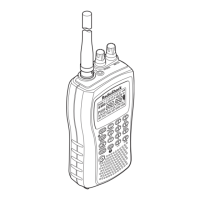
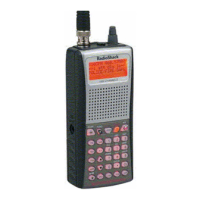
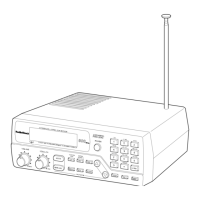
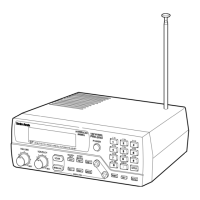
PRO-89 200 Channel
VHF/Air/UHF/800MHz
Handheld Race Scanner
Two-Second Scan/Search Delay Delays
scanning for 2 seconds before moving to
another channel, so you can hear more
replies.
Five Service Banks Search preset
frequencies in separate fire/police, air, ham
radio,auto race, andmarinebanks,tomake
it easy to locate specific types of calls.
20 Monitor Memories Temporarily
save up to 20 frequencies located
during a search, so you can move
selected frequencies to channel
storage later.
Ten Channel-Storage Banks Storeup
to 20 channels in each of 10 different
banks, to group channels so you can
more easily identify calls.
!
IMPORTANT
!
If an icon appears at the end of a paragraph, go to the box on that page
with the corresponding icon for pertinent information.
o
Warning
!
Important —Caution
Ó —Hint Ô —Note
Memory Backup Keeps the channel
frequencies storedinmemoryforabout
1 hour during a power loss.
Triple Conversion Superheterodyne
Receiver Eliminates interference
from intermediate frequency (IF)
images, so you hear only the frequency
you select.
HyperSearch and HyperScan —Set
the scanner to search at up to 50 steps
per second and scan at up to 25
channels per second, to quickly find
interesting transmissions.
Duplicate Frequency Check Automatically notifies you if you are
about to store a frequency you have already stored, to help avoid
wasting storage space.
Direct Search Search for new and unlisted frequencies starting
from a specified frequency.

Table of Contents

Other manuals for Radio Shack PRO-89

Questions and Answers

  • C
    Christina MorrisAug 12, 2025
    How to fix a Radio Shack PRO-89 that is not working?
    • C
      connie44Aug 13, 2025
      If your Radio Shack Scanner is totally inoperative, be sure the adapter’s barrel plug is fully inserted into the PWR DC 9V jack. Also, replace the batteries with fresh ones, or recharge the rechargeable batteries.
  • B
    Beverly HintonAug 16, 2025
    Why does my Radio Shack Scanner have poor reception?
    • M
      Michelle KimAug 16, 2025
      If your Radio Shack Scanner has poor or no reception, ensure that the antenna is properly connected. Also, avoid programming frequencies that are the same as 'birdie' frequencies, or only listen to them manually.
  • L
    Laurie SantiagoAug 20, 2025
    What to do if Radio Shack Scanner is on but will not scan?
    • T
      tinaburtonAug 20, 2025
      If your Radio Shack Scanner is on but will not scan, adjust the SQUELCH clockwise. Also, make sure you have stored frequencies into more than one channel.
  • K
    Kyle MillsAug 25, 2025
    Why does Radio Shack PRO-89 lock on unclear frequencies?
    • T
      Tom SchneiderAug 25, 2025
      If your Radio Shack Scanner locks on frequencies that have an unclear transmission during scanning, avoid programming frequencies listed as “birdie” frequencies, or only listen to them manually.
  • K
    Kristina TuckerAug 27, 2025
    What to do if my Radio Shack PRO-89 is on but will not scan?
    • K
      Karen SmithAug 27, 2025
      If your Radio Shack Scanner is on but not scanning, there might be several reasons: * The SQUELCH might not be correctly adjusted. Try adjusting it clockwise. * Only one or no channels might be stored. Store frequencies into more than one channel. * The keylock might be turned on. Turn off the keylock. * The scanner might need to be reset or initialized. Turn the scanner off then on again, or reset/initialize the scanner.
  • M
    Mark NielsenAug 31, 2025
    How to fix a Radio Shack PRO-89 Scanner that is totally inoperative?
    • B
      barneshaileyAug 31, 2025
      If your Radio Shack Scanner is totally inoperative, it could be due to several reasons: * The AC or DC adapter might not be connected properly. Ensure the adapter’s barrel plug is fully inserted into the jack. * The batteries might be dead. Replace the batteries with fresh ones, or recharge rechargeable batteries. * An antenna might not be connected or is connected incorrectly. Make sure an antenna is properly connected to the scanner.
  • B
    barberfeliciaSep 4, 2025
    What to do if the keypad on my Radio Shack PRO-89 Scanner does not work?
    • J
      Jack RodriguezSep 4, 2025
      If the keypad on your Radio Shack Scanner isn't working, here are a few potential causes and solutions: * The keylock might be turned on. Turn off the keylock. * The scanner might need to be reset or initialized. Turn the scanner off then on again, or reset/initialize the scanner.
  • J
    Jared GraySep 7, 2025
    What to do if the Radio Shack Scanner keypad does not work?
    • B
      Barbara FullerSep 8, 2025
      If the keypad on your Radio Shack Scanner does not work, first turn off the keylock. If that doesn't work, turn the scanner off then on again, or reset/initialize the scanner.

Summary

Preparation

Installing Batteries

Instructions for inserting AA batteries into the scanner.

Operation

Finding and Storing Active Frequencies

Instructions for searching service banks for active frequencies.

Scanning at the Races

Storing a Car Number and Frequency

Store a car number and frequency in channels, recall by number.

Special Features

Locking Out Channels Or Frequencies

Increase scanning speed by locking out unwanted channels/frequencies.

Using Priority

Scan channels while monitoring a selected priority frequency.

A General Guide to Scanning

Troubleshooting

Scanner Inoperability and Reception Issues

Addresses problems with power, antenna, and signal reception.

Keypad and Scanning Problems

Solutions for unresponsive keypads and scanners not scanning.

Specifications

Frequency Coverage and Channel Capacity

Details scanner's frequency ranges and channel storage capabilities.

Performance Metrics and Technical Details

Covers sensitivity, selectivity, scan speed, and other technical specs.

Radio Shack PRO-89 Specifications

General IconGeneral
BrandRadio Shack
ModelPRO-89
CategoryScanner
LanguageEnglish

Related product manuals